Cetech - Custom Software Development Services Elementor Template Kit Latest Version
Elementor Kits Themeforest 4.8 (118 reviews)
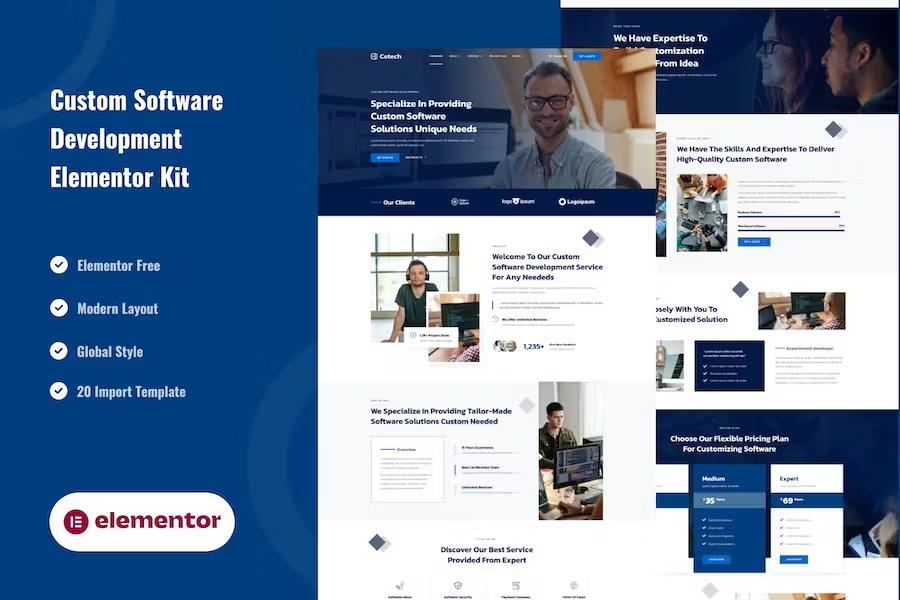
Cetech is a collection of pre-designed layouts created specifically for the Elementor page builder within the WordPress environment. This template kit provides a structured foundation for building professional websites for software development firms without requiring any advanced coding knowledge or technical programming skills. The package includes twenty distinct page templates that cover essential sections like the homepage, detailed service descriptions, project portfolios, team profiles, and company history. You also gain access to specific layouts for contact pages, frequently asked questions, blog archives, and individual blog posts. By using these ready-made designs, you can quickly assemble a cohesive site structure that maintains a consistent visual identity across every page. Because the kit is built to function with the free version of Elementor, it remains accessible to users who do not wish to purchase additional software licenses. It works effectively with most standard WordPress themes and is specifically tuned for the lightweight Hello Elementor theme.
Related products
 Themeforest
Installation of this kit relies on the Envato Elements plugin, which handles the file importing process directly within your WordPress dashboard. Once the kit file is uploaded, the system identifies any necessary requirements to ensure all components display correctly on your site. You start the setup by importing the global kit styles, which establish the primary typography, color schemes, and spacing settings across your pages. After these global settings are applied, you can import individual templates into the Elementor library one by one. These saved templates become available for use whenever you create a new page, allowing you to drag and drop your preferred designs into the editor. The process of building a site becomes a matter of replacing placeholder text and imagery with your own specific content. This approach keeps the workflow organized while providing a clear path to achieving a polished, professional look for your technology business website.
Specialized blocks are included to handle functional elements like headers, footers, and off-canvas menus, which are vital for a modern user experience. These components provide a unified look that remains consistent as users move between different parts of your site. To manage user interaction, the kit integrates with the MetForm plugin, offering ready-to-use forms for contact inquiries, newsletter subscriptions, and frequently asked questions. Setting up these forms involves importing the specific form blocks and then linking them to your pages through the Elementor editor. Once a form is inserted into a layout, you can modify fields and labels to match the specific needs of your business operations. The header and footer sections are managed through the ElementsKit interface, which allows you to define global display settings so that your site navigation remains active across the entire domain without needing to recreate it for every single page you build.
Managing the customization of these templates is intuitive because they rely entirely on the native Elementor interface. You can adjust the layout settings of any page by selecting the full-width option and hiding the default WordPress page title to create a clean, modern canvas. The flexibility of the system allows you to mix and match different blocks to create unique layouts that suit the specific requirements of a software agency or development consultancy. If you prefer to change the color palette or font choices, the global style settings provide a centralized location to update these parameters, which then automatically propagate throughout the imported templates. This saves a significant amount of time during the design phase by eliminating the need to manually edit individual elements across your entire project. By focusing on these core design components, you create a professional online presence that clearly communicates your software services and project capabilities to potential clients effectively.
- Item type
- template kit
- Category
- Elementor Kits
- Version
- Latest Version
- Availability
- In stock
- Delivery
- Digital
- Last updated
- September 19, 2026
For shoppers browsing Elementor Kits, Cetech - Custom Software Development Services Elementor Template Kit is recorded as a template kit. The page below separates supplied product information from general store and license terms.
Usage rights depend on the license selected at checkout. Review the complete terms before using this item for client work, redistribution, SaaS, or more than one end product.