CobaltApps ProductPress Skin for Dynamik Website Builder 1.0
Wordpress Themes Cobaltapps 4.8 (4.5K reviews)
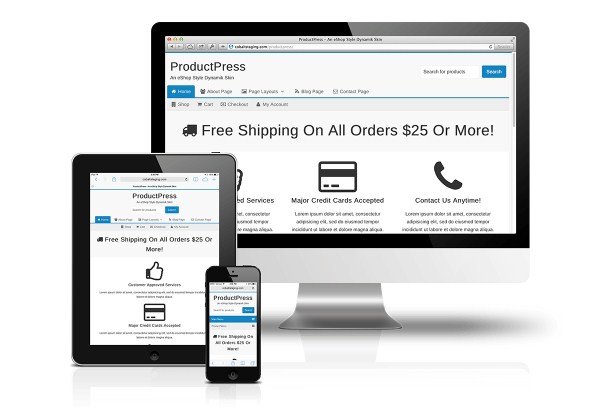
CobaltApps ProductPress is a skin designed specifically for Dynamik Website Builder, a popular website creation tool for WordPress. This is not a standalone theme; it works on top of Dynamik's framework. If you already use Dynamik, you know it gives you a strong foundation for building sites, but the default look can feel a bit generic. That generic look is exactly what this skin replaces. What you get instead is something calmer. ProductPress brings a clean, modern aesthetic that puts your content first. It is built by CobaltApps, a developer known for making thoughtful, practical WordPress products. The skin works entirely within the Dynamik system, so you don't need to touch code or fight with separate plugins to get the look you want. Instead, you install it as your active skin, and Dynamik handles the rest. The result is a site that feels polished, professional, and focused on what matters most: the words, images, and products you are sharing with your audience.
The underlying style of this skin is called Lefty, and it is deliberately minimal. This is a deliberate choice, not an accident. Lefty strips away the visual noise that often clutters business websites. No busy backgrounds, no aggressive animations, no oversized decorative elements. Nothing is there for decoration alone. Instead, you get generous whitespace, simple layouts, and a clear visual hierarchy. The idea is to remove the clutter so visitors can focus on your actual content. Whether you run an online store, a portfolio, or a blog, this approach helps your work stand out naturally. The design is content-focused in the truest sense. Every element on the page has a job to do, anything that doesn't serve the content is either hidden or simplified. That unique way of decluttering is what makes Lefty feel different from other minimal skins. It is not just about looking clean; it is about making the browsing experience calm and intuitive for the user.
Related products
 Themeforest

On the technical side, the skin is fully responsive. That means your site will look good on phones, tablets, and desktops without any extra work. The responsive layout adapts automatically, so you don't have to build a separate mobile version. It is also fully customizable through Dynamik's built-in options. You can adjust colors, fonts, layout widths, and more without writing a single line of CSS. The skin is SEO optimized, meaning it follows clean markup standards and respects search engine guidelines. That gives you a solid starting point for getting found online. Ease of use is another strong point. Because the skin plugs directly into Dynamik, you manage everything from the familiar WordPress admin area. There is no complicated settings panel to learn and no need to edit template files. If you can use Dynamik, you can use this skin. It simply adds a better default design to the toolkit you already have.
This skin is not a standalone theme. Dynamik Website Builder by CobaltApps is required. Installation works as a direct replacement for the default skin that comes with Dynamik. Switching back is easy at any time. If you are already running Dynamik, this is a simple way to refresh your site's look without starting over. The download comes as a zip file, ready to install just like any other theme or skin. You do not need any special technical knowledge to get it up and running. Anyone who uses Dynamik and wants a cleaner, more professional design for their website is the intended audience. This works for product-focused sites, creative portfolios, and standard business pages. The main benefit is that you save time and effort. Instead of hiring a developer or spending hours tweaking CSS, you install ProductPress and immediately get a polished, content-first design. That makes it a practical upgrade for people who value simplicity and readability.
- Last updated
- August 11, 2026
- Delivery
- Digital
- Availability
- In stock
- Version
- 1.0
- Category
- Wordpress Themes
- Item type
- theme
CobaltApps ProductPress Skin for Dynamik Website Builder appears in the Wordpress Themes catalog and is classified as a theme. The page focuses on information available in the listing rather than unsupported performance or compatibility claims.
Usage rights depend on the license selected at checkout. Review the complete terms before using this item for client work, redistribution, SaaS, or more than one end product.