Confez - Event Organizer & Conference Elementor Template Kit Latest Version
Others Themeforest 4.8 (4.6K reviews)
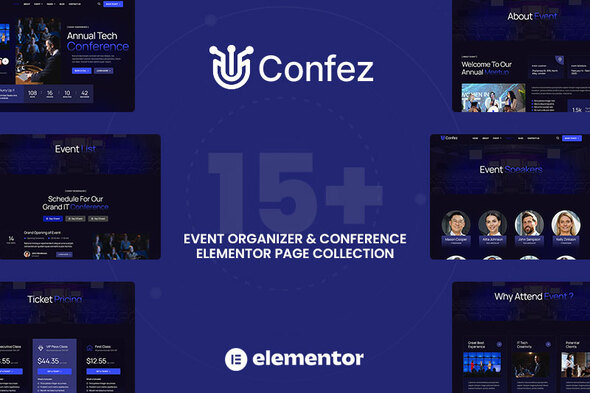
Confez – template kit is a professionally designed and feature-rich kit specifically tailored for event, organizer, conference, occasion, function, meet-up, gathering, meeting, congress and event organizer sites. Because of its sleek and modern design, it provides a professional online presence for event organizer & conference, helping them showcase their expertise and attract potential people. It is combination of a professional design with a 100% responsive layout, is retina-ready, and is very easy to customize because using Elementor, you don’t need a single line of coding!
This is not a WordPress theme. It is template Kit which includes ready-to-use professionally crafted 15+ Page Templates. This kit has been optimized for use with the free Hello Elementor theme but may be used with most themes that support Elementor.
Highlighted Features
- Modern & Professional Design
- Using Free Plugins
- 15+ Ready to use Templates
- Fully Responsive Layout
- Drag-and-drop visual builder for true no-code customization
- Works with most WordPress Elementor themes
- Cross Browser Compatibility: Chrome, Firefox, Safari, Opera
Templates included
- Global Kit Styles – Customize fonts & color in one place
- Home
- About Us
- Event List
- Event Details
- Features
- Speakers
- Speakers Details
- Pricing
- Our Gallery
- FAQ
- Testimonials
- Blog Archive
- Single Blog Archive
- Contact
- 404 Error Page
- Coming Soon
- MetForm Contact Form
Addons installed with kit
- ElementsKit Lite
- Elementor Header & Footer Builder (UAE)
- Jeg Elementor Kit
- MetForm
How to Use Template Kits:
- Install and Activate the “Envato Elements” plugin from > Plugins > Add New
- Download your kit file and Do not unzip
- Go to Elements > Installed Kits and click the Upload Template Kit button. You may also import automatically by clicking Connect Account to link your Elements subscription, then import under Elements > Template Kits.
- Check the top of the page for an orange banner, then click Install Requirements to load any plugins the kit requires.
- Click import on the Global Kit Styles first
- Import one template at a time. These are stored in Elementor under Templates > Saved Templates.
- Go to Pages and create a new page and click Edit with Elementor
- Click the gear icon at lower-left of the builder to view page settings and choose Elementor Full Width and hide page title
- Click the gray folder icon to access My Templates tab and then Import the page you’d like to customize.
Theme Builder allows you to alter the headers and footers if you have Elementor Pro.
Visit for more detail guidance: https://help.market.envato.com/hc/en-us/articles/36033428836889-How-to-Upload-Install-Elementor-Template-Kits-from-Themeforest-to-WordPress
- https://help.elements.envato.com/hc/en-us/articles/36032349441945-How-to-Install-Elementor-Template-Kits-With-the-Envato-Elements-Plugin-in-WordPress-for-Envato-Elements-Subscribers
For further support, go to Elementor > Get Help in WordPress menu.
How to Import Metforms
- Import the metform block templates
- Import the page template where the form appears and right-click to enable the Navigator
- Locate and select the Metform widget and click Edit Form. Choose New, then Edit Form. The builder will appear
- Click ‘Add Template’ grey folder icon.
- Click ‘My Templates’ tab.
- Choose your imported metform template, then click ‘Insert’ (click No for page settings).
- Once the template is loaded, make any desired customizations and click ‘Update & Close’ The form will appear in the template
- Click Update
Setup Global Header and Footer in UAE known as “Elementor Header & Footer Builder plugin”
- Import the header and footer template
- Go to UAE known as “Elementor Header & Footer Builder” > Header & Footer Builder and click Add New button
- Give it a title and select Header, Display on Entire Site and click Publish
- Click Edit with Elementor
- Click the gray folder icon to access My Templates tab and select the header template to import and Update.
- Repeat for Footer
Image licensing
This Template Kit uses demo images from Envato Elements. You will need to license these images from Envato Elements to use them on your website, or you can substitute them with your own.
- https://elements.envato.com/ru/collections/2ZQJRU8KFP
 Themeforest
- Last updated
- October 21, 2026
- Delivery
- Digital
- Availability
- In stock
- Version
- Latest Version
- Category
- Others
- Item type
- template kit
Listed under Others, Confez - Event Organizer & Conference Elementor Template Kit is a template kit. This presentation keeps the product name and recorded facts intact while organizing the details for easier review.
Usage rights depend on the license selected at checkout. Review the complete terms before using this item for client work, redistribution, SaaS, or more than one end product.