Custom Login & Access WordPresss Plugin 2.2.0
Wordpress Plugins Codecanyon 4.8 (2.8K reviews)
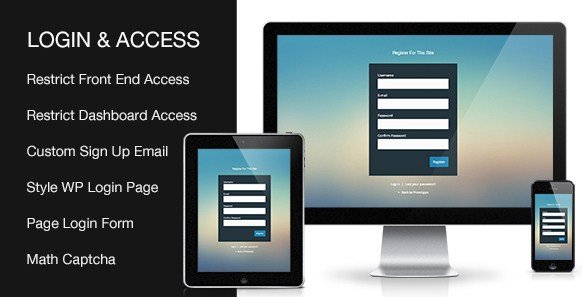
Custom Login & Access is a WordPress plugin built for site owners who want control over who sees their content. It replaces the standard WordPress login experience with one you can customize, and it adds practical tools for directing visitors toward registration or restricting parts of your site to logged-in users. The plugin is distributed through the CodeCanyon marketplace as a normal WordPress plugin package, meaning it installs through the standard WordPress admin panel just like any other plugin. At its most basic level, it solves a common problem: some of your site's content should only be visible to people who create an account and sign in. Sites that run memberships, private communities, or restricted client areas will find the access control works without custom code or a developer on hand. The configuration screens are straightforward, so the initial setup rarely takes more than a few minutes.
One of the main features is the ability to restyle the default WordPress login page. Instead of the plain, generic layout that ships with WordPress, you can adjust the appearance so the login screen matches your site's colors, branding, and overall design language. The plugin also lets you place login, registration, and password recovery forms anywhere you want by adding them to a normal page. That means you can build a dedicated login page, use a custom URL, and present these forms in the same layout as the rest of your site, rather than sending people to the standard wp-login screen. The forms are added through the plugin's own insertion options, so you do not need to edit theme template files or write any PHP to make them appear. This is particularly useful when you want the login experience to feel like a natural part of the site instead of an abrupt detour to a default WordPress page.
Beyond static pages, the plugin offers modal login and registration forms. A modal form appears in a popup window over the current page, so visitors can sign in or create an account without leaving the content they were reading. This kind of interaction keeps the experience fluid and reduces friction when a user hits a restricted area. The restriction features are just as direct. You can block front-end access for visitors who are not logged in, meaning pages, posts, or even whole sections of your site can be hidden behind a login prompt. When a non-logged-in visitor tries to view protected content, the plugin can redirect them to the login page or display a message asking them to sign in first. Site owners who sell courses, offer downloadable resources, or manage any kind of gated material will appreciate how quickly these protections can be applied to existing content.
Similar products

 Themify
Setting up Custom Login & Access does not require a deep technical background. The plugin's admin area groups its settings into clear sections, covering the login page design, the placement of forms, and the rules for content restriction. You choose which parts of the front end stay visible to guests and which parts require an account, then define what those visitors see when they land on protected content. Configuring the visual side is equally manageable, with options for styling the login screen to fit your existing site. The plugin handles the typical user flows that WordPress sites need, including login, registration, and forgotten password forms. For site owners who want to gate content for registered users only, this is a straightforward solution. It replaces a handful of separate tasks that would otherwise require multiple plugins or custom development, all within a single WordPress plugin. That keeps maintenance simple, since there is only one plugin to update and one set of settings to review.
- Last updated
- August 11, 2026
- Delivery
- Digital
- Availability
- In stock
- Version
- 2.2.0
- Category
- Wordpress Plugins
- Item type
- plugin
The Custom Login & Access WordPresss Plugin listing is available in Wordpress Plugins as a plugin. Check the description, item facts, and purchase details to assess its relevance to a project.
Usage rights depend on the license selected at checkout. Review the complete terms before using this item for client work, redistribution, SaaS, or more than one end product.