Depest - Pest Control Services Elementor Template Kit Latest Version
Others Themeforest 4.8 (4.2K reviews)
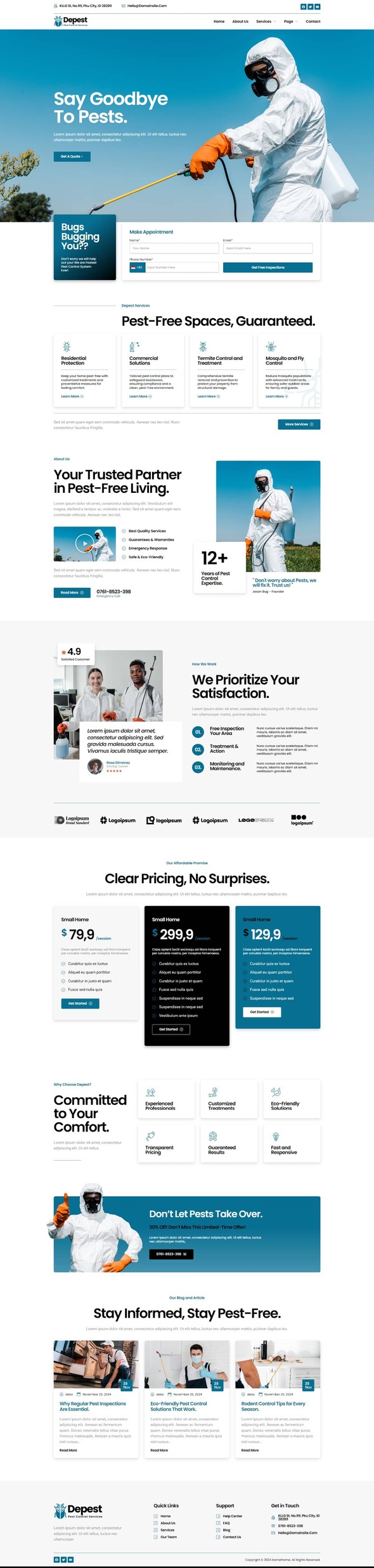
Depest – Pest Control Services Elementor Template Kit is a comprehensive solution for creating modern and professional websites tailored for Pest Control Services Services. Build your website effortlessly with responsive designs and no coding required.
Key Features:
This template kit is built using Elementor, the leading WordPress website builder, offering unparalleled ease of use and functionality.
More from this category
 Themeforest

Key benefits include:
- Responsive Design: Optimized for desktops, tablets, and mobile devices.
- Elementor Compatibility: Drag-and-drop interface; no technical expertise required.
- SEO-Friendly: Crafted to enhance your website’s visibility in search engines.
- Easy Customization: Fully adjustable to align with your branding.
- Comprehensive Documentation: Detailed setup guide for quick and easy installation.
Who Is It For?:
This template is perfect for businesses looking to establish a professional online presence, such as:
- Pest Control Services
- Disinfection & Pesticide
- Personal or Small businesses
Premium Features:
Stand out with premium features designed to meet modern web design standards:
- RomethemeKit Plugin Integration: This powerful add-on provides everything you need to create stunning and fully customizable websites effortlessly. With advanced features such as custom blocks, theme builder capabilities, icons, forms, and seamless Elementor compatibility, RomethemeKit ensures a streamlined website-building experience.
- Smooth Animations: Enhance user experience with polished visual effects.
- Optimized Performance: Lightweight design for fast loading times.
- 12+ Pre-Designed Templates: Covering all essential business pages.
- Global Kit Style: Manage fonts and colors from one centralized location.
- Lifetime Free Updates: Regularly updated to include new features and improvements.
Templates Included:
This kit provides everything you need:
Pages:
- Homepage
- About Us
- Services
- Service Detail
- Team
- Pricing
- FAQs
- Blog
- Contact Us
- 404 Page
Headers and Footers included:
Powered by RomethemeKit Plugin.
- Header
- Footer
Bonus Blocks:
- Contact Form – Block
- Appointment Form – Block
Plugins installed with kit:
- RomethemeKit for Elementor Plugin
- RomethemeForm Plugin
How to Use Template Kits:
This is not a WordPress Theme. Template kits contain the design data for Elementor only and are installed using the Envato Elements plugin for WordPress or directly through Elementor.
Elementor Template Kits use the Envato Elements plugin to install.
Detailed Guide:
https://help.market.envato.com/hc/en-us/articles/36033428836889-How-to-Upload-Install-Elementor-Template-Kits-from-Themeforest-to-WordPress
For further support, go to Elementor > Get Help in WordPress menu.
Setup Global Header and Footer in RomethemeKit
If you have Elementor Pro, headers and footers may be customized under Theme Builder.
- Go to Romethemekit > Theme builder > Header and click Add New
- Give it a title and select Header, click Condition tab and add Entire Site and click Save
- Click Edit with Elementor
- Click the gray folder icon to access My Templates tab and select the header template to import and Update.
- Repeat for Footer
How to Setup Forms
If you have Elementor Pro, skip install of form plugin and form blocks.
- Import the form blocks.
- Click on RomethemeForm > Forms in the admin menu
- Click Add New
- Enter a Form Name and click Save and Edit (ignore other options)
- Click the gray folder icon in the builder area and click the My Templates tab
- Click Insert on the form block
- Click Publish/Update
- When customizing pages with forms, click the Rometheme Form Element and select the form from the drop-down
Check out our installation guide video for easy setup instructions.
Images:
This Template Kit uses demo images from Envato Elements. You will need to license these images from Envato Elements to use them on your website, or you can substitute them with your own. Blog Content is not included – you will need to add a few posts to WordPress before post content will appear in templates.
https://elements.envato.com/collections/TCRDA5GMU7
- Last updated
- October 19, 2026
- Delivery
- Digital
- Availability
- In stock
- Version
- Latest Version
- Category
- Others
- Item type
- template kit
Depest - Pest Control Services Elementor Template Kit is listed in Others as a template kit. The supplied description, preview, version, price, and recorded product details are collected here for review.
Usage rights depend on the license selected at checkout. Review the complete terms before using this item for client work, redistribution, SaaS, or more than one end product.