Ensign: Multi Purpose PWA Mobile App Template Latest Version
HTML Templates Themeforest 4.8 (2.0K reviews)
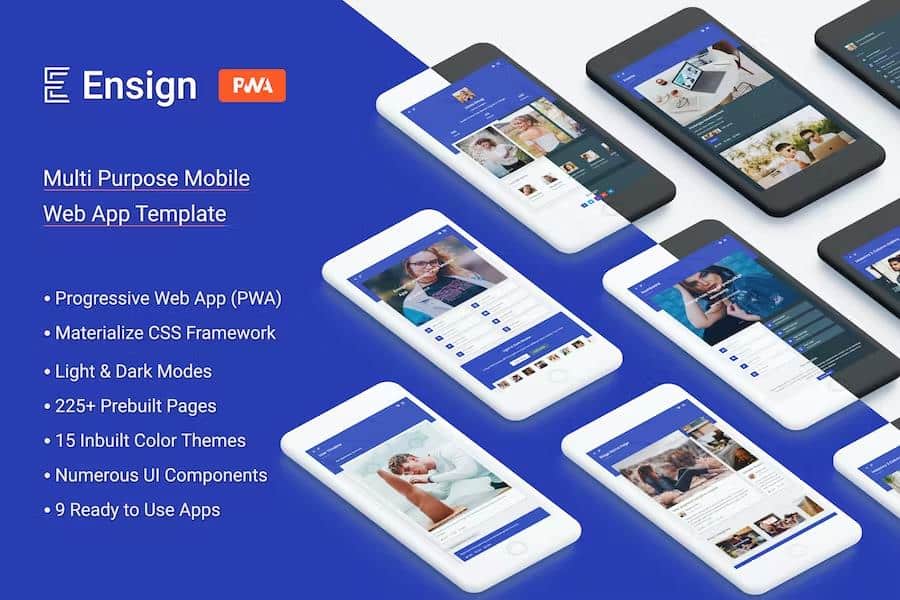
Ensign: Multi Purpose PWA Mobile App Template is premium mobile Ui App. It is a Progressive Web App (PWA). It is designed using Materialize Framework. It is modern responsive front-end framework based on Material Design. It is specially designed to give your mobile app a unique and elegant look. It is easy to customize and coded in developer friendly manner.
It has solid integration of reusable UI components and latest trending plugins. This template can be used for various types of project applications. It comes with pre built 13 different mobile apps. Following apps are inbuilt: Social Media app, Ecommerce app, Blog app, Portfolio app, University app, Online Courses app, Payment & Wallet app, News app, Events app, Chat & Messaging app, Mailbox app, Contacts app and general purpose app. Various niche based web app projects can be made from this mobile app. It makes this app a complete one stop solution for all your needs.
Major Features:
- Build using Materialize CSS framework.
- Progressive Web App (PWA) Ready
- 225+ Inbuilt Demo Pages
- 15 Color Themes Included
- Light and Dark Mode
- Specially build for small screens, but can be viewed on large screens as well
- 4 Different Header Layouts
- 3 Different Footer Layouts
- Light, dark and colored Navigation Menu Styles
- Various Types of Portfolios
- Various Types of Blogs
- Material Font Icons
- Google Fonts
- Detailed Documentation
- User Interface and Utility Components
- Charts library for Graphical Representations
- Calendar and Event App
- Social Media app
- Ecommerce app
- Blog app
- Portfolio app
- Payment & Wallet app
- Events app
- Chat & Messaging app
- Mailbox app
- Contacts app
- General purpose app
- Profile Management Module
- Fixed Bottom Menu for quick links
- Super Fast and Light Weight
- Coded to be developer friendly
- Multi Purpose and Wide Range of pages
- Famous Material Design UI
- Premium and Elegant Template
- Site Access and Error Pages Section
- Contacts, Messages, Notification Modules
- Mailbox Module
- Various Mobile Site Inner Pages
- Various Input Forms and Components
- Complete Mobile UI App
- Excellent Support
- Cross Browser Compatible
Progressive Web App (PWA)
A Progressive Web App (PWA) is a web app that uses modern web capabilities to deliver an app-like experience to users.
Progressive Web Apps are user experiences that have the reach of the web, and are:
Reliable - Load instantly and never show the downasaur, even in uncertain network conditions.
Fast - Respond quickly to user interactions with silky smooth animations and no janky scrolling.
Engaging - Feel like a natural app on the device, with an immersive user experience.
This new level of quality allows Progressive Web Apps to earn a place on the user's home screen.
Light and Dark Modes
Ensign: Multi Purpose PWA Mobile App Template can be viewed as light and dark mode. You can keep both the versions in your project or show only as light or dark. There is a icon in header to switch between light and dark mode.
Prebuilt Themes
Ensign: Multi Purpose PWA Mobile App Template comes with multiple prebuilt themes. This template has 15 different color themes integrated. You can either use anyone theme or allow users to change as per their liking.
Pre built Mobile Apps
It comes with pre built 9 different mobile apps. Following apps are inbuilt: Social Media app, Ecommerce app, Blog app, Portfolio app, University app, Online Courses app, Payment & Wallet app, News app, Events app, Chat & Messaging app, Mailbox app, Contacts app and general purpose app. Various niche based web app projects can be made from this mobile app.
Navigation Menu
Navigation Menu has number of variations in this template. There are basically 3 different navigation menu styles in this template. They are light menu, dark menu and colored menu.
Also, Each above menu type can be configured in various colors themes.
Headers
Header top bar has number of variations in this template. There are basically 4 different header layouts in this template. They are:
- Centered Header (default)
- Left Aligned Header
- Right Aligned Header
- App Style Header
Also, Each above header can be configured in various colors.
Footers
Footer has number of variations in this template. There are basically 3 different footer layouts in this template. They are:
- Centered Footer (default)
- Left Aligned Footer
- Minimal Footer
Also, Each above footer can be configured in various colors.
Charts - Graphical Representations
Ensign Mobile App template is integrated with various types of graphical representations. Charts like line, area, bar, stacked bar, scatter, donut, pie, funnel etc. are configured in this template.
Echarts library is integrated for graphical representations in this template. You can extend or configure it as per your need.
Inbuilt Pages:
Home Pages
- Default Home Page
- Welcome Page
- Social Media
- Events
- Profile
- Dashboard
- Ecommerce
- Walkthrough
- Blog
- Login
- Registration
Company App Screens
Our Team
- Pricing plans
- App Search
- User Timeline
- Partners & Clients
- Contact Us
- About Us
- Customer Testimonials
- App FAQ
- Welcome Screen
- Purchase Invoice
- App Walkthrough
- App Offline
User Actions Screens
- Subscribe
- User Profile Card
- Share
- Settings
Blogs
- Blog Home Page
- Masonry 2 Column Blog
- Single Column Blog
- Blog Carousel
- Content 2 Column Blog
- Full Width Blog
- Small Style Blog
- Medium Style Blog
- Small Right Aligned Blog
- Medium Right Aligned Blog
- Alternate Small Blog
- Alternate Medium Blog
- Title Only Blog
- Content Blog
- View Blog
- Add Comment
- Subscribe Blog
Gallery
- Carousel
- Grid 2 Column
- Single Column
- Masonry 2 Column
- Full Width
- Grid 3 Column
- Full Width 2 Column
- Full Width 3 Column
- Masonry 3 Column
- Full Width Masonry 2 Column
- Full Width Masonry 3 Column
- Masonry with Title 2 Column
- Full Width with Content
- Masonry with Content 2 Column
- Full Width with Title
- Grid with Title 2 Column
Events App
- Events Dashboard
- Event Calendar
- All Events
- View Event Details
- Event Timeline
- Book Event
- Add New Event
- Edit Event
Error Pages
- 404 page
- 500 page
- 403 page
- 405 page
- 408 page
- 503 page
User App Access
- Login
- Registration
- Forgot Password
- Reset Password
- App Lock Screen
Social Media App
- Social Media Dashboard
- Activity
- All Users
- Friends
- Friend Requests
- Activity Carousel
- Timeline
- Followers
- Following
- Add Friends
User Profile
- Notifications
- Profile
- Edit Profile
Chat & Messages App
- Messages
- Chat
- Chat Rooms
- Group Chat
- Video Call
Contacts App
- Contacts
- Add new contact
- Edit contact
- Phone Call
Wallet and Payment App
Transactions
- Credits
- Debits
- Make Payment
- Pay Bills
Mailbox App
- Mail Box
- Mail Compose
- Mail View
User Interface
- Buttons
- Font Icons
- Responsive Media
- Animated Bars
- Typography
- Background Parallax
- Dropdown Buttons
- Progress Bars
- Wave Effect
- Data List
- App Grid
- Icon Buttons & Dropdowns
- Responsive Grids
- Blockquote
- Tables
- Box Shadow
- Color Palette
- Colored Tables
- Pagination
- Count Badges
Elements
- Cards
- Content Tabs
- Modals
- Light Box
- Icon Tiles
- Message Popups
- Popout Expandables
- Small Iconic Cards
- Light Box Grid
- Expandables
- Colored Modals
- Colored Expandables
- Colored Tabs
- FullScreen Popups
- Iconic Feature Cards
- Message Toast
- Tooltips
- Swipable
- Image Waves Effect
- Parallax Grid
- Iconic Services
- Message Cards
- Page Footer
- Transparent Expandables
- Cards Actions
- Footer Menu
- Page Loader
Carousels
- Single Column Carousel (Touch)
- Multi Column Carousel (Touch)
- 3D Carousel (Touch)
- Content Carousel (Touch)
- Fullscreen Carousel (Touch)
Form Inputs
- Text Inputs
- Input Validation
- Select
- Multiple Select
- Iconic Text Inputs
- Switches
- Character Count Text Inputs
- Chips
- Checkboxes
- Avatar Chips
- Radio Buttons
- Input Chips
- Range
- Range Color Picker
- Advanced Range Inputs
Date & Time Pickers
- Date Pickers
- Time Pickers
Graphs and charts
- Bar Charts
- Donut charts
- Line Charts
- Stacked Bar Charts
- Scatter Charts
- Area Charts
- Funnel charts
- Pie charts
- Gauge Charts
Sliders
- Slider
- Fullscreen Slider
Shop and Ecommerce App
- Shop Home Page
- Products (Single Column)
- Products (Grid View)
- Carousel Products
- Product Details
- Products (List View)
- Shopping Cart
- Products Category
- Products (List Right View)
- Invoice
- Shipping
- Payment Successful
- Wishlist
- Shopping FAQ
Fonts
Free Google Fonts are used in this template. Google Font "Poppins" is integrated. It can be easily replace with any other font of your choice.
Fonts Icons
Material Design Font icons are used in this project. They are clean, crisp and vector based fonts.
Detailed Documentation
Ensign mobile app template has a detailed documentation included. All the settings regarding headers, footers, Menu, PWA, UI, Components, themes, site mode, installation etc. are explained in detail with proper screenshots.
All images in downloaded package are replaced with placeholder images.
Every item on Gplzone comes with a license that defines how you can use the product. Understanding the license terms before purchasing is important to ensure you have the right permissions for your intended use. Gplzone offers two main license types: Regular License and Extended License.
The license grants you a non-exclusive, non-transferable right to use the item in accordance with the terms described below. You are not purchasing the item itself, but rather a license to use the item within the specified conditions. All intellectual property rights remain with the original author.
Please read this page carefully before making a purchase. If you are unsure which license you need, refer to the comparison table below or contact our support team for guidance.
The Regular License is designed for personal projects and single-client use. It is the most common license type and is suitable for most individual and freelance use cases. The Regular License allows you to use the item in one end product.
What You Can Do
- Use the item in one end product for personal or commercial use.
- Use the item in an end product that is sold to a single client. You may charge your client for creating the end product.
- Modify the item to suit your needs. You may customize, adapt, or alter the item as part of your end product.
- Use the item in a free end product. This includes personal websites, portfolios, and non-commercial projects.
- Combine the item with other works to create a larger end product, provided the end product is not distributed or sold as a template or theme.
What You Cannot Do
- Use the item in multiple end products. A separate license is required for each end product.
- Redistribute, resell, license, or sub-license the item in its original form or as a competing product.
- Use the item in a product that is sold to multiple end users (SaaS, template, theme marketplace, etc.).
- Extract the source code or components of the item for use in other products outside the end product.
- Use the item on behalf of multiple clients. Each client requires a separate license.
The Extended License is designed for commercial use and projects where the end product is distributed to multiple end users. It grants you additional rights beyond the Regular License, making it suitable for agencies, SaaS products, and commercial applications.
What You Can Do
- Everything permitted under the Regular License.
- Use the item in an end product that is sold, distributed, or made available to multiple end users. This includes SaaS applications, web applications, mobile apps, and software-as-a-service products.
- Use the item in multiple end products for the same client without purchasing additional licenses.
- Use the item in a theme or template that is sold on a marketplace or distributed to multiple customers, provided the item is not redistributed in its original form.
- Charge end users for access to or use of the end product that incorporates the item.
What You Cannot Do
- Redistribute, resell, license, or sub-license the item in its original form. The extended license does not grant you the right to resell the item itself as a standalone product.
- Extract the source code or components of the item for use in other products outside the end product, except as permitted by the item’s specific license.
- Use the item on behalf of multiple different clients in separate end products without separate licenses. The Extended License covers multiple end products for the same client only.
The table below provides a quick comparison between the Regular License and the Extended License to help you determine which one is right for your project:
Rule of thumb: If you are building a project for yourself or a single client, the Regular License is usually sufficient. If the end product will be distributed to multiple users or used commercially across multiple end products, you need the Extended License.
If you initially purchased the wrong license type, you may be able to exchange it under certain conditions. Gplzone allows license exchanges under the following rules:
- Upgrading is allowed — You can upgrade from a Regular License to an Extended License within 30 days of the original purchase. Simply purchase the Extended License and contact us through our help center. We will refund the cost of the Regular License.
- Downgrading is not allowed — You cannot exchange an Extended License for a Regular License. Once an Extended License has been purchased, the additional usage rights have been granted and cannot be reversed.
- Time limit applies — License exchanges must be requested within 30 days of the original purchase date. After this period, no exchanges will be processed.
- One exchange per purchase — You may only exchange a license once per purchase. Make sure you purchase the correct license the second time around.
To process a license exchange, please provide both order numbers (the original purchase and the new purchase) and contact us via our contact page or help center.
The following terms apply to all license types on Gplzone. By purchasing a product on Gplzone, you agree to these general license terms:
Scope of License
The license is a single, non-exclusive, non-transferable right to use the item as specified. You do not acquire ownership of the item or any intellectual property rights. The license is valid in perpetuity unless otherwise stated for the specific item.
Modifications
You may modify the item as necessary to use it in your end product. However, modified versions of the item are still bound by the original license terms. You may not claim ownership of the original item or its components, even after modification.
Third-Party Assets
Some items may include third-party assets such as fonts, images, icons, or libraries. These assets are subject to their respective licenses. If the item includes third-party assets with specific licensing requirements, those requirements are detailed in the item’s documentation.
Updates & Support
Future updates to the item are covered by the same license. You do not need to repurchase the item to receive updates. However, support is provided by the author and may be subject to separate terms or time limitations as specified on the product page.
Termination
The license is effective until terminated. Gplzone reserves the right to revoke the license if you violate any of the terms. Upon termination, you must stop using the item and remove it from all end products. No refunds will be provided for licenses terminated due to violation of terms.
Liability
The item is provided “as is” without warranties of any kind. Gplzone and the author are not liable for any damages arising from the use or inability to use the item. The total liability shall not exceed the price paid for the license.
Can I use a Regular License for a client project?
Yes. The Regular License allows you to create an end product for a single client. You may charge your client for your services. However, if you plan to use the same item for multiple clients, you need a separate Regular License for each client, or an Extended License if all projects are for the same client.
Do I need an Extended License for a SaaS application?
Yes. If your end product is a SaaS application or any product that is distributed to or accessed by multiple end users, you need an Extended License. This applies regardless of whether the SaaS is free or paid.
Can I use the item in a WordPress theme I sell?
Only with an Extended License. The Extended License allows you to incorporate the item into a theme or template that is sold or distributed to multiple users, provided the item is not distributed in its original standalone form.
What happens if I use the item beyond the license terms?
Using an item beyond the scope of its license is a violation of the license agreement and may result in license termination. Gplzone may also take legal action to protect the rights of our authors. If you are unsure about whether your use case is covered, please contact us before proceeding.
Does the license expire?
No. The license is perpetual, meaning it does not expire. You can continue using the item in your end product indefinitely. However, the license applies to a specific version of the item. Major version updates may be released under revised terms.