Exphome - Sketch Smart Home Mobile UI Kit Latest Version
Others Themeforest 4.8 (546 reviews)
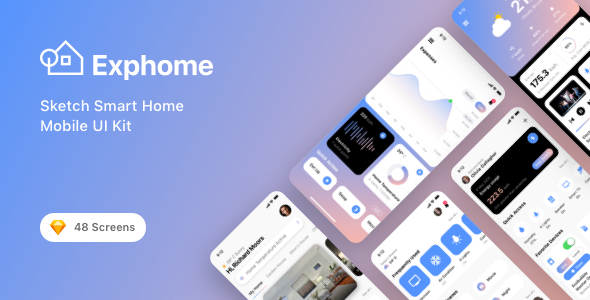
Exphome is a wonderful Sketch Smart Home Mobile UI Kit designed for accelerate your smart home and technology services application design process. It contains all 48 screens in layered and organized elements. Each screen fully customizable, easy to use and carefully assembled in Sketch. This template is ready to use for iOS app.
Features
More from this category
 Themeforest


- 48 Screen Layouts
- Pixel Perfect
- 100% Vector and Customizable
- Layered & Well Organized
- San Francisco Fonts
- Designed based on 375×812 Screen Resolutions
- Designed in Sketch
Pages Included
- Splash Screen
- Start 01
- Start 02
- Start 03
- Start 04
- Start 05
- Start 06
- Sign In 01
- Sign In 02
- Sign In 03
- Forgot Password
- Sign Up 01
- Sign Up 02
- Sign Up 03
- Verification Code
- Home 01
- Home 02
- Home 03
- Home 04
- Home 05
- Home 06
- Room Details 01
- Room Details 02
- Room Details 03
- Device Details 01
- Device Details 02
- Device Details 03
- Device Details 04
- Device Details 05
- Statics 01
- Statics 02
- Statics 03
- Statics 04
- Schedule 01
- Schedule 02
- Add Device
- Rooms
- Voice Control
- Room Camera 01
- Room Camera 02
- Account 01
- Account 02
- Account 03
- Account 04
- Navigation 01
- Navigation 02
- Navigation 03
- Navigation 04
Source & Credits
- Fonts: San Francisco
- Image: Unsplash
- Icon: Flaticon
How to Use Sketch Files
Add or Replace Images: Select the Layers Group section of Artboard, double click on the Layer with Mask name, and you can adjust on the right side by clicking “Select Image”. You can also edit any text, color or any font file by double click and change the same.
Note
All images are just used for preview purpose only and replaced with Placeholder Images. They are not part of the template and not included in the final purchase files.
Please don’t forget to rate this item if you like it.
Thanks a Lot!
- Item type
- digital product
- Category
- Others
- Version
- Latest Version
- Availability
- In stock
- Delivery
- Digital
- Last updated
- October 11, 2026
This listing covers Exphome - Sketch Smart Home Mobile UI Kit, a Others from digital product. Use the source description and recorded item details below to check whether it fits the intended project.
Usage rights depend on the license selected at checkout. Review the complete terms before using this item for client work, redistribution, SaaS, or more than one end product.