Femmyou - Beauty Salon & Spa Elementor Template Kit Latest Version
Others Themeforest 4.8 (3.8K reviews)
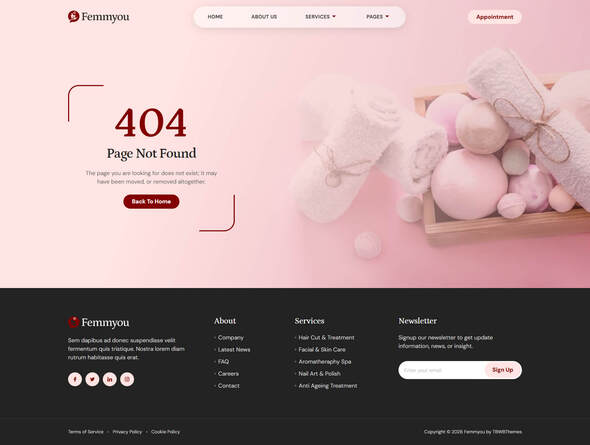
Femmyou, an Elementor Template Kit, embodies elegance for beauty salon and spa websites. Featuring a graceful and captivating design, the dominant pink and maroon hues exude sophistication. The modern and simple layout enhances user experience. With over 12 readily available templates, Femmyou ensures convenience and ease of customization. Its chic aesthetic and user-friendly interface make it the perfect choice for creating a visually stunning online presence for beauty and spa businesses.
Features :
Other products to consider
 Themeforest
- 15 pre-built templates ready to use
- Cross Browser Compatible
- Using Free Plugins (Elementor Pro is not required)
- 100% Fully Responsive & Mobile-friendly
- Clean and Modern Design Style
- Customize fonts and colors in one place (Global Kit Style)
Templates in Zip :
- Header
- Footer
- Contact Form
- Appointment Form
- Subscription Form
- About Us
- Services
- Pricing Plan
- Appointment
- Gallery
- Contact Us
- 404 Page
- Single Post
- Blog
- Homepage
- Global Kit Styles
Required Plugins :
- Elementor Website Builder
- Elementskit Lite
- Jeg Elementor Kit
- Metform
How to Use Template Kits:
This is not a WordPress Theme. Template kits contain the design data for Elementor only and are installed using the Template Kit Import plugin for WordPress or directly through Elementor.
Detailed Guide:
https://help.market.envato.com/hc/en-us/articles/36033428836889-How-to-Upload-Install-Elementor-Template-Kits-from-Themeforest-to-WordPress
For further support, go to Elementor > Get Help in WordPress menu.
How to Import Metforms :
- Import the metform block templates
- Import the page template where the form appears and right-click to enable the Navigator
- Locate and select the Metform widget and click Edit Form. Choose New, then Edit Form. The builder will appear
- Click ‘Add Template’ grey folder icon
- Click ‘My Templates’ tab
- Choose your imported metform template, then click ‘Insert’ (click No for page settings)
- Once the template is loaded, make any desired customizations and click ‘Update & Close’ The form will appear in the template
- Click Update
Setup Global Header and Footer in ElementsKit :
- Import the header and footer template
- Go to ElementsKit > Header Footer and click Add New (if prompted with a wizard, you may click Next through it without taking any action)
- Title the header, leave Entire Site selected and toggle Activation to On
- Click the gray Edit Content button to load the builder
- Click the gray folder icon and select the header template to import, select your menu in the nav element and click Update
- Repeat for Footer
Image License :
This Template Kit uses demo images from Envato Elements. You will need to license these images from Envato Elements to use them on your website, or you can substitute them with your own.
- https://elements.envato.com/collections/E8JNC7X4PH
- Item type
- template kit
- Category
- Others
- Version
- Latest Version
- Availability
- In stock
- Delivery
- Digital
- Last updated
- October 14, 2026
For shoppers browsing Others, Femmyou - Beauty Salon & Spa Elementor Template Kit is recorded as a template kit. The page below separates supplied product information from general store and license terms.
Usage rights depend on the license selected at checkout. Review the complete terms before using this item for client work, redistribution, SaaS, or more than one end product.