Gplzone Security Scanner

Fotomag - A Silky Minimalist Blogging Magazine WordPress Theme For Visual Storytelling.zip
SHA-256: calculating...
Initializing scanner... 0%
Connecting to security engines...
No Threats Detected
0 security vendors flagged this file as malicious
Scanned · engines
Fotomag - A Silky Minimalist Blogging Magazine WordPress Theme For Visual Storytelling 2.0.8 | Gplzone
Gplzone
Home Products Wordpress Themes Fotomag - A Silky Minimalist Blogging Magazine WordPress Theme For Visual Storytelling

Fotomag - A Silky Minimalist Blogging Magazine WordPress Theme For Visual Storytelling 2.0.8

Wordpress Themes Themeforest 4.8 (2.0K reviews)
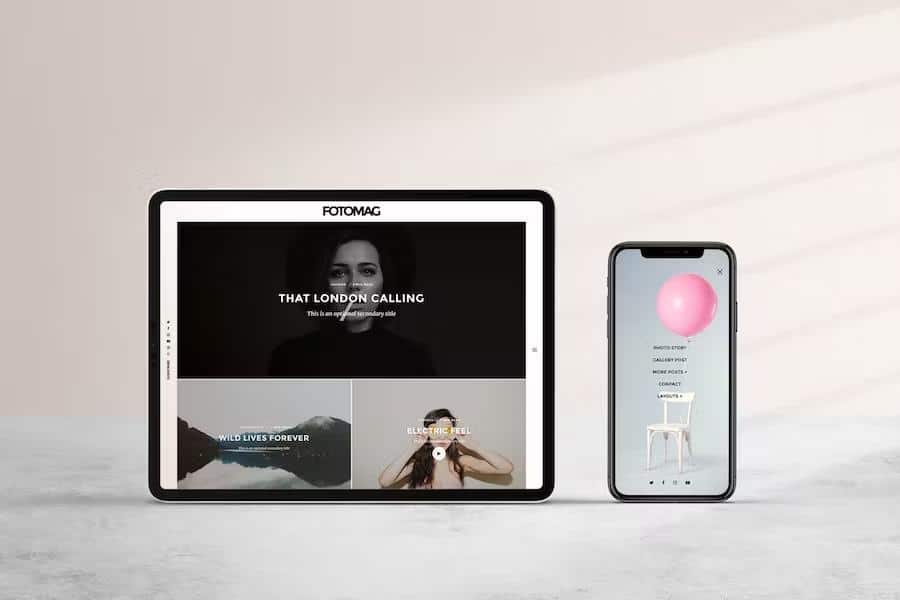
Fotomag - A Silky Minimalist Blogging Magazine WordPress Theme For Visual Storytelling
$4.99
0
Product Overview

Fotomag is a minimalist WordPress magazine for visual sites about travel, recipes, personal and everything in between.
Fotomag is a silky-smooth and minimalist photography blog magazine for WordPress. Fotomag is anti-bloatware and only follows WordPress and general best coding standards to ensure Fotomag will probably be the easiest blogging WordPress theme you will ever set up and enjoy – all the options are completely controlled via WordPress’ customizer.

Fotomag was designed to focus completely on your beautiful imagery, with no unnecessary gimmicky distractions, so real visitors will feel extra engaged with your imagery and story telling. In essence, Fotomag is ideal for any modern website that wants to focus on story telling with beautiful imagery. From travel journals to recipe sites to company blogs. And everything in between.

General Features

  • Custom CSS box to easily enter any specific visual customizations
  • Custom JavaScript input to easily enter any custom JavaScript code
  • Responsive design that looks great on screens of all shapes, orientations and sizes.
  • Retina Ready (HD) WordPress photography magazine theme
  • Comes with .mo/.po files for quick and easy translation. Some languages have already been translated.
  • Integrated lightbox (can be turned on/off in the customizer)
  • Touch-friendly slider and user experience
  • Author pages can add social network icons that link to author profile links
  • Logo options, including Retina logo option
  • Set top and bottom padding for header (logo area)
  • Almost everything can be turned on/off from the customizer

Pages Features
Post Format: Gallery. Beautiful full-screen gallery that is super touch friendly and portrait-image friendly + too. You can see the demo of it here: Gallery Post Demo
Post Format: Video (Able to embed YouTube / Vimeo / Kickstarter / Viddler videos). They will appear in a minimalist lightbox at the press of the play button (YouTube starts playing automatically when the play button + is pressed, and paused if the X button or background is pressed)
Post Format: Audio(Able to embed any audio embed). They will appear in a minimalist lightbox at the press of + the play button.

  • Show Category Above Title (Can be turned on/off in Customizer)
  • Down Arrow On Image (Can be turned on/off in Customizer)
  • Like System (Can be turned on/off in Customizer)
  • Progress Bar (Can be turned on/off in Customizer)
  • Author Box (Can be turned on/off in Customizer)
  • Publish Date (Can be turned on/off in Customizer)
  • Tags (Can be turned on/off in Customizer)
  • Sharing Block (Can be turned on/off in Customizer)
  • Next + Previous Posts (Can be turned on/off in Customizer)
  • Comments (Can be turned on/off in Customizer)
  • Related Posts(Can be turned on/off in Customizer)
  • Placeholder Image option to set a default image to show for posts without featured image.
    Pages Features
  • Progress Bar (Can be turned on/off in Customizer)
  • Sharing Block (Can be turned on/off in Customizer)
  • Comments (Can be turned on/off in Customizer)
  • Right Sticky navigation menu
  • Set any background image or color for the slide in navigation menu
  • Set an opacity value for background image to make it more/less visible
  • Set the menu items font color to work with your chosen background image/color
  • Add social media icons to bottom of slide in menu
  • Left Sticky navigation menu
  • Add social media icons to appear on the left menu
  • Show search icon + search lightbox modal (Can be turned on/off)
  • Show subscribe + subscribe lightbox modal (Can be turned on/off) and recommended service is MailChimp
  • Set text for subscribe button in left naviation menu
  • Set text for subscribe lightbox modal title
  • Set text for subscribe lightbox modal sub title
  • Set any background image or color for subscribe lightbox modal/li>
  • Set an opacity value for background image to make it more/less visible in the subscribe lightbox modal
  • Set the subscribe lightbox modal font color to work with your chosen background image/color

Typography

  • Set font family for titles (Select any Google font using a select option with all of them in the customizer)
  • Set font family for body (Select any Google font using a select option with all of them in the customizer)
  • Set font family special character extensions (None/One/Multiple can be ticked in the customizer)
  • Set line height for desktops and mobiles (All easily controlled in the customizer)
  • Set font size for desktops and mobiles (All easily controlled in the customizer)
  • Set desired font color for article text (Easily controlled with colorpicker option in the customizer)
  • Set desired font color for headings (Easily controlled with colorpicker option in the customizer)
  • Set desired font color for blockquotes (Easily controlled with colorpicker option in the customizer)
    Set desired font color for links and links hover action (Easily controlled with colorpicker option in the + customizer)
    Set desired font color for widget links and widget links hover action (Easily controlled with colorpicker + option in the customizer)

Footer

  • Footer widget area to insert widgets in the footer
  • Logo options, including Retina logo option
  • Text area to insert text under the Footer logo area
  • Text area to insert copyright line text in the footer
  • Lots of social icons options for the footer area
  • Footer menu available in Appearance -> Menus. It appears above the copyright line

Extra options

  • Integrated lightbox (can be turned on/off in the customizer)
  • Minified Javascript Option (can be turned on/off in the customizer)
  • Load YouTube API option for automatic play of video post formats (can be turned on/off in the customizer)
  • Pagination style option: Number pagination or infinite scroll with load more button
    **A dream: Super clean code and child-theme ready **
    Fotomag was written following all modern WordPress coding standards, with regards to security, prefix best practises and file structure. The theme uses clean PHP, HTML5, CSS3 and Javascript code. The theme also comes with a ready-to-use child theme file that works instantly.

1
License Overview

Every item on Gplzone comes with a license that defines how you can use the product. Understanding the license terms before purchasing is important to ensure you have the right permissions for your intended use. Gplzone offers two main license types: Regular License and Extended License.

The license grants you a non-exclusive, non-transferable right to use the item in accordance with the terms described below. You are not purchasing the item itself, but rather a license to use the item within the specified conditions. All intellectual property rights remain with the original author.

Please read this page carefully before making a purchase. If you are unsure which license you need, refer to the comparison table below or contact our support team for guidance.

2
Regular License

The Regular License is designed for personal projects and single-client use. It is the most common license type and is suitable for most individual and freelance use cases. The Regular License allows you to use the item in one end product.

What You Can Do

  • Use the item in one end product for personal or commercial use.
  • Use the item in an end product that is sold to a single client. You may charge your client for creating the end product.
  • Modify the item to suit your needs. You may customize, adapt, or alter the item as part of your end product.
  • Use the item in a free end product. This includes personal websites, portfolios, and non-commercial projects.
  • Combine the item with other works to create a larger end product, provided the end product is not distributed or sold as a template or theme.

What You Cannot Do

  • Use the item in multiple end products. A separate license is required for each end product.
  • Redistribute, resell, license, or sub-license the item in its original form or as a competing product.
  • Use the item in a product that is sold to multiple end users (SaaS, template, theme marketplace, etc.).
  • Extract the source code or components of the item for use in other products outside the end product.
  • Use the item on behalf of multiple clients. Each client requires a separate license.
3
Extended License

The Extended License is designed for commercial use and projects where the end product is distributed to multiple end users. It grants you additional rights beyond the Regular License, making it suitable for agencies, SaaS products, and commercial applications.

What You Can Do

  • Everything permitted under the Regular License.
  • Use the item in an end product that is sold, distributed, or made available to multiple end users. This includes SaaS applications, web applications, mobile apps, and software-as-a-service products.
  • Use the item in multiple end products for the same client without purchasing additional licenses.
  • Use the item in a theme or template that is sold on a marketplace or distributed to multiple customers, provided the item is not redistributed in its original form.
  • Charge end users for access to or use of the end product that incorporates the item.

What You Cannot Do

  • Redistribute, resell, license, or sub-license the item in its original form. The extended license does not grant you the right to resell the item itself as a standalone product.
  • Extract the source code or components of the item for use in other products outside the end product, except as permitted by the item’s specific license.
  • Use the item on behalf of multiple different clients in separate end products without separate licenses. The Extended License covers multiple end products for the same client only.
4
License Comparison

The table below provides a quick comparison between the Regular License and the Extended License to help you determine which one is right for your project:

Feature
Regular
Extended
Single end product
Personal / freelance use
Single client project
Modify & customize
Free end product
SaaS / multi-user distribution
Multiple end products (same client)
Commercial template / theme resale
Charge end users
Redistribute original item
Multiple different clients

Rule of thumb: If you are building a project for yourself or a single client, the Regular License is usually sufficient. If the end product will be distributed to multiple users or used commercially across multiple end products, you need the Extended License.

5
Exchanging Licenses

If you initially purchased the wrong license type, you may be able to exchange it under certain conditions. Gplzone allows license exchanges under the following rules:

  1. Upgrading is allowed — You can upgrade from a Regular License to an Extended License within 30 days of the original purchase. Simply purchase the Extended License and contact us through our help center. We will refund the cost of the Regular License.
  2. Downgrading is not allowed — You cannot exchange an Extended License for a Regular License. Once an Extended License has been purchased, the additional usage rights have been granted and cannot be reversed.
  3. Time limit applies — License exchanges must be requested within 30 days of the original purchase date. After this period, no exchanges will be processed.
  4. One exchange per purchase — You may only exchange a license once per purchase. Make sure you purchase the correct license the second time around.

To process a license exchange, please provide both order numbers (the original purchase and the new purchase) and contact us via our contact page or help center.

6
General License Terms

The following terms apply to all license types on Gplzone. By purchasing a product on Gplzone, you agree to these general license terms:

Scope of License

The license is a single, non-exclusive, non-transferable right to use the item as specified. You do not acquire ownership of the item or any intellectual property rights. The license is valid in perpetuity unless otherwise stated for the specific item.

Modifications

You may modify the item as necessary to use it in your end product. However, modified versions of the item are still bound by the original license terms. You may not claim ownership of the original item or its components, even after modification.

Third-Party Assets

Some items may include third-party assets such as fonts, images, icons, or libraries. These assets are subject to their respective licenses. If the item includes third-party assets with specific licensing requirements, those requirements are detailed in the item’s documentation.

Updates & Support

Future updates to the item are covered by the same license. You do not need to repurchase the item to receive updates. However, support is provided by the author and may be subject to separate terms or time limitations as specified on the product page.

Termination

The license is effective until terminated. Gplzone reserves the right to revoke the license if you violate any of the terms. Upon termination, you must stop using the item and remove it from all end products. No refunds will be provided for licenses terminated due to violation of terms.

Liability

The item is provided “as is” without warranties of any kind. Gplzone and the author are not liable for any damages arising from the use or inability to use the item. The total liability shall not exceed the price paid for the license.

7
Common Questions

Can I use a Regular License for a client project?

Yes. The Regular License allows you to create an end product for a single client. You may charge your client for your services. However, if you plan to use the same item for multiple clients, you need a separate Regular License for each client, or an Extended License if all projects are for the same client.

Do I need an Extended License for a SaaS application?

Yes. If your end product is a SaaS application or any product that is distributed to or accessed by multiple end users, you need an Extended License. This applies regardless of whether the SaaS is free or paid.

Can I use the item in a WordPress theme I sell?

Only with an Extended License. The Extended License allows you to incorporate the item into a theme or template that is sold or distributed to multiple users, provided the item is not distributed in its original standalone form.

What happens if I use the item beyond the license terms?

Using an item beyond the scope of its license is a violation of the license agreement and may result in license termination. Gplzone may also take legal action to protect the rights of our authors. If you are unsure about whether your use case is covered, please contact us before proceeding.

Does the license expire?

No. The license is perpetual, meaning it does not expire. You can continue using the item in your end product indefinitely. However, the license applies to a specific version of the item. Major version updates may be released under revised terms.