GeoDirectory Marker Cluster 2.3.4
Wordpress Plugins Geodirectory 4.8 (743 reviews)
⚡GeoDirectory Marker Cluster Overview
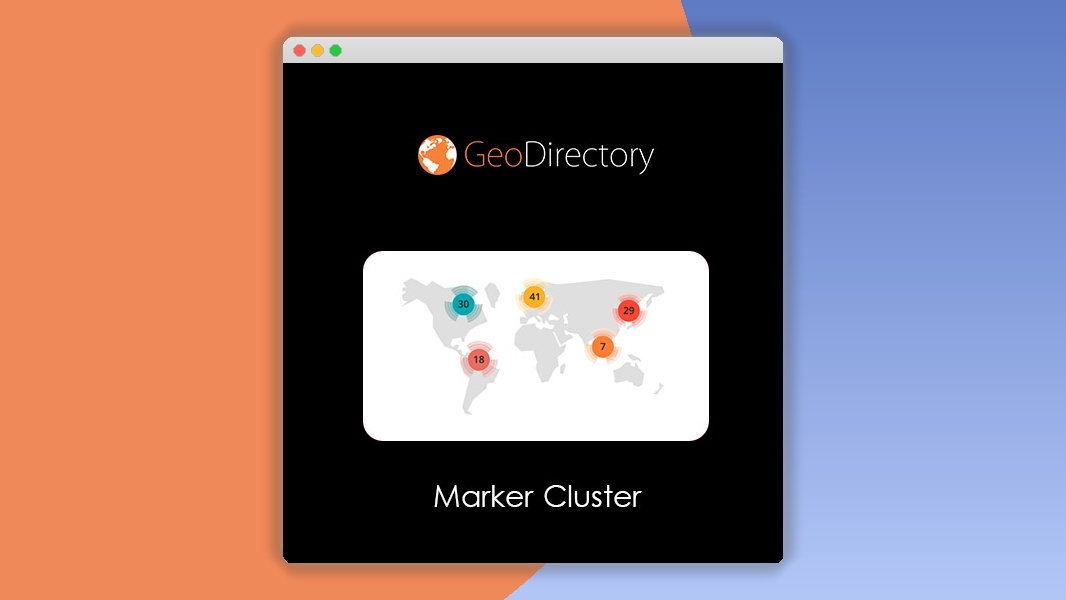
Enhance your GeoDirectory maps with the powerful GeoDirectory Marker Cluster plugin. This essential add-on revolutionizes how users interact with locations on your map by intelligently grouping nearby markers into clusters. As users zoom in, clusters break apart, revealing individual locations, providing a cleaner, more organized, and significantly faster map experience. This is crucial for directories with a high volume of listings, ensuring your map remains responsive and user-friendly even with hundreds or thousands of pins.
By implementing marker clustering, you reduce visual clutter and improve the overall usability of your map interface. Visitors can quickly scan an area, identify densely populated regions, and zoom in to discover specific listings without being overwhelmed by individual markers. This leads to a more engaging user journey, encouraging longer site visits and higher conversion rates for your directory listings. Boost user satisfaction and streamline navigation with this indispensable tool.
Can't Decide A Single Theme/Plugin?Join The Membership Now
Instead of buying this product alone, unlock access to all items including v with our affordable membership plans. Worth $35.000++
🎯 Benefits of our Premium Membership Plan
- Download v for FREE along with thousands of premium plugins, extensions, themes, and web templates.
- Automatic updates via our auto-updater plugin.
- 100% secured SSL checkout.
- Free access to upcoming products in our store.
🎮 GeoDirectory Marker Cluster Key Features
- 🎮 Automatic Marker Clustering: Seamlessly groups nearby markers into manageable clusters based on zoom level.
- 🔧 Customizable Cluster Styles: Tailor the appearance of clusters to match your website's design with customizable icons and colors.
- 📊 Performance Optimization: Significantly improves map loading times and responsiveness, especially with large numbers of listings.
- 🔒 User-Friendly Interface: Provides a cleaner, less cluttered map view for visitors, enhancing their browsing experience.
- ⚡ Dynamic Zoom Behavior: Clusters automatically expand and contract as users zoom in and out of the map.
- 🎯 Targeted Listing Discovery: Helps users quickly identify areas with high concentrations of listings.
- 🛡️ Seamless GeoDirectory Integration: Designed to work perfectly with the GeoDirectory plugin and its add-ons.
- 🚀 Responsive Design: Ensures optimal display and functionality across all devices, from desktops to mobile phones.
- 💡 Easy Installation & Configuration: Simple setup process that requires minimal technical expertise.
- 📱 Mobile-First Approach: Prioritizes a smooth and efficient user experience on mobile devices.
- 🔌 Extensible Functionality: Built with developers in mind for potential future integrations and customizations.
- 📈 Improved User Engagement: Leads to a more intuitive and enjoyable map exploration experience, encouraging more interaction.
✅ Why Choose GeoDirectory Marker Cluster?
- ✅ Enhance User Experience: Eliminate map clutter and make it easier for users to find what they're looking for, leading to higher satisfaction.
- ✅ Boost Performance: Significantly speed up map loading times and ensure a smooth, lag-free experience, even with thousands of listings.
- ✅ Increase Conversions: A better map experience means users stay longer and are more likely to engage with your listings, driving more leads.
- ✅ Seamless Integration: Effortlessly works with your existing GeoDirectory setup, requiring no complex coding or configuration.
💡 GeoDirectory Marker Cluster Use Cases & Applications
- 💡 Real Estate Directories: Display thousands of property listings without overwhelming users, allowing them to easily spot neighborhood hotspots.
- 🧠 Travel & Tourism Guides: Organize attractions, hotels, and points of interest in popular destinations, making trip planning more efficient.
- 🛒 Local Business Listings: Help users discover nearby shops, restaurants, and services in densely populated urban areas.
- 💬 Event Directories: Group multiple events happening in the same vicinity, simplifying event discovery for attendees.
- 📰 News & Article Maps: Visualize geographically tagged news stories, allowing users to explore events by location.
- 🎓 Educational Institution Maps: Display numerous schools, colleges, and universities in a clear, organized manner.
⚙️ How to Install & Setup GeoDirectory Marker Cluster
- 📥 Download the Plugin: Purchase and download the GeoDirectory Marker Cluster plugin from the official GeoDirectory website.
- 🔧 Upload and Activate: Navigate to your WordPress Dashboard > Plugins > Add New. Upload the plugin file and click "Activate".
- ⚡ Configure Settings: Go to GeoDirectory > Settings > Maps. You will find the Marker Cluster options to enable and customize.
- 🎯 Adjust Cluster Options: Fine-tune cluster radius, marker icons, and other visual settings to match your website's aesthetic and functional requirements.
No complex coding is required. The plugin integrates seamlessly with your existing GeoDirectory setup, and all settings are managed through the user-friendly WordPress interface.
🔧 GeoDirectory Marker Cluster Technical Specifications
- 💻 Compatibility: Fully compatible with the latest versions of WordPress and GeoDirectory.
- 🔧 Core Technology: Built upon robust JavaScript libraries for efficient marker clustering.
- 🌐 Map Provider Agnostic: Works with various map providers supported by GeoDirectory, including Google Maps and OpenStreetMap.
- ⚡ Performance Focused: Optimized for speed and efficiency, minimizing impact on server resources.
- 🛡️ Secure Codebase: Developed with security best practices to ensure a safe and reliable experience.
- 📱 Cross-Browser Compatible: Functions flawlessly across all major web browsers.
- 🔌 Extensible Architecture: Designed for easy integration with other GeoDirectory add-ons and custom solutions.
- 📊 Customization Options: Offers granular control over cluster appearance and behavior.
📝 GeoDirectory Marker Cluster Changelog
Version 2.1.0: Introduced enhanced cluster styling options, including custom polygon shapes for clusters and advanced color gradient controls. Improved performance for extremely large datasets by optimizing marker rendering on zoom events.
Version 2.0.5: Resolved an issue where cluster icons were not consistently displaying custom image assets under specific zoom conditions. Added minor UI improvements to the settings page for better clarity.
Version 2.0.0: Major update introducing a completely re-architected clustering engine for superior performance and scalability. Added support for dynamic cluster icon generation based on the number of markers within a cluster. Enhanced compatibility with GeoDirectory v2.3.x and later.
Version 1.8.2: Fixed a bug that could cause map tiles to overlap incorrectly when rapidly zooming in and out with many clusters present. Ensured better adherence to accessibility standards for screen readers.
Version 1.7.5: Implemented a new feature allowing users to specify a minimum number of markers before a cluster is formed, offering more control over density. Improved the responsiveness of cluster updates on touch devices.
Version 1.5.0: Initial release of the Marker Cluster add-on for GeoDirectory, providing core clustering functionality, basic customization options, and seamless integration with the GeoDirectory map system.
⚡GPL & License Information
- Freedom to modify and distribute
- No recurring fees or restrictions
- Full source code access
- Commercial usage rights
🌟 GeoDirectory Marker Cluster Customer Success Stories
💬 "Before using the Marker Cluster plugin, our city guide map was almost unusable with hundreds of businesses listed. Now, it's incredibly fast and intuitive. Users can easily see dense areas and zoom in without lag. A game-changer!" - Sarah K., Local Business Directory Owner
💬 "We manage a large real estate portal with thousands of properties. The GeoDirectory Marker Cluster has dramatically improved our map performance, making it much easier for potential buyers to browse listings by neighborhood. Highly recommended!" - John P., Real Estate Tech Lead
💬 "As a travel blogger, I wanted to showcase many points of interest on a map. This plugin makes it so clean and organized. Visitors can quickly get an overview of an area and then drill down. It's essential for any GeoDirectory site with lots of locations." - Emily R., Travel Blogger
💬 "The customization options are fantastic. We were able to match the cluster styles perfectly to our brand. The improvement in user experience and site speed was noticeable immediately. Fantastic plugin and support!" - Mark T., Web Developer
💬 "Our event directory had become a mess on the map. This plugin cleaned it up instantly. Users can now see where multiple events are clustered, making it much easier to plan their festival attendance. Worth every penny." - David L., Event Organizer
❓ GeoDirectory Marker Cluster Frequently Asked Questions
Q: Will the GeoDirectory Marker Cluster plugin slow down my website?
A: No, quite the opposite! This plugin is designed to significantly improve your map's performance by reducing the number of individual markers displayed at any given time. This leads to faster loading and a smoother user experience.Q: Can I customize the appearance of the clusters?
A: Yes, absolutely! The plugin offers various customization options, allowing you to change cluster icons, colors, and sizes to match your website's design and branding.Q: How do I install and set up the plugin?
A: Installation is straightforward. Simply upload the plugin via your WordPress dashboard, activate it, and then navigate to the GeoDirectory > Settings > Maps section to configure the marker clustering options.Q: What kind of support can I expect?
A: You will receive access to dedicated support from the GeoDirectory team. We are committed to helping you get the most out of our plugins and will assist with any installation or configuration questions.Q: Does this plugin work with all GeoDirectory map add-ons?
A: The GeoDirectory Marker Cluster is built to integrate seamlessly with the core GeoDirectory plugin and is compatible with most of its popular add-ons, ensuring a cohesive experience.Q: Is the plugin compatible with different map providers like Google Maps and OpenStreetMap?
A: Yes, the Marker Cluster add-on is designed to be provider-agnostic, meaning it works effectively with any map provider that is supported by the GeoDirectory plugin itself.
🚀 Ready to Transform Your Website with GeoDirectory Marker Cluster?
Elevate your GeoDirectory website with the GeoDirectory Marker Cluster plugin. If your site features a large number of locations, this add-on is an absolute necessity for improving map performance and enhancing the user experience. Say goodbye to slow, cluttered maps and welcome a streamlined, intuitive interface that keeps your visitors engaged and satisfied.
Choosing the GeoDirectory Marker Cluster means investing in a solution that directly impacts user engagement and conversion rates. Its intelligent grouping of markers not only makes your maps visually appealing but also empowers users to discover listings more efficiently. This translates to longer visit durations, more exploration of your directory, and ultimately, a higher likelihood of conversions for your listed businesses or properties.
Don't let a cumbersome map deter your visitors. Equip your GeoDirectory site with the power of marker clustering today. Experience the difference a fast, organized, and user-friendly map can make. Get the GeoDirectory Marker Cluster now and unlock a superior browsing experience for your users!
Every item on Gplzone comes with a license that defines how you can use the product. Understanding the license terms before purchasing is important to ensure you have the right permissions for your intended use. Gplzone offers two main license types: Regular License and Extended License.
The license grants you a non-exclusive, non-transferable right to use the item in accordance with the terms described below. You are not purchasing the item itself, but rather a license to use the item within the specified conditions. All intellectual property rights remain with the original author.
Please read this page carefully before making a purchase. If you are unsure which license you need, refer to the comparison table below or contact our support team for guidance.
The Regular License is designed for personal projects and single-client use. It is the most common license type and is suitable for most individual and freelance use cases. The Regular License allows you to use the item in one end product.
What You Can Do
- Use the item in one end product for personal or commercial use.
- Use the item in an end product that is sold to a single client. You may charge your client for creating the end product.
- Modify the item to suit your needs. You may customize, adapt, or alter the item as part of your end product.
- Use the item in a free end product. This includes personal websites, portfolios, and non-commercial projects.
- Combine the item with other works to create a larger end product, provided the end product is not distributed or sold as a template or theme.
What You Cannot Do
- Use the item in multiple end products. A separate license is required for each end product.
- Redistribute, resell, license, or sub-license the item in its original form or as a competing product.
- Use the item in a product that is sold to multiple end users (SaaS, template, theme marketplace, etc.).
- Extract the source code or components of the item for use in other products outside the end product.
- Use the item on behalf of multiple clients. Each client requires a separate license.
The Extended License is designed for commercial use and projects where the end product is distributed to multiple end users. It grants you additional rights beyond the Regular License, making it suitable for agencies, SaaS products, and commercial applications.
What You Can Do
- Everything permitted under the Regular License.
- Use the item in an end product that is sold, distributed, or made available to multiple end users. This includes SaaS applications, web applications, mobile apps, and software-as-a-service products.
- Use the item in multiple end products for the same client without purchasing additional licenses.
- Use the item in a theme or template that is sold on a marketplace or distributed to multiple customers, provided the item is not redistributed in its original form.
- Charge end users for access to or use of the end product that incorporates the item.
What You Cannot Do
- Redistribute, resell, license, or sub-license the item in its original form. The extended license does not grant you the right to resell the item itself as a standalone product.
- Extract the source code or components of the item for use in other products outside the end product, except as permitted by the item’s specific license.
- Use the item on behalf of multiple different clients in separate end products without separate licenses. The Extended License covers multiple end products for the same client only.
The table below provides a quick comparison between the Regular License and the Extended License to help you determine which one is right for your project:
Rule of thumb: If you are building a project for yourself or a single client, the Regular License is usually sufficient. If the end product will be distributed to multiple users or used commercially across multiple end products, you need the Extended License.
If you initially purchased the wrong license type, you may be able to exchange it under certain conditions. Gplzone allows license exchanges under the following rules:
- Upgrading is allowed — You can upgrade from a Regular License to an Extended License within 30 days of the original purchase. Simply purchase the Extended License and contact us through our help center. We will refund the cost of the Regular License.
- Downgrading is not allowed — You cannot exchange an Extended License for a Regular License. Once an Extended License has been purchased, the additional usage rights have been granted and cannot be reversed.
- Time limit applies — License exchanges must be requested within 30 days of the original purchase date. After this period, no exchanges will be processed.
- One exchange per purchase — You may only exchange a license once per purchase. Make sure you purchase the correct license the second time around.
To process a license exchange, please provide both order numbers (the original purchase and the new purchase) and contact us via our contact page or help center.
The following terms apply to all license types on Gplzone. By purchasing a product on Gplzone, you agree to these general license terms:
Scope of License
The license is a single, non-exclusive, non-transferable right to use the item as specified. You do not acquire ownership of the item or any intellectual property rights. The license is valid in perpetuity unless otherwise stated for the specific item.
Modifications
You may modify the item as necessary to use it in your end product. However, modified versions of the item are still bound by the original license terms. You may not claim ownership of the original item or its components, even after modification.
Third-Party Assets
Some items may include third-party assets such as fonts, images, icons, or libraries. These assets are subject to their respective licenses. If the item includes third-party assets with specific licensing requirements, those requirements are detailed in the item’s documentation.
Updates & Support
Future updates to the item are covered by the same license. You do not need to repurchase the item to receive updates. However, support is provided by the author and may be subject to separate terms or time limitations as specified on the product page.
Termination
The license is effective until terminated. Gplzone reserves the right to revoke the license if you violate any of the terms. Upon termination, you must stop using the item and remove it from all end products. No refunds will be provided for licenses terminated due to violation of terms.
Liability
The item is provided “as is” without warranties of any kind. Gplzone and the author are not liable for any damages arising from the use or inability to use the item. The total liability shall not exceed the price paid for the license.
Can I use a Regular License for a client project?
Yes. The Regular License allows you to create an end product for a single client. You may charge your client for your services. However, if you plan to use the same item for multiple clients, you need a separate Regular License for each client, or an Extended License if all projects are for the same client.
Do I need an Extended License for a SaaS application?
Yes. If your end product is a SaaS application or any product that is distributed to or accessed by multiple end users, you need an Extended License. This applies regardless of whether the SaaS is free or paid.
Can I use the item in a WordPress theme I sell?
Only with an Extended License. The Extended License allows you to incorporate the item into a theme or template that is sold or distributed to multiple users, provided the item is not distributed in its original standalone form.
What happens if I use the item beyond the license terms?
Using an item beyond the scope of its license is a violation of the license agreement and may result in license termination. Gplzone may also take legal action to protect the rights of our authors. If you are unsure about whether your use case is covered, please contact us before proceeding.
Does the license expire?
No. The license is perpetual, meaning it does not expire. You can continue using the item in your end product indefinitely. However, the license applies to a specific version of the item. Major version updates may be released under revised terms.