Gudvoice - Music & Band Elementor Template Kit Latest Version
Others Themeforest 4.8 (3.9K reviews)
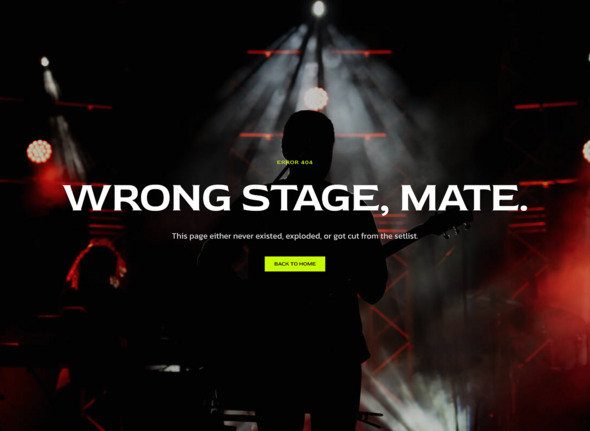
Introducing ”Gudvoice” Music & Band Elementor Template Kit is a bold and expressive solution for musicians, bands, vocal artists, DJs, producers, and music labels looking to create a dynamic and immersive online presence. Built with Elementor Free, this template kit allows you to build a professional, high-impact website without any coding knowledge. Whether you’re promoting your latest album, upcoming tour dates, music videos, or merchandise, Gudvoice offers modern, performance-ready layouts designed to highlight your sound, story, and artistic identity. With sections crafted for streaming integration, event promotion, fan engagement, and press coverage, this kit ensures your audience stays connected and engaged. Sleek visuals, responsive design, and bold styling make Gudvoice the perfect stage for your digital performance—ideal for any act in the modern music and entertainment industry.
Features:
Similar products
 Themeforest

Templates Included:
Required Plugin(included):
How to Use Template Kits:
This is not a WordPress Theme. Template kits contain the design data for Elementor only and are installed using the envato Elements plugin for WordPress or directly through Elementor.
Elementor Template Kits use the Envato Elements plugin to install.
Detailed Guide:
https://help.market.envato.com/hc/en-us/articles/36033428836889-How-to-Upload-Install-Elementor-Template-Kits-from-Themeforest-to-WordPress
For further support, go to Elementor > Get Help in WordPress menu.
How To Setup Header and Footer in ElementsKits:
-
Import the header and footer template
-
Go to ElementsKit > Header Footer select Header and click Add New
-
Give it a title, leave Entire Site selected and toggle Activation to On
-
Click the template title and Edit Content
-
Click the gray folder icon and select the header template to import and Update
-
Repeat for Footer
How To Import Metforms:
-
Import the metform block templates
-
Locate and select the Metform widget and click Edit Form. Choose New, then Edit Form. The builder will appear
-
Click ‘Add Template’ grey folder icon
-
Click ‘My Templates’ tab.
-
Choose your imported metform template, then click ‘Insert’ (click No for page settings)
-
Once the template is loaded, make any desired customizations and click ‘Update & Close’ The form will appear in the template
-
Click Update
Detailed Guide
IMPORTANT:
This Template Kit uses demo images from Envato Elements. You will need to license these images from Envato Elements to use them on your website, or you can substitute them with your own.
https://elements.envato.com/collections/HGK5SCMN9J
- Item type
- template kit
- Category
- Others
- Version
- Latest Version
- Availability
- In stock
- Delivery
- Digital
- Last updated
- October 22, 2026
Gudvoice - Music & Band Elementor Template Kit is one of the Others items recorded as a template kit. The content below uses the supplied listing information and current local catalog data.
Usage rights depend on the license selected at checkout. Review the complete terms before using this item for client work, redistribution, SaaS, or more than one end product.