HomeQ - Smart Home App UI Kit Latest Version
Others Themeforest 4.8 (1.7K reviews)
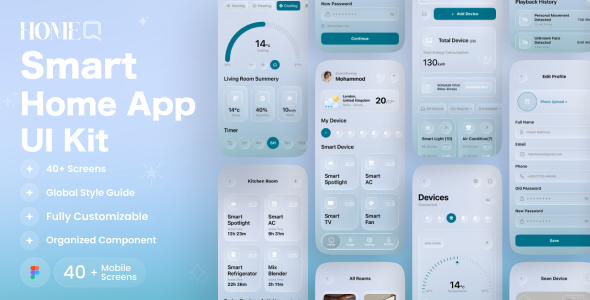
HomeQ – Smart Home Mobile App UI Kit, designed high-quality modern solution for smart home applications for iOS and Android platforms. Built with a focus on user experience, clean design, and easy customization, smart home application that lets users control and monitor various smart devices like air conditioners, lights, AC, TV, fan and speakers directly from their smartphone. Making it easier for developers and designers to create a professional and user-friendly app for managing personal or smart home control. Easy to use and screens is ready to use for iOS & Android app. You can easily change any design. It’s easy to customize and also well documented.
- 01.Splash Screens
- 02.Onboarding 01
- 03.Onboarding 02
- 04.Onboarding 03
- 05.Welcome Screens 01
- 06.Welcome Screens 02
- 07.Sign In Page 01
- 08.Sign In Page 02
- 09.Sign Up Page 01
- 10.Sign Up Page 02
- 11.Forgot Password
- 12.Check Email
- 13.Reset Password 01
- 14.Reset Password 02
- 15.Congratulations
- 16.Create New Password
- 17.Main Page
- 18.Temperature
- 19.Devices
- 20.Home Analysis
- 21.All Rooms
- 22.Search
- 23.Filter
- 24.Wating Room
- 25.Schedule
- 26.Edit Schedule
- 27.Kitchen Room
- 28.Smart Lamp
- 29.Air Conditioner
- 30.CCTV Camera
- 31.All Smart Devices
- 32.Searching For Devices 01
- 33.Searching For Devices 02
- 34.Voice Assistant 01
- 35.Voice Assistant 02
- 36.Scan Device
- 37.Congratulations
- 38.Profile
- 39.Edit Profile
- 40.Settings
- 41.Notification
- 42.Support
Features –
- 45+ High Quality iOS & Android Screens
- Clean, unique and modern style
- Symbol & well layer organized
- 100% Vector and Customizable
- Fully Auto Layout with Style Guide
- Well organized layers and groups
- Easy customizable fig files
- Pixel perfect design
- File named layers and groups
- 24/7 great support
- Premium font and icon used
- Designed in Figma
The fig include –
- Documentation
- fig files
How to Edit:
In order to edit the file, you need to have figma installed on your system, and the fonts mentioned in the credits installed. As you can see on the right, the layers are well organized and grouped into folders, which make editing very easy. So, all you have to do is select the layer from the right, and then edit it with figma
Font used
- SF Pro
Icons Used
- Iconly
- Hugeicons
- flaticon
Note –
If you need any help, Please contact us

 Themeforest
- Item type
- digital product
- Category
- Others
- Version
- Latest Version
- Availability
- In stock
- Delivery
- Digital
- Last updated
- October 25, 2026
For shoppers browsing Others, HomeQ - Smart Home App UI Kit is recorded as a digital product. The page below separates supplied product information from general store and license terms.
Usage rights depend on the license selected at checkout. Review the complete terms before using this item for client work, redistribution, SaaS, or more than one end product.