Infoliox - Personal Portfolio Elementor Template Kit Latest Version
Others Themeforest 4.8 (2.1K reviews)
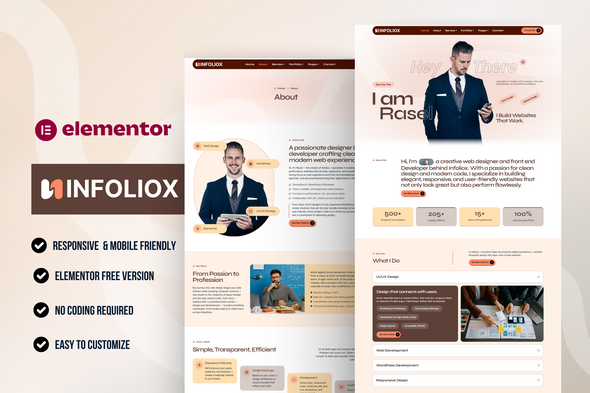
Infoliox – Personal Portfolio Elementor Template Kit
Showcase your personal brand, creative work, and services with Infoliox—a modern and clean Elementor Template Kit crafted for freelancers, designers, developers, and creative professionals. It helps you build a standout portfolio site with zero coding required.
More from this category

 Themeforest


Whether you’re launching a new brand or refreshing your online portfolio, Infoliox gives you the flexibility and speed to go live with a highly professional look.
Why Choose Infoliox?
- Clean and minimal layout tailored for personal portfolios
- Ready-to-use sections for projects, services, and contact
- Fully responsive and mobile-friendly design
- Quick customization with Elementor – no coding needed
Required Plugins:
- Elementor (Page Builder)
- Ultimate Addons for Elementor (Header & Footer)
- MetForm (Forms)
- Jeg Elementor Kit (Addons)
What’s Included in the Zip:
- Home Page
- About Page
- Service Page
- Service Detail Page
- Portfolio Page
- Portfolio Details Page
- Pricing Page
- Blog Archive
- Single Post
- Contact Page
- 404 Page
- Header
- Footer
- Contact Metform
- Newsletter Metform
This is not a WordPress Theme. Template kits contain design data for Elementor only and are installed using the Envato Elements plugin or directly through Elementor.
How to Import MetForm Custom Form:
- Import the MetForm templates first.
- Import the page template where the form appears, then edit with Elementor.
- Click the MetForm widget in the page and click Edit Form.
- Select “New”, leave blank, and click Edit Form button.
- Click the gray folder icon and go to the “My Templates” tab.
- Select your imported MetForm template and click Insert.
- Once loaded, click “Update”.
How to Setup Header & Footer with Ultimate Addons for Elementor (UAE):
- If using Elementor Pro, headers and footers can be managed via Theme Builder. Otherwise, make sure Elementor and Ultimate Addons for Elementor (UAE) are installed and activated.
- Go to Dashboard > UAE > Header & Footer Builder and click Add New.
- Give the template a Title, set the Type of Template to Header (repeat later for Footer), set Display Location to Entire Site, then Publish.
- Edit with Elementor.
- Insert the header (or footer) template via the gray folder icon (“My Templates” tab).
- Customize and click Update.
Detailed Guide:
https://help.market.envato.com/hc/en-us/articles/36033428836889-How-to-Upload-Install-Elementor-Template-Kits-from-Themeforest-to-WordPress
Images:
This Template Kit uses demo images from Envato Elements. You will need to license these images from Envato Elements to use them on your website, or you can substitute them with your own.
Collection Link:
https://elements.envato.com/collections/7L894AQMNG
- Item type
- template kit
- Category
- Others
- Version
- Latest Version
- Availability
- In stock
- Delivery
- Digital
- Last updated
- October 21, 2026
Infoliox - Personal Portfolio Elementor Template Kit belongs to the Others section and is treated as a template kit. Its preview, description, and listing facts can be checked without adding claims not found in the source.
Usage rights depend on the license selected at checkout. Review the complete terms before using this item for client work, redistribution, SaaS, or more than one end product.