Kickstart - Retina Responsive Multi-Purpose Theme 2.9.2
Wordpress Themes Themeforest 4.8 (3.6K reviews)
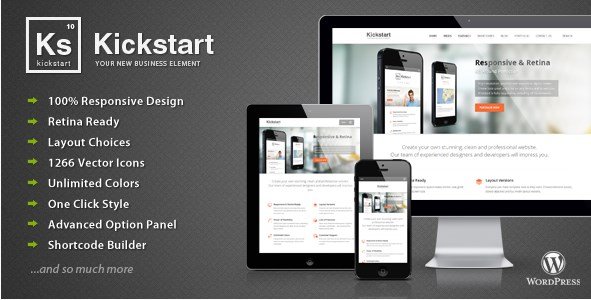
Kickstart is a multi-purpose WordPress theme designed to adapt to almost any kind of website. It comes from ThemeForest and is distributed through WooCrack as an original zip file. The template is built to work flawlessly on phones, tablets, and desktop monitors, with a fully responsive layout that adjusts automatically. The layout engine uses fluid grids and flexible images, so content rearranges itself naturally. No separate mobile version is required, which saves time during setup. Every image and icon is prepared for retina displays, so text and graphics stay sharp on high-resolution screens. People who need a single product for personal blogs, business sites, portfolios, or online shops will find the flexibility necessary without having to purchase separate templates. The visual presentation can be changed with a few clicks, and the overall structure supports a wide range of content types. This is not a niche design; it is intended to cover many different projects while keeping a consistent, professional look.
Global styling options allow users to switch between boxed, boxed-attached, and full-width page layouts with one click. That means a complete change in how the site frames its content, without touching any code. The included set of 1,266 handcrafted vector icons comes in dual-tone variations, giving designers plenty of choices for menus, lists, feature blocks, and buttons. An advanced option panel sits at the center of the customization experience. The panel is organized logically, grouping related options so new users don't get lost. It collects most settings in one place, so colors, typography, spacing, and layout controls are easy to locate and adjust. A powerful shortcode builder simplifies the process of adding complex elements like columns, tabs, accordions, and callout boxes. Common building blocks are just a few clicks away, and the generated code stays clean and editable. Instead of manually writing shortcodes, the builder provides a visual interface that generates the required markup.
Other products to consider
 Themeforest
Typography fans will appreciate the huge collection of Google Fonts, all accessible from the control panel. With hundreds of typefaces to pick from, matching a brand's voice becomes a simple task. A font preview feature lets you see how each typeface looks before applying it, and an element choice system helps pick specific elements to style. Background customization is equally flexible. Users can choose from predefined patterns, upload their own custom background, and enable a cover option so the background fills the screen proportionally. This feature is useful for sites that rely on large imagery as their primary visual impact. Bloggers get multiple post formats, meaning standard text posts, galleries, videos, audio, and quotes can be displayed differently across the site. Several blog layouts are available, so listing pages can be set up as traditional chronological posts, grid views, or alternative arrangements that match the content style. The combination of these visual tools makes structural changes straightforward.
Translation readiness is built directly into the template. It includes .po and .mo language files, which are the standard format for WordPress translations. These files contain all the text strings that appear on the front end, so nothing gets missed during translation. Anyone converting the site to another language can use these files with common translation software. For sites with lots of content, the unlimited sidebar creation feature is particularly useful. Different pages can display different widget areas, allowing tailored navigation or promotional spots per section. Unlimited header options give additional control over the top of each page. Headers are not locked into a single format; users can create variations and apply them where needed. Kickstart handles all these areas without requiring separate plugins. That makes it a practical option for developers and site owners who want a single tool that adapts to many different tasks. It is a stable foundation for anyone building a personal project or a larger content-driven website.
- Last updated
- August 10, 2026
- Delivery
- Digital
- Availability
- In stock
- Version
- 2.9.2
- Category
- Wordpress Themes
- Item type
- theme
Kickstart - Retina Responsive Multi-Purpose Theme is cataloged as a Wordpress Themes under theme. Review the preview and recorded details alongside the original description before purchase.
Usage rights depend on the license selected at checkout. Review the complete terms before using this item for client work, redistribution, SaaS, or more than one end product.