Kryphos - Cyber Security Elementor Template Kit Latest Version
Others Themeforest 4.8 (308 reviews)
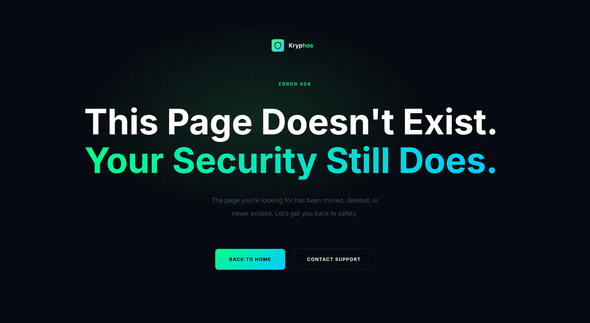
Kryphos is a bold, professional and fully responsive Elementor Template Kit
built for cyber security agencies, IT security firms, penetration testing
services and managed security providers. Designed with a dark, high-impact
aesthetic that instantly communicates authority and technical expertise,
Kryphos helps your business build trust with clients from the very first
impression. Whether you are offering network security audits, cloud
protection, threat intelligence or compliance consulting, Kryphos gives you a
polished digital presence that sets you apart in a competitive and high-stakes
industry.
Kryphos includes a complete set of pre-built templates covering every page
your security business needs, from a commanding homepage and detailed service
pages to case studies, pricing plans, team profiles, a blog and a
conversion-focused contact page. Every template is built using free Elementor
widgets only, requires no coding and is fully customizable through simple drag
and drop editing. With a purposeful dark color system, strong typographic
hierarchy and pixel-perfect responsive design across all devices, Kryphos
delivers the professional credibility that cyber security clients expect and
demand.
Important: This is an
Elementor Template Kit. Do not use WordPress
Tools > Import. Install the
Template Kit Import plugin (Plugins > Add New > search
“Template Kit Import” by Envato), then go to
Tools > Template Kit to import.
Related products
 Themeforest

Features:
- For Cyber Security Agencies
- Fully With Elementor Free Version (Elementor Pro is not required)
- Simple, Modern and Clean Design
- No Coding Knowledge Required
- 18+ Ready To Use Templates
- Easy & Fully Customizable
Templates Include:
- Global Kit Style
- Home
- About Us
- Services
- Service Detail
- Projects
- Project Detail
- Team
- Pricing
- Blog
- Single Blog
- FAQ
- Contact Us
- Metform Contact
- 404 Page
- Coming Soon
- Header
- Footer
Plugins installed with kit:
- Jeg Elementor Kit
- MetForm
- Ultimate Addons for Elementor
How to Use Template Kits:
This is not a WordPress Theme. Template kits contain the design data for
Elementor and are imported using the
Template Kit Import plugin via
Tools > Template Kit.
-
Plugins > Add New → search “Template Kit Import” (by Envato) → Install
& Activate - Go to Tools > Template Kit
- Upload your Template Kit ZIP
- Click “Install Requirements”
- Import “Global Kit Styles” first, then the pages/parts you need
Help & Support
Need more help? Choose an option below:
- Full Guide: How to Upload & Install Elementor Template Kits
- Contact Us
For further support, go to Elementor > Get Help in WordPress menu.
How To Import Metform Custom Form
- Import metform template
- Import the template where the form appears, then edit in Elementor
-
Click the Metform widget in the column where the form should be and click
Edit Form - Select New, leave blank selected then click Edit Form button
- Click ‘Add Template’ grey folder button
- Click ‘My Templates’ tab
- Choose your imported metform template, then click ‘Insert’
- Once the template is loaded, click ‘Update’
How to setup header in Ultimate Addons for Elementor plugin
If you have Elementor Pro, headers and footers may be customized under Theme
Builder.
- Go to UAE menu item > Header & Footer
- Click Add New
- Add title
- On the “Type of Template” choose Header/Footer
- On the “Display On” choose All Pages
- Then click “Add Display Rule” then choose All Posts
- Save the template
Images This Template Kit uses demo images from Envato
Elements. You will need to license these images from Envato Elements to use
them on your website, or you can substitute them with your own.
- https://app.envato.com/shared/workspaces/192915f9-e250-4d7f-8039-19ddb891946b
FAQ
-
Can I import via WordPress Tools > Import? No. That
importer handles WXR posts/pages. This is an Elementor Template Kit and must
be imported with the Template Kit Import plugin via
Tools > Template Kit. -
Do I need Elementor Pro? No, this kit is built for
Elementor Free unless otherwise noted. -
My pages don’t look like the demo. Go to
Tools > Template Kit and click
Install Requirements, then import Global Kit Styles first
before importing pages/parts.
- Item type
- template kit
- Category
- Others
- Version
- Latest Version
- Availability
- In stock
- Delivery
- Digital
- Last updated
- October 27, 2026
Kryphos - Cyber Security Elementor Template Kit is one of the Others items recorded as a template kit. The content below uses the supplied listing information and current local catalog data.
Usage rights depend on the license selected at checkout. Review the complete terms before using this item for client work, redistribution, SaaS, or more than one end product.