Lullaby - Maternity & Newborn Photography Elementor Template Kit Latest Version
Others Themeforest 4.8 (2.9K reviews)
-
Compatible for wordpress v.6.x
-
Compatible for elementor v3.10.0 & elementor pro v3.10.1
-
Buy once, free updates forever
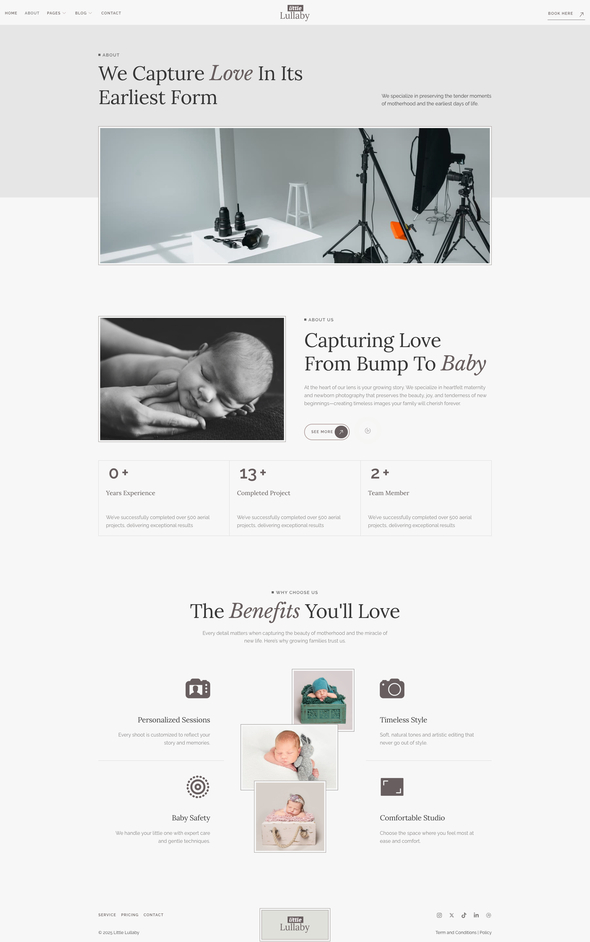
Maternity and Newborn Photography – Photography Template Kit is a beautifully designed Elementor Template Kit built for WordPress, ideal for photographers who want to showcase their portfolio with elegance and ease. Whether you’re a maternity photographer, newborn specialist, family portrait artist, or lifestyle photography studio, this template kit gives you the perfect canvas to present your visual storytelling.
Powered by WordPress and the intuitive Elementor builder, it allows you to fully customize layouts, galleries, and content without any coding. Highlight your photo sessions, display stunning image galleries and present your photography packages with a soft, professional design that resonates emotionally with expecting parents and families. This kit is perfect for building a warm, inviting photography website that captures the essence of motherhood and the early stages of life.
Related products

 Themeforest
Features:
Templates Included:
Required Plugin(included):
How to Use Template Kits:
This is not a WordPress Theme. Template kits contain the design data for Elementor only and are installed using the Envato Elements plugin for WordPress or directly through Elementor.
Elementor Template Kits use the Envato Elements plugin to install.
Detailed Guide:
https://help.market.envato.com/hc/en-us/articles/36033428836889-How-to-Upload-Install-Elementor-Template-Kits-from-Themeforest-to-WordPress
For further support, go to Elementor > Get Help in WordPress menu.
How to Install:
- Install and Activate the “Envato Elements” plugin from Plugins > Add New in WordPress.
- Do not unzip.
- Go to Elements > Installed Kits and click the Upload Template Kit button.
- Before importing a template, ensure the Install Requirements button is clicked to activate the required plugins.
- For best results, do not import more than one template at a time.
- Go to Pages, create a new page, and click Edit with Elementor.
- Click the gear icon at the lower-left of the builder to view page settings and choose Elementor Full Width and hide the page title.
- Click the gray folder icon to access the My Templates tab and then Import the page you’d like to customize.
How to Import Metforms If you have Elementor Pro, skip install of Metform and form blocks.
- If you have Elementor Pro, skip install of Metform and form blocks.
- Import the Metform block templates.
- Import the page template where the form appears and right-click to enable the Navigator.
- Locate and select the Metform widget and click Edit Form. Choose New, then Edit Form. The builder will appear.
- Click the ‘Add Template’ gray folder icon.
- Click the ‘My Templates’ tab.
- Choose your imported Metform template, then click ‘Insert’ (click No for page settings).
- Once the template is loaded, make any desired customizations and click ‘Update & Close’. The form will appear in the template.
- Click Update.
IMPORTANT:
This Template Kit uses demo images from Envato Elements. You will need to license these images from Envato Elements to use them on your website, or you can substitute them with your own.
https://elements.envato.com/collections/YSXEM8A47G?utm_source=my_collection&utm_medium=link&utm_campaign=share_collection
- Last updated
- October 21, 2026
- Delivery
- Digital
- Availability
- In stock
- Version
- Latest Version
- Category
- Others
- Item type
- template kit
Lullaby - Maternity & Newborn Photography Elementor Template Kit is listed in Others as a template kit. The supplied description, preview, version, price, and recorded product details are collected here for review.
Usage rights depend on the license selected at checkout. Review the complete terms before using this item for client work, redistribution, SaaS, or more than one end product.