Maisone - Luxury Interior Design Elementor Template Kit Latest Version
Others Themeforest 4.8 (4.9K reviews)
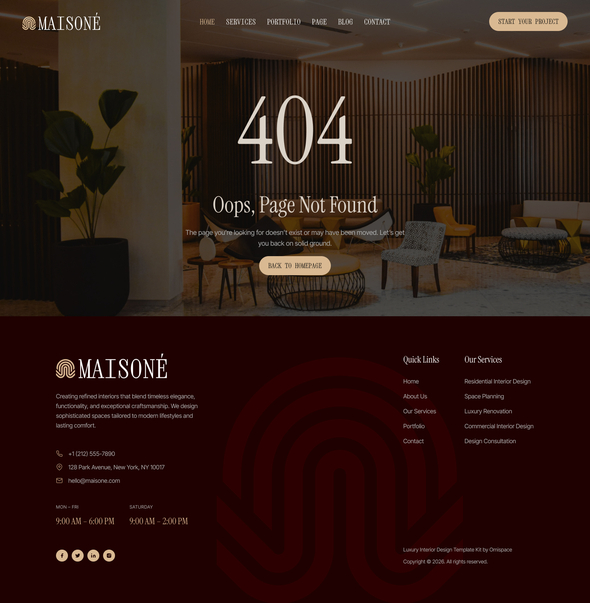
Maisoné is a luxury Elementor Template Kit crafted specifically for interior design studios, architecture firms, home styling consultants, and high-end residential design businesses. Featuring an elegant editorial aesthetic, sophisticated typography, and carefully curated layouts, Maisoné helps you showcase your services, portfolio, projects, and expertise with a refined and professional online presence.
Designed with both aesthetics and usability in mind, Maisoné combines timeless visual appeal with conversion-focused page structures. From portfolio showcases and service detail pages to project case studies and pricing layouts, every template is thoughtfully created to help design professionals present their work with confidence and credibility.
Similar products
 Themeforest
Built entirely with Elementor and free plugins, Maisoné allows you to create a premium website without writing a single line of code. Whether you’re an independent interior designer, luxury design studio, architectural consultant, or boutique creative firm, Maisoné provides everything needed to establish a distinctive and memorable digital presence.
Suitable For:
- Luxury Interior Design Studios
- Architecture & Design Firms
- Home Styling & Decoration Consultants
- Residential & Commercial Interior Designers
- Luxury Renovation & Remodeling Services
Features:
- Using Free Plugins (Elementor Pro is not required)
- Elegant Luxury & Editorial Design Style
- 17+ Ready-to-Use Page Templates
- Dedicated Portfolio, Project & Service Detail Pages
- Pricing, Team & Testimonial Templates Included
- Fully Responsive Layout
- Retina Ready Display
- Fully Customizable with Elementor
- No Coding Knowledge Required
- Cross Browser Compatibility
- One Click Template Kit Import
Templates Include:
- Global Theme Style
- Home
- About Us
- Services
- Service Details
- Portfolio
- Portfolio Details
- Team
- Pricing
- Testimonial
- Faqs
- Contact Us
- Blog
- Single Post
- 404 Page
- Header
- Footer
- MetForm Contact
Required Plugin:
- Elementor
- Jeg Elementor Kit
- ElementsKit Lite
- MetForm
How to Use Template Kits
THIS IS NOT a WordPress Theme. Template kits contain the design data for Elementor only and are installed using the Envato Elements plugin for WordPress or directly through Elementor.
Detailed Guide:https://help.market.envato.com/hc/en-us/articles/36033428836889-How-to-Upload-Install-Elementor-Template-Kits-from-Themeforest-to-WordPress
For further support, go to Elementor > Get Help in WordPress menu.
How to Import Metforms
If you have Elementor Pro, skip install of Metform and form blocks.
- Import the metform block templates.
- Import the page template where the form appears and right-click to enable the Navigator.
- Locate and select the Metform widget and click Edit Form. Choose New, then Edit Form. The builder will appear.
- Click the “Add Template” gray folder icon.
- Click the “My Templates” tab.
- Choose your imported MetForm template, then click “Insert” (click No for page settings).
- Once the template is loaded, make any desired customizations and click “Update & Close”. The form will appear in the template.
- Click Update.
Setup Header in ElementsKit Lite Plugin
If you have Elementor Pro, headers and footers may be customized under Theme Builder.
- Go to ElementsKit > Header Footer.
- If prompted to go through the wizard, click Next all the way through and then return to step 1 (you are not required to enter your email address or share your information).
- Click Add New Template button at the top.
- Name your template, then toggle “Activate/Deactivate” to On.
- Click the gray Edit Content button. Elementor will open.
- Click the gray folder icon to access the My Templates tab and insert the header or footer template.
- Customize and Publish.
Important
This Template Kit uses demo images from Envato Elements. You will need to license these images from Envato Elements to use them on your website, or you can substitute them with your own.
https://elements.envato.com/collections/X925SGNBL3
- Item type
- template kit
- Category
- Others
- Version
- Latest Version
- Availability
- In stock
- Delivery
- Digital
- Last updated
- October 27, 2026
The available listing for Maisone - Luxury Interior Design Elementor Template Kit places it among Others products. It is presented here as a template kit with its supplied description and purchase information.
Usage rights depend on the license selected at checkout. Review the complete terms before using this item for client work, redistribution, SaaS, or more than one end product.