MonsterInsights – Google Optimize Addon 1.6.0
Wordpress Plugins Monsterinsight 4.8 (2.9K reviews)
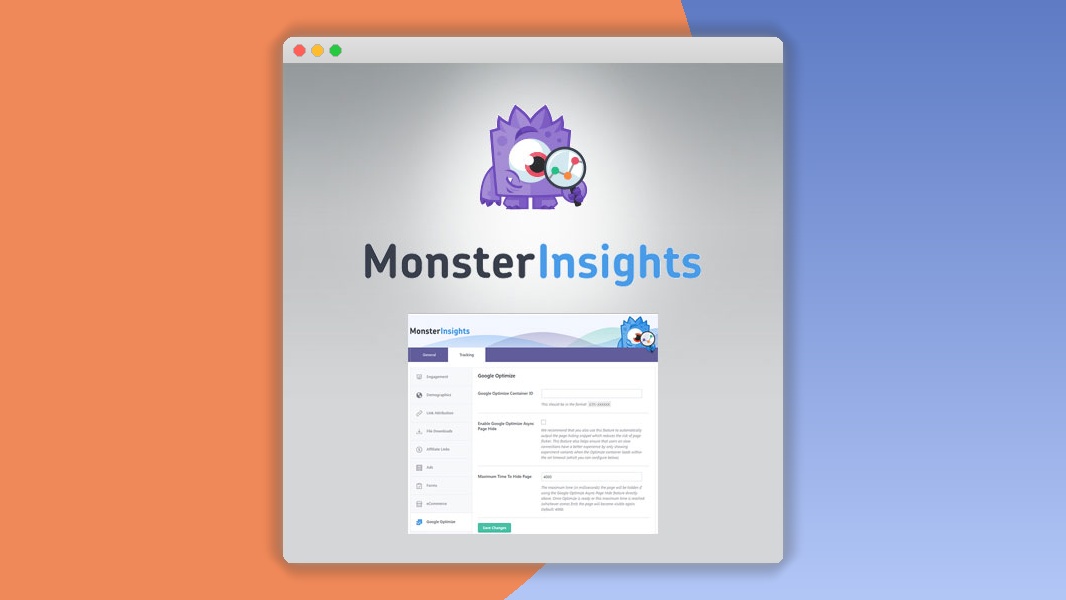
⚡MonsterInsights – Google Optimize Addon Overview
Supercharge your website’s performance and user experience with the MonsterInsights – Google Optimize Addon. This powerful extension seamlessly integrates Google Optimize with your MonsterInsights setup, allowing you to run sophisticated A/B tests, multivariate tests, and redirect tests directly from your WordPress dashboard. By leveraging the capabilities of Google Optimize, you can pinpoint exactly which website elements resonate best with your audience, leading to significant improvements in conversion rates, engagement, and overall site effectiveness. No more guesswork – make data-driven decisions to refine your content, calls-to-action, and design elements for maximum impact.
The MonsterInsights – Google Optimize Addon simplifies the complex process of A/B testing, making it accessible even for users without extensive technical expertise. It provides intuitive controls and clear insights, enabling you to easily set up experiments, track their progress, and analyze the results directly within your familiar WordPress environment. Unlock the full potential of your website by understanding user behavior at a granular level. Whether you’re looking to boost sales, increase sign-ups, or improve reader retention, this addon empowers you with the tools to continuously optimize for success, ensuring your website evolves with your audience’s needs and preferences.
Can't Decide A Single Theme/Plugin?Join The Membership Now
Instead of buying this product alone, unlock access to all items including v with our affordable membership plans. Worth $35.000++
🎯 Benefits of our Premium Membership Plan
- Download v for FREE along with thousands of premium plugins, extensions, themes, and web templates.
- Automatic updates via our auto-updater plugin.
- 100% secured SSL checkout.
- Free access to upcoming products in our store.
🎮 MonsterInsights – Google Optimize Addon Key Features
- 🎮 Seamless Google Optimize Integration: Effortlessly connect and manage Google Optimize experiments within your WordPress dashboard.
- 🔧 A/B Testing Made Easy: Create and run A/B tests on headlines, buttons, content, and more with a user-friendly interface.
- 📊 Multivariate Testing Capabilities: Test multiple variations of different elements simultaneously to understand complex user interactions.
- 🔒 Redirect Test Functionality: Easily implement redirect tests to compare different landing pages or URL structures.
- ⚡ Real-time Experiment Tracking: Monitor the performance of your ongoing tests with live data and actionable insights.
- 🎯 Conversion Rate Optimization (CRO): Directly improve your website's conversion rates by identifying winning variations.
- 🛡️ Audience Targeting: Target specific segments of your audience for your experiments to gather more relevant data.
- 🚀 Performance Monitoring: Keep track of experiment performance and overall website traffic trends within MonsterInsights.
- 💡 Actionable Insights: Receive clear reports and recommendations based on your test results to guide your optimization strategy.
- 📱 Responsive Design Testing: Ensure your website performs optimally across all devices by testing variations on mobile, tablet, and desktop.
- 🔌 Effortless Setup: Quick and straightforward installation and configuration process, getting you started in minutes.
- 📈 Data-Driven Decisions: Move beyond assumptions and make informed choices backed by robust testing data.
✅ Why Choose MonsterInsights – Google Optimize Addon?
- ✅ Effortless A/B Testing: Simplifies complex A/B testing, making it accessible and manageable for all WordPress users.
- ✅ Boost Conversions Significantly: Directly impacts your bottom line by optimizing elements that drive user action and sales.
- ✅ Data-Driven Optimization: Empowers you with concrete data to refine your website and achieve tangible results.
- ✅ Comprehensive Analytics Integration: Leverages the power of MonsterInsights for a holistic view of your website performance and testing outcomes.
💡 MonsterInsights – Google Optimize Addon Use Cases & Applications
- 💡 Headline Optimization: Test different headlines to see which ones attract more clicks and engagement.
- 🧠 Call-to-Action (CTA) Improvement: Experiment with button text, colors, and placement to maximize click-through rates.
- 🛒 Product Page Conversion: Test variations of product descriptions, images, and pricing to boost sales on e-commerce sites.
- 💬 Form Optimization: Analyze different form field arrangements and labels to increase lead generation and sign-ups.
- 📰 Content Readability: Test font sizes, paragraph lengths, and content structure to improve user comprehension and time on page.
- 🎓 Landing Page Effectiveness: Optimize landing pages for specific campaigns to ensure higher conversion rates for targeted traffic.
⚙️ How to Install & Setup MonsterInsights – Google Optimize Addon
- 📥 Install MonsterInsights: Ensure you have the latest version of the MonsterInsights plugin installed and activated on your WordPress site.
- 🔧 Activate the Addon: Upload and activate the MonsterInsights – Google Optimize Addon from your WordPress plugins dashboard.
- ⚡ Connect Google Optimize: Navigate to MonsterInsights > Settings > Integrations and connect your Google Optimize account.
- 🎯 Create Your First Experiment: Go to the Google Optimize section within MonsterInsights to set up your A/B, multivariate, or redirect tests.
For detailed instructions and troubleshooting, please refer to the official MonsterInsights documentation. Ensure your website has a Google Analytics tracking code properly installed via MonsterInsights for the addon to function correctly.
🔧 MonsterInsights – Google Optimize Addon Technical Specifications
- 💻 Compatibility: Fully compatible with the latest versions of WordPress and MonsterInsights.
- 🔧 Integration: Seamlessly integrates with Google Optimize and Google Analytics.
- 🌐 Platform: WordPress Plugin Addon.
- ⚡ Functionality: Enables A/B, multivariate, and redirect testing.
- 🛡️ Security: Developed with security best practices in mind.
- 📱 Responsive: Works across all devices and screen sizes.
- 🔌 Dependencies: Requires MonsterInsights plugin and a Google Optimize account.
- 📊 Data Handling: Leverages Google Optimize's robust experiment tracking and reporting features.
📝 MonsterInsights – Google Optimize Addon Changelog
Version 1.8.2: Enhanced compatibility with the latest MonsterInsights core updates. Improved error handling for experiment setup to provide clearer user feedback. Optimized data synchronization between MonsterInsights and Google Optimize for more reliable real-time reporting.
Version 1.8.1: Resolved an issue where certain experiment configurations were not displaying correctly in the MonsterInsights interface. Added minor UI tweaks for better user experience when managing multiple experiments.
Version 1.8.0: Introduced support for testing new types of page elements with improved selectors. Enhanced the integration with Google Analytics 4 for more accurate data attribution within A/B tests. Added a direct link to Google Optimize from within the MonsterInsights experiment management screen.
Version 1.7.5: Fixed a bug that could cause slow loading times on sites with a large number of active experiments. Improved the accuracy of audience targeting parameters passed to Google Optimize. Updated API connections to ensure continued stability.
Version 1.7.4: Addressed a compatibility conflict with certain popular WordPress themes. Refined the process for selecting variations in multivariate tests for greater ease of use. Included enhanced debugging logs for faster support resolution.
Version 1.7.3: Improved the performance of the experiment dashboard within MonsterInsights. Added a new option to easily duplicate existing experiments for quick iteration. Ensured full compliance with recent Google Optimize API changes.
⚡GPL & License Information
- Freedom to modify and distribute
- No recurring fees or restrictions
- Full source code access
- Commercial usage rights
🌟 MonsterInsights – Google Optimize Addon Customer Success Stories
💬 "Since integrating the MonsterInsights Google Optimize Addon, we’ve seen a 25% increase in our lead generation form submissions. The ability to easily test different form layouts has been a game-changer for us." - Sarah K., Marketing Manager
💬 "As a small business owner, I don't have a dedicated analytics team. This addon makes A/B testing so accessible, I can confidently optimize my product pages and see direct results in sales. Highly recommended!" - John P., E-commerce Entrepreneur
💬 "We used the addon to test different calls-to-action on our blog posts. The results were immediate, showing us which phrasing encouraged more clicks to our premium content, leading to a 15% uplift in content engagement." - Emily R., Content Strategist
💬 "The seamless integration with MonsterInsights was fantastic. Setting up redirect tests for our new service pages took minutes, and the data provided was clear and actionable, helping us choose the best performing page." - Michael T., Web Developer
💬 "Finally, a way to do serious CRO without needing to be a coding expert. This addon is intuitive and powerful, allowing us to continuously refine our user journey and improve our conversion funnel." - Jessica L., Digital Marketing Specialist
❓ MonsterInsights – Google Optimize Addon Frequently Asked Questions
Q: Do I need to have Google Optimize already set up?
A: Yes, you will need an active Google Optimize account and a container set up. The MonsterInsights – Google Optimize Addon helps you connect and manage your experiments from within WordPress, but Google Optimize itself is required for the testing functionality.Q: Can I run A/B tests on any part of my website?
A: Yes, you can run A/B tests on various elements of your website, including headlines, text, buttons, images, and even entire sections of your pages. The addon allows you to define these elements for testing within the Google Optimize interface.Q: How do I install the MonsterInsights – Google Optimize Addon?
A: First, ensure you have the MonsterInsights plugin installed and activated. Then, upload and activate the MonsterInsights – Google Optimize Addon from your WordPress plugins page. Finally, go to MonsterInsights > Settings > Integrations to connect your Google Optimize account.Q: What kind of support is available if I encounter issues?
A: You will receive dedicated support for the MonsterInsights – Google Optimize Addon as part of your MonsterInsights subscription. Our support team is available to help with installation, configuration, and troubleshooting any issues you might face.Q: Can I customize the experiments beyond what's offered by default?
A: The addon provides robust integration with Google Optimize, which itself offers extensive customization options for experiments, including targeting, objectives, and experiment types. You can leverage all of Google Optimize's advanced features through this integration.Q: Is this addon compatible with different themes and page builders?
A: Yes, the MonsterInsights – Google Optimize Addon is designed to be highly compatible with most WordPress themes and popular page builders, ensuring you can test elements across your entire site regardless of your setup.
🚀 Ready to Transform Your Website with MonsterInsights – Google Optimize Addon?
Unlock the true potential of your website with the MonsterInsights – Google Optimize Addon. Stop guessing what your audience wants and start knowing. By seamlessly integrating the power of Google Optimize with your MonsterInsights analytics, you gain the ability to run precise A/B tests, multivariate tests, and redirect tests directly from your WordPress dashboard. This means you can experiment with headlines, CTAs, page layouts, and more, all while tracking performance with unparalleled ease, leading to significantly improved conversion rates and user engagement.
Choosing the MonsterInsights – Google Optimize Addon means choosing a path of continuous improvement driven by data. It’s not just about running tests; it’s about understanding your users on a deeper level and making informed decisions that directly impact your business goals. Whether you aim to boost sales, increase sign-ups, or enhance user experience, this addon provides the essential tools and insights to achieve measurable success, making it an indispensable asset for any serious website owner looking to optimize for growth.
Don't let your website's performance be left to chance. Invest in the MonsterInsights – Google Optimize Addon today and start making data-backed decisions that drive real results. Experience the confidence that comes with knowing your website is performing at its absolute best, optimized for your specific audience. Take the guesswork out of conversion rate optimization and elevate your online presence to new heights. Your journey to a more effective and profitable website starts here!
Every item on Gplzone comes with a license that defines how you can use the product. Understanding the license terms before purchasing is important to ensure you have the right permissions for your intended use. Gplzone offers two main license types: Regular License and Extended License.
The license grants you a non-exclusive, non-transferable right to use the item in accordance with the terms described below. You are not purchasing the item itself, but rather a license to use the item within the specified conditions. All intellectual property rights remain with the original author.
Please read this page carefully before making a purchase. If you are unsure which license you need, refer to the comparison table below or contact our support team for guidance.
The Regular License is designed for personal projects and single-client use. It is the most common license type and is suitable for most individual and freelance use cases. The Regular License allows you to use the item in one end product.
What You Can Do
- Use the item in one end product for personal or commercial use.
- Use the item in an end product that is sold to a single client. You may charge your client for creating the end product.
- Modify the item to suit your needs. You may customize, adapt, or alter the item as part of your end product.
- Use the item in a free end product. This includes personal websites, portfolios, and non-commercial projects.
- Combine the item with other works to create a larger end product, provided the end product is not distributed or sold as a template or theme.
What You Cannot Do
- Use the item in multiple end products. A separate license is required for each end product.
- Redistribute, resell, license, or sub-license the item in its original form or as a competing product.
- Use the item in a product that is sold to multiple end users (SaaS, template, theme marketplace, etc.).
- Extract the source code or components of the item for use in other products outside the end product.
- Use the item on behalf of multiple clients. Each client requires a separate license.
The Extended License is designed for commercial use and projects where the end product is distributed to multiple end users. It grants you additional rights beyond the Regular License, making it suitable for agencies, SaaS products, and commercial applications.
What You Can Do
- Everything permitted under the Regular License.
- Use the item in an end product that is sold, distributed, or made available to multiple end users. This includes SaaS applications, web applications, mobile apps, and software-as-a-service products.
- Use the item in multiple end products for the same client without purchasing additional licenses.
- Use the item in a theme or template that is sold on a marketplace or distributed to multiple customers, provided the item is not redistributed in its original form.
- Charge end users for access to or use of the end product that incorporates the item.
What You Cannot Do
- Redistribute, resell, license, or sub-license the item in its original form. The extended license does not grant you the right to resell the item itself as a standalone product.
- Extract the source code or components of the item for use in other products outside the end product, except as permitted by the item’s specific license.
- Use the item on behalf of multiple different clients in separate end products without separate licenses. The Extended License covers multiple end products for the same client only.
The table below provides a quick comparison between the Regular License and the Extended License to help you determine which one is right for your project:
Rule of thumb: If you are building a project for yourself or a single client, the Regular License is usually sufficient. If the end product will be distributed to multiple users or used commercially across multiple end products, you need the Extended License.
If you initially purchased the wrong license type, you may be able to exchange it under certain conditions. Gplzone allows license exchanges under the following rules:
- Upgrading is allowed — You can upgrade from a Regular License to an Extended License within 30 days of the original purchase. Simply purchase the Extended License and contact us through our help center. We will refund the cost of the Regular License.
- Downgrading is not allowed — You cannot exchange an Extended License for a Regular License. Once an Extended License has been purchased, the additional usage rights have been granted and cannot be reversed.
- Time limit applies — License exchanges must be requested within 30 days of the original purchase date. After this period, no exchanges will be processed.
- One exchange per purchase — You may only exchange a license once per purchase. Make sure you purchase the correct license the second time around.
To process a license exchange, please provide both order numbers (the original purchase and the new purchase) and contact us via our contact page or help center.
The following terms apply to all license types on Gplzone. By purchasing a product on Gplzone, you agree to these general license terms:
Scope of License
The license is a single, non-exclusive, non-transferable right to use the item as specified. You do not acquire ownership of the item or any intellectual property rights. The license is valid in perpetuity unless otherwise stated for the specific item.
Modifications
You may modify the item as necessary to use it in your end product. However, modified versions of the item are still bound by the original license terms. You may not claim ownership of the original item or its components, even after modification.
Third-Party Assets
Some items may include third-party assets such as fonts, images, icons, or libraries. These assets are subject to their respective licenses. If the item includes third-party assets with specific licensing requirements, those requirements are detailed in the item’s documentation.
Updates & Support
Future updates to the item are covered by the same license. You do not need to repurchase the item to receive updates. However, support is provided by the author and may be subject to separate terms or time limitations as specified on the product page.
Termination
The license is effective until terminated. Gplzone reserves the right to revoke the license if you violate any of the terms. Upon termination, you must stop using the item and remove it from all end products. No refunds will be provided for licenses terminated due to violation of terms.
Liability
The item is provided “as is” without warranties of any kind. Gplzone and the author are not liable for any damages arising from the use or inability to use the item. The total liability shall not exceed the price paid for the license.
Can I use a Regular License for a client project?
Yes. The Regular License allows you to create an end product for a single client. You may charge your client for your services. However, if you plan to use the same item for multiple clients, you need a separate Regular License for each client, or an Extended License if all projects are for the same client.
Do I need an Extended License for a SaaS application?
Yes. If your end product is a SaaS application or any product that is distributed to or accessed by multiple end users, you need an Extended License. This applies regardless of whether the SaaS is free or paid.
Can I use the item in a WordPress theme I sell?
Only with an Extended License. The Extended License allows you to incorporate the item into a theme or template that is sold or distributed to multiple users, provided the item is not distributed in its original standalone form.
What happens if I use the item beyond the license terms?
Using an item beyond the scope of its license is a violation of the license agreement and may result in license termination. Gplzone may also take legal action to protect the rights of our authors. If you are unsure about whether your use case is covered, please contact us before proceeding.
Does the license expire?
No. The license is perpetual, meaning it does not expire. You can continue using the item in your end product indefinitely. However, the license applies to a specific version of the item. Major version updates may be released under revised terms.