Movedo - Responsive Multi-Purpose WordPress Theme 3.6.7
Wordpress Themes Themeforest 4.8 (1.0K reviews)
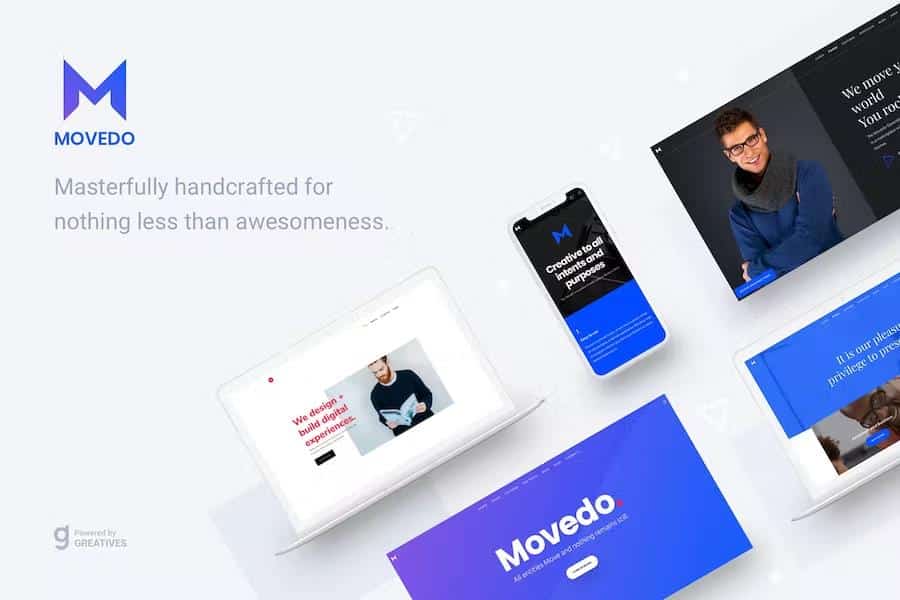
Movedo - Responsive Multipurpose WordPress Theme
Your moment to shine has arrived!!! MOVEDO is a creative and multi-purpose WP theme masterfully handcrafted for nothing less than awesomeness. It literally sets in motion a series of new features, such as ultra-dynamics parallax, radical safe button, super-crispy moldable typography, and immaculate future-proof device style to break free from the tyranny of sameness. Whether general or specific-purpose websites, corporations, freelancers, agencies, photographers, designers, bloggers, you name it, MOVEDO breaks the mold, adjusts to your creativity, and rocks the world of users for you to become peerless in the most competitive times ever.
Ultra-Dynamic Parallax for your columns – UNIQUE
MOVEDO justifies its name by introducing motion dynamics in columns. Scroll or move your mouse and the whole world does move. One needs to be fearless to become peerless.
- Vertical Parallax
- Mouse Move X and Y
- Mouse Move X
- Mouse Move Y
Amazing Clipping animations in columns & specific elements – UNIQUE
MOVEDO in version 2.0 introduced the clipping animations in columns and in some specific elements (title, image). Check the Creative Corporate demo to have an idea!
- Clipping Up
- Clipping Down
- Clipping Left
- Clipping Right
- Colored Clipping Up
- Colored Clipping Down
- Colored Clipping Left
- Colored Clipping Right
17 Handcrafted, Detailed Websites
Besides the endless possibilities, homepages and pages, Movedo comes with 17 detailed case studies. Get inspired for your next web site.
Define the Positions for your columns – UNIQUE
Arrest everyone’s attention through eye-catching moving columns. Change columns’ position and showcase works beyond linear structuring.
- Top Position
- Bottom Position
- Right Position
- Left Position
- Z-index
Radical Safe Button – UNIQUE
Brand new, evolved, and revealing safe button at your service to entice your customers and facilitate users’ navigation.
Manipulative Typography – Super-Crispy Moldable Typography – UNIQUE
Fed up with fixed and unbendable typographies? MOVEDO breaks the mold and clears one more hurdle to personalized impeccable texts.
- Standard Fonts
- More than 600 Google Fonts
- Font Uploader
- Incredible responsive control for your typography
Incomparable Manipulation of the Header Elements (not just predefined headers)
Header Layouts with various options for each one of them.
- Default Layout
- Logo on Top
- Side Navigation
- Split Menu
- Hidden Side Navigation
Assign any menu as your Responsive Menu
Define the screen size you prefer to enable the Responsive Header
Amazing Modern Clipping Animations
Full Control of your Logos and their sizes
- Logo for the Default Header
- Logo for the Dark Header
- Logo for the Light Header
- Logo for the Side Navigation
- Logo for the Sticky Header
- Logo for the Responsive Header
Amazing Sticky Header type – Movedo Sticky – UNIQUE
Additionally select among the following and override the global one per page.
- Simple
- Shrink
- Scroll Up
- Movedo
- None
All-In-One Custom Footers
No more boring old-style footers. Break free from sameness and embrace uniqueness by adding every available element in this new class of footers.
Select among different Menu styles (Classic, Button, Underline, Hidden)
Boxed, Stretched and Framed Layout
Demo Content Import
- One-Click Dummy Data
- Import on Demand
- Content Manager
Maintenance Mode Functionality
Coming Soon Mode Functionality
Customizable Search Page
Customizable Google Maps
Awesome Modals for your needs
- Contact Form
- Newsletter
- Search Function
- Language Switcher
- Social Links
Custom Modals with any element you need on any page
Sliding Area which you are able to customize differently per custom post!
Hidden Menu Navigation option per page/post/portfolio/product
Amazing Feature Section (custom/full height with color, image, slider, video, map or Revolution Slider)
Smooth Parallax Scroll Effect (even on devices)
- Vertical Parallax
- Horizontal Parallax
- Sensor Option to define the Parallax Perfomance
Header Overlapping globally or per page/post/portfolio/product
Extensive WooCommerce Support
- Hover Switch Images in Shop Overview
- Zoom Image Effect in Single Product
- Ajax Cart
- Different Title (Backgrounds, Colors, Height) for each product category
- Multiple Navigation Styles
Extra Sticky Anchor Menu per Page
Boundless Title Options
Separately Categories Titles (post categories, product categories)
One Page Version
Full Page Scrolling with multiple options
More than 100 Predefined Layouts to be inspired
Live Color Customizer with Unlimited Color Options. -With no doubt, you can control every color in Movedo.
Background Sections (Color, Image, Video, YouTube)
Background Section Effects-(Default, Parallax, Parallax Left to Right, Parallax Right to Left, Animated, Horizontal Animation, Image as Pattern)
Full Width Background Sections
Full Width Elements
Mega Menus built in the theme, options via GUI
Multiple Custom Page Titles
Ultra Responsive Design
Retina Ready
Smooth Scroll
Theme Loader
Innovative Option Panel.-Movedo Option panel is built with the renowned Redux Framework and gives you many configuration options in a user-friendly environment. Click the Movedo tab from the main WordPress navigation and then you will be able to access and enjoy many core features of Movedo. All the options have detailed descriptions in order to explain their purpose.
Visual Composer by WPBakery- It is included for free
Revolution Slider- Comes bundled with Movedo
Predefined Color Presets
Crossbrowser Compatible
CSS animations
Full Width Background Sections
Full Width Elements
Unlimited Sidebars
Sticky Sidebars
Top Bar Header Elements
Blog Options
- Blog Grid
- Blog Masonry
- Blog Large Media
- Blog Small Media
- Blog Full Width
- Blog Carousel
- Blog Filterable
- Post format support: Standard, Gallery, Audio, Video, Link, Quote
- Multiple Navigation Styles
Portfolio Overview Options
- Portfolio Grid
- Portfolio Masonry
- Portfolio Full Width
- Portfolio Carousel
- Multiple Hover Effects
Single Portfolio Item Options
- Featured Image
- Classic Gallery
- Vertical Gallery
- Slider
- YouTube/Vimeo
- HTML5 Video
- Feature Section Possibilities
- Multiple Navigation Styles
Plethora of Handcrafted Elements- especially handmade for the theme’s preferences which harmoniously use the amazing visual interface of the Visual Composer. More than 50 thoroughly tested elements with detailed descriptions will make your life much easier. No code skills needed!
Multiple Gallery Options
Contact Forms
- Contact Form 7 Support
- Gravity Forms Support
- Multiple Form Styles
Custom Widgets
One-Click Theme Updates
Translation Ready
- WPML Multilingual plugin Compatible
- Polylang Multilingual plugin Support
- Translation Ready(po & mo files)
Google Fonts Support
RTL support for languages such as Arabic, Persian, Hebrew and Urdu which are all written from right to left
Awesome Icon Fonts
Breadcrumbs Navigation Support
SEO Optimized - Movedo uses valid and clean code so that you make sure that Gooogle and other search engines will love it. It is also compatible with the most famous SEO plugins.
Speed Optimized
Child Theme Compatible
Touch Swipe Support
Extensive Live Documentation
Video Tutorials
All files are well commented and organized
Coding Skills: Not Required
Images & Videos- The images included in preview are for demonstration purposes only. Most of them have been purchased from Shutter Stock.
Every item on Gplzone comes with a license that defines how you can use the product. Understanding the license terms before purchasing is important to ensure you have the right permissions for your intended use. Gplzone offers two main license types: Regular License and Extended License.
The license grants you a non-exclusive, non-transferable right to use the item in accordance with the terms described below. You are not purchasing the item itself, but rather a license to use the item within the specified conditions. All intellectual property rights remain with the original author.
Please read this page carefully before making a purchase. If you are unsure which license you need, refer to the comparison table below or contact our support team for guidance.
The Regular License is designed for personal projects and single-client use. It is the most common license type and is suitable for most individual and freelance use cases. The Regular License allows you to use the item in one end product.
What You Can Do
- Use the item in one end product for personal or commercial use.
- Use the item in an end product that is sold to a single client. You may charge your client for creating the end product.
- Modify the item to suit your needs. You may customize, adapt, or alter the item as part of your end product.
- Use the item in a free end product. This includes personal websites, portfolios, and non-commercial projects.
- Combine the item with other works to create a larger end product, provided the end product is not distributed or sold as a template or theme.
What You Cannot Do
- Use the item in multiple end products. A separate license is required for each end product.
- Redistribute, resell, license, or sub-license the item in its original form or as a competing product.
- Use the item in a product that is sold to multiple end users (SaaS, template, theme marketplace, etc.).
- Extract the source code or components of the item for use in other products outside the end product.
- Use the item on behalf of multiple clients. Each client requires a separate license.
The Extended License is designed for commercial use and projects where the end product is distributed to multiple end users. It grants you additional rights beyond the Regular License, making it suitable for agencies, SaaS products, and commercial applications.
What You Can Do
- Everything permitted under the Regular License.
- Use the item in an end product that is sold, distributed, or made available to multiple end users. This includes SaaS applications, web applications, mobile apps, and software-as-a-service products.
- Use the item in multiple end products for the same client without purchasing additional licenses.
- Use the item in a theme or template that is sold on a marketplace or distributed to multiple customers, provided the item is not redistributed in its original form.
- Charge end users for access to or use of the end product that incorporates the item.
What You Cannot Do
- Redistribute, resell, license, or sub-license the item in its original form. The extended license does not grant you the right to resell the item itself as a standalone product.
- Extract the source code or components of the item for use in other products outside the end product, except as permitted by the item’s specific license.
- Use the item on behalf of multiple different clients in separate end products without separate licenses. The Extended License covers multiple end products for the same client only.
The table below provides a quick comparison between the Regular License and the Extended License to help you determine which one is right for your project:
Rule of thumb: If you are building a project for yourself or a single client, the Regular License is usually sufficient. If the end product will be distributed to multiple users or used commercially across multiple end products, you need the Extended License.
If you initially purchased the wrong license type, you may be able to exchange it under certain conditions. Gplzone allows license exchanges under the following rules:
- Upgrading is allowed — You can upgrade from a Regular License to an Extended License within 30 days of the original purchase. Simply purchase the Extended License and contact us through our help center. We will refund the cost of the Regular License.
- Downgrading is not allowed — You cannot exchange an Extended License for a Regular License. Once an Extended License has been purchased, the additional usage rights have been granted and cannot be reversed.
- Time limit applies — License exchanges must be requested within 30 days of the original purchase date. After this period, no exchanges will be processed.
- One exchange per purchase — You may only exchange a license once per purchase. Make sure you purchase the correct license the second time around.
To process a license exchange, please provide both order numbers (the original purchase and the new purchase) and contact us via our contact page or help center.
The following terms apply to all license types on Gplzone. By purchasing a product on Gplzone, you agree to these general license terms:
Scope of License
The license is a single, non-exclusive, non-transferable right to use the item as specified. You do not acquire ownership of the item or any intellectual property rights. The license is valid in perpetuity unless otherwise stated for the specific item.
Modifications
You may modify the item as necessary to use it in your end product. However, modified versions of the item are still bound by the original license terms. You may not claim ownership of the original item or its components, even after modification.
Third-Party Assets
Some items may include third-party assets such as fonts, images, icons, or libraries. These assets are subject to their respective licenses. If the item includes third-party assets with specific licensing requirements, those requirements are detailed in the item’s documentation.
Updates & Support
Future updates to the item are covered by the same license. You do not need to repurchase the item to receive updates. However, support is provided by the author and may be subject to separate terms or time limitations as specified on the product page.
Termination
The license is effective until terminated. Gplzone reserves the right to revoke the license if you violate any of the terms. Upon termination, you must stop using the item and remove it from all end products. No refunds will be provided for licenses terminated due to violation of terms.
Liability
The item is provided “as is” without warranties of any kind. Gplzone and the author are not liable for any damages arising from the use or inability to use the item. The total liability shall not exceed the price paid for the license.
Can I use a Regular License for a client project?
Yes. The Regular License allows you to create an end product for a single client. You may charge your client for your services. However, if you plan to use the same item for multiple clients, you need a separate Regular License for each client, or an Extended License if all projects are for the same client.
Do I need an Extended License for a SaaS application?
Yes. If your end product is a SaaS application or any product that is distributed to or accessed by multiple end users, you need an Extended License. This applies regardless of whether the SaaS is free or paid.
Can I use the item in a WordPress theme I sell?
Only with an Extended License. The Extended License allows you to incorporate the item into a theme or template that is sold or distributed to multiple users, provided the item is not distributed in its original standalone form.
What happens if I use the item beyond the license terms?
Using an item beyond the scope of its license is a violation of the license agreement and may result in license termination. Gplzone may also take legal action to protect the rights of our authors. If you are unsure about whether your use case is covered, please contact us before proceeding.
Does the license expire?
No. The license is perpetual, meaning it does not expire. You can continue using the item in your end product indefinitely. However, the license applies to a specific version of the item. Major version updates may be released under revised terms.