NCorp - Business Consulting Elementor Template Kit Latest Version
Others Themeforest 4.8 (332 reviews)
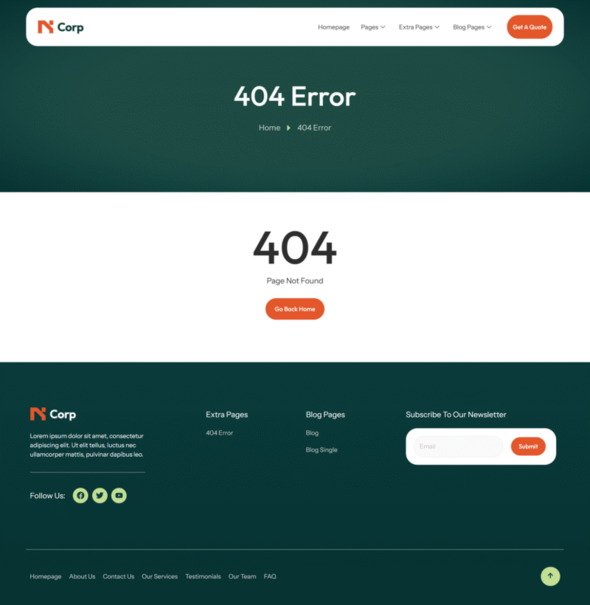
NCorp – Business Consulting Elementor Template Kit is a modern and professional Elementor Template Kit designed specifically for Business consultants, Corporate Law Firms and Startups. With a clean design and fully responsive layout, this kit helps you showcase what you do, make clients able to reach out to you and much more.
Built with the free version of Elementor, you can easily customize every page without coding and having to pay extra.
Features:
• No Elementor Pro Required
• No Coding Required
• Modern Looking Design
• Easy Accesible Forms
Included Templates:
• Global Theme Style
• Homepage
• About Us
• Contact Us
• Our Services
• Testimonials
• Our Team
• FAQ
• 404 Error
• Blog
• Blog Single
• Hero
• Footer
• MetForm – Contact Form
• MetForm – News Letter
Required Plugins:
• Elementor
• ElementsKit Lite
• MetForm
How to Use Template Kits:
This is not a WordPress Theme. Template kits contain the design data for Elementor only and are installed using the envato Template Kit Import plugin for WordPress or directly through Elementor.
Detailed Guide:
https://help.market.envato.com/hc/en-us/articles/36033428836889-How-to-Upload-Install-Elementor-Template-Kits-from-Themeforest-to-WordPress
For further support, go to Elementor > Get Help in WordPress menu.
How to Import MetForm Custom Form:
- While edititing a page where a form should appear, open the Elementor navigator to locate the Metform widget.
- Click Edit Form in the builder panel.
- Select New, leave blank selected then click Edit Form button.
- Click ‘Add Template’ grey folder button.
- Click ‘My Templates’ tab.
- Choose your imported MetForm template, then click ‘Insert’.
- Once the template is loaded, click ‘Update’.
Setup Header in ElementsKit Lite
If you have Elementor Pro, setup headers and footers in Theme Builder. Pages you create with Elementor must have the Page Layout set to Elementor Full width for the global header and footer to appear.
- Go to ElementsKit > Header Footer
- If prompted to go through the wizard, click Next all the way through and then return to step 1 (you are not required to enter your email address or share your information)
- Click Add New Template button at the top
- Name your template, then toggle “Activate/Deactivate:” to On
- Click the gray Edit Content button. Elementor will open.
- Click the gray folder icon to access My Templates tab and Insert the header or footer template.
- Customize and Publish
Images
This Template Kit uses demo images from Royalty-free or AI Generated sources. You may use them on your website, or you can substitute them with your own. Blog Content is not included – you will need to add a few posts to WordPress before post content will appear in templates.
 Themeforest
- Last updated
- October 23, 2026
- Delivery
- Digital
- Availability
- In stock
- Version
- Latest Version
- Category
- Others
- Item type
- template kit
NCorp - Business Consulting Elementor Template Kit is listed in Others as a template kit. The supplied description, preview, version, price, and recorded product details are collected here for review.
Usage rights depend on the license selected at checkout. Review the complete terms before using this item for client work, redistribution, SaaS, or more than one end product.