Nuvira - Eco-Friendly Cabin Rental & Adventure Elementor Template Kit Latest Version
Others Themeforest 4.8 (4.9K reviews)
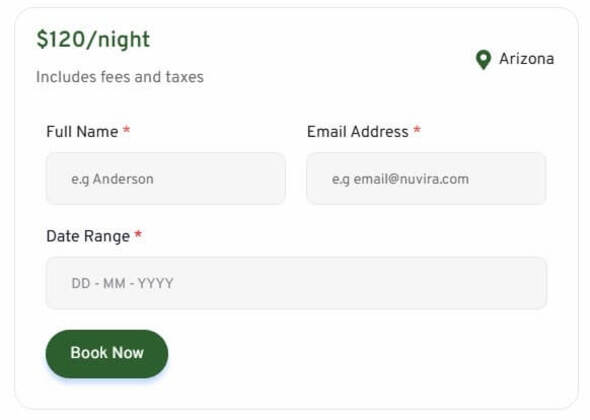
Nuvira is a modern, nature-inspired Elementor template kit designed specifically for eco-friendly cabin rentals, glamping resorts, forest lodges, and outdoor adventure retreats. Built on the power and flexibility of WordPress and Elementor Free, Nuvira ensures a seamless and fully customizable experience, allowing you to create a beautiful, high-performing website without writing a single line of code. This template kit is ideal for eco-tourism businesses looking to highlight sustainable stays, showcase rustic cabins or off-grid accommodations, and promote nature-based activities like hiking, kayaking, stargazing, or forest bathing. With earthy aesthetics, immersive layout designs, and pre-built pages for bookings, experiences, cabins, and contact, Nuvira is tailored for those who value responsible travel, green living, and immersive outdoor experiences. Whether you run a treehouse retreat, mountain cabin, or eco-adventure camp, Nuvira provides everything you need to create a compelling, eco-conscious web presence.
Suitable For:
- Eco Cabin Rental & Glamping Business Website
- Adventure Tour & Nature Retreat Booking Site
- Sustainable Travel & Forest Lodge Landing Page
Features:
- Clean, Modern, and Professional Design
- Using Elementor Free and Free Plugins
- 21 Ready to Use Pages
- Build With Container
- Fully Responsive Layout
- Fully Customizable
- Cross Browser Compatibility: Chrome, Firefox, Safari, Opera
Templates Included:
- Global Theme Style
- Homepage
- About Us
- Cabins
- Cabin Detail
- Adventure
- Our Team
- Pricing Plan
- Guest Review
- Blog
- Single Post
- Gallery
- FAQs
- 404
- Coming Soon
- Contact Us
Blocks:
- Block – Primary Header
- Block – Secondary Header
- Block – Booking Form
- Block – Contact Form
- Block – Footer
Required Plugin (included):
-
Elementor Free (Pro is not required)
-
Ultimate Addons for Elementor Lite
-
The Plus Addons for Elementor
-
MetForm
-
Elementskit Lite
-
Gum Elementor Addon
 Themeforest
How to Install:
- Install and activate the “Envato Elements” plugin from Plugins > Add New in WordPress
- Do not unzip
- Go to Elements > Installed Kits and click the Upload Template Kit button.
- Before importing a template, ensure the Install Requirements button is clicked to activate required plugins
- For best results, do not import more than one template at a time.
- Go to Pages and create a new page and click Edit with Elementor
- Click the gear icon at the lower left of the builder to view page settings and choose Elementor Full Width and hide page title
- Click the gray folder icon to access the My Templates tab and then import the page you’d like to customize
Detailed Guide: https://help.market.envato.com/hc/en-us/articles/900000842846-How-to-use-the-Envato-Elements-WordPress-Plugin-v2-0
How to Import Metforms
(Skip This Step if You’re Using Elementor Pro)
- Make sure MetForm Plugin is installed
- Import the MetForm block templates
- Import the page template where the form appears and right-click to enable the Navigator.
- Locate and select the MetForm widget and click Edit Form. Choose New, then Edit Form. The builder will appear.
- Click “Add Template” grey folder icon
- Click “My Templates” tab
- Choose your imported MetForm template, then click “Insert” (click No for page settings)
- Once the template is loaded, make any desired customizations and click “Update & Close”. The form will appear in the template
Setup Global Header/Footer Ultimate Addons Plugin
(Skip This Step if You’re Using Elementor Pro)
- Make sure Ultimate Addons is installed
- Go to Ultimate Addons menu item > Header & Footer
- Click “Add New” to create a new template
- Select the Type of Template between Header, Footer, Before Footer, or Custom Block and set its Display Location and User Roles
- Publish the template and edit it with Elementor to design your section
- Save your changes, and the custom layout will appear on your site!
IMPORTANT:
This Template Kit uses demo images from Envato Elements. You will need to license these images from Envato Elements to use them on your website, or you can substitute them with your own.
- https://elements.envato.com/collections/F6Y25BLGZU
- Item type
- template kit
- Category
- Others
- Version
- Latest Version
- Availability
- In stock
- Delivery
- Digital
- Last updated
- October 21, 2026
Nuvira - Eco-Friendly Cabin Rental & Adventure Elementor Template Kit belongs to the Others section and is treated as a template kit. Its preview, description, and listing facts can be checked without adding claims not found in the source.
Usage rights depend on the license selected at checkout. Review the complete terms before using this item for client work, redistribution, SaaS, or more than one end product.