Osca - Clean Shopping PrestaShop Theme Latest Version
Others Themeforest 4.8 (2.0K reviews)
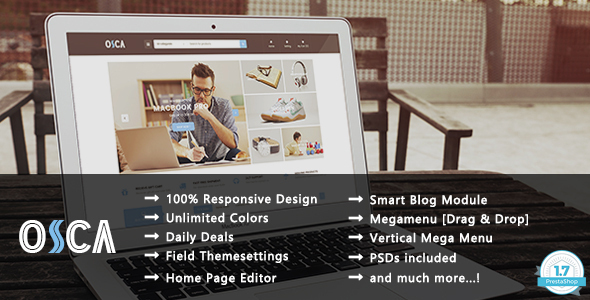
Osca Theme – Overview
Osca is a super flexible Shopping Electronics, Books, Toys and Cosmetics PrestaShop Theme with a clean and simple design for creating your best online store. This responsive theme featured with 4 homepage layouts, unlimited color styles, powerful Mega Menu, List and Grid products view, Product Quick view and Product Image Zoom,.. In addition, flexible settings, fast loading, premium modules, fast support and much more. The theme is built with latest web technologies and SEO optimized to make it friendly with search engines. We Build is the right choice if you want to create professional and truly unique eCommerce website with ease.
Similar products
 Themeforest

CHANGELOG
Version 2.1 – May 19, 2025
NEW: PrestaShop 8.2.1 compatibility.
FIXED: When changing color at a product with combinations, the main image does not switch to the corresponding color.
FIXED: (Backend) When adding new items to the megamenu structure, you have to refresh the page to see the items you have added.
Version 2.0 – Jan 05, 2024
NEW: PrestaShop 8.0, 8.1.2, 8.1.3 compatibility
NEW: PHP 8 compatibility
Version 1.9 – Jan 18, 2022
UPDATED: Ajax Builder in Shopping Cart
Version 1.8 – Nov 3, 2021
NEW: PrestaShop 1.7.8.x compatibility
FIXED: Could not be found modules on Addons when install theme
Version 1.7 – Dec 29, 2020
NEW: PrestaShop 1.7.7.x compatibility
FIXED: Conditions of the account registration form
FIXED: Title section filter in the page product category
FIXED: Effect when changing the page product category
FIXED: Bug on BackOffice Megamenu Editor
FIXED: Ajax builder in Megamenu Editor
UPDATED: Module Field Product Comment latest version
Version 1.6 – May 4, 2020
UPDATED: PrestaShop 1.7.6.5, 1.7.6.x compatibility
Version 1.5 – Mar 19, 2020
UPDATED: PrestaShop 1.7.6.4 compatibility
Version 1.4 – Feb 3, 2020
NEW: PrestaShop 1.7.6.3 compatibility
FIXED: Custom CSS does not work.
FIXED: "count() parameter must be an array or an object that implements countable" when install and uninstall modules.
Version 1.3 – Sept 17, 2019
FIXED: HTTP 500 Internal Server Error in Back Office to compatible with latest PrestaShop versions 1.7.6.x, 1.7.5.x
FIXED: Compile Error: Declaration of AdminFieldMegamenuController::setMedia() must be compatible with AdminControllerCore::setMedia($isNewTheme = false)
FIXED: PHP Warning: sizeof() when enable debug mode
FIXED: PHP Warning: count() Parameter must be an array or an object that implements Countable
FIXED: Pagination in category page does not work
Version 1.2 – Aug 2, 2018
Fully compatible with latest versions PrestaShop 1.7.4.x, 1.7.3.x
Version 1.1.3 – Sept 05, 2017
- Fixed Security issue on the FieldVmegamenu module.
Version 1.1.2 – Aug 05, 2017
- Fixed bug "PHP Fatal error: Uncaught Exception: The module Smartblogrecentposts must be installed first" during installing the theme in PrestaShop 1.7.2.0.
Version 1.1.1 – July 20, 2017
- Fixed bug Ajax Search to compatible with PrestaShop 1.7.1.2
- Fixed bug responsive Size Chart popup.
- Fixed bug CSS in the Check Out page.
- Fixed errors when enable the Debug Mode of PrestaShop.
- Updated documentation.
Version 1.1 – May 5, 2017
- Compatible with PrestaShop 1.7.1.1, 1.7.1.x
- Fixed Module FieldNewproduct,FieldSpeciaproduct: Edit functions to get products.
- Fixed Module FieldStacticfooter: Edit function getStaticfooterLists().
- Fixed Admin Module FieldMegamenu.
- Fixed File layer-both-column.tpl: Fixed an error when debug mode enabled.
- Fixed Module FieldTabcategories: Delete default products cause errors not show module on Homepage.
- Fixed Module FieldThemecustomize: Change function getTabs() to different from PrestaShop default.
- Fixed Module FieldSmartcode : Change class SmartyLazyRegister to FieldSmartCodesProcessor to different from PrestaShop default.
Version 1.0 – Apr 29, 2017
Initial Release
- Item type
- theme
- Category
- Others
- Version
- Latest Version
- Availability
- In stock
- Delivery
- Digital
- Last updated
- October 15, 2026
The catalog entry for Osca - Clean Shopping PrestaShop Theme is grouped with Others and classified as a theme. Available product information is shown below with related items from the local catalog.
Usage rights depend on the license selected at checkout. Review the complete terms before using this item for client work, redistribution, SaaS, or more than one end product.