Rasoi Reverie — Restaurant & Cafe Elementor Template Kit Latest Version
Others Themeforest 4.8 (2.0K reviews)
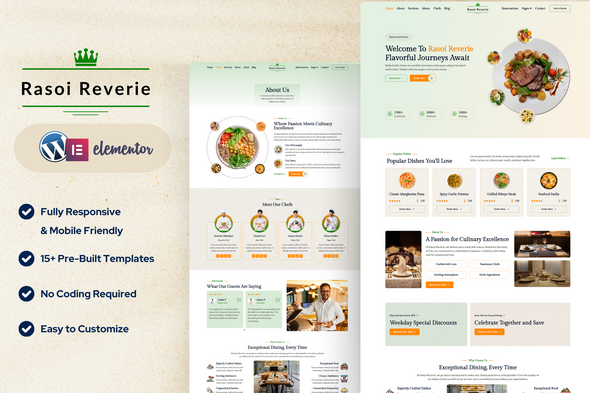
Rasoi Reverie is a beautifully crafted Elementor Template Kit designed specifically for restaurants, cafes, and culinary businesses. This kit offers an elegant and user-friendly layout to showcase your services, menu, and reservations, helping to attract more customers and enhance your online presence.
What’s Included in the Zip:
- Home
- About
- Services
- Menu
- Chefs
- Reservations
- Reservations Form
- Post Archive
- Single Post
- Contact
- Contact Form
- Header
- Footer
- 404 Page
Plugins Installed with Kit:
- Elementor (Page Builder)
- Ultimate Addons for Elementor (Header & Footer)
- MetForm (Forms)
- Jeg Elementor Kit (Addons)
How to Use Template Kits:
This is not a WordPress Theme. Template kits contain the design data for Elementor only and are installed using the Envato Elements plugin for WordPress or directly through Elementor.
Elementor Template Kits use the Envato Elements plugin to install.
How to Import MetForm Custom Form:
- Import MetForm template.
- Import the template where the form appears, then edit in Elementor.
- Click the MetForm widget in the column where the form should be and click Edit Form.
- Select New, leave blank selected then click Edit Form button.
- Click ‘Add Template’ grey folder button.
- Click ‘My Templates’ tab.
- Choose your imported MetForm template, then click ‘Insert’.
- Once the template is loaded, click ‘Update’.
How to Setup Header & Footer with Ultimate Addons for Elementor (UAE):
- If you have Elementor Pro, headers and footers may be customized under Theme Builder. Otherwise, make sure Elementor and Ultimate Addons for Elementor (UAE) are installed and activated.
- Go to Dashboard > UAE > Header & Footer Builder and click Add New.
- Give the template a Title, set the Type of Template to Header (repeat later for Footer), and set the Display Location to Entire Site.
- Publish the template, then click Edit with Elementor.
- Click gray folder icon to access My Templates tab.
- Insert the header (or footer) template.
- Customize and Update.
Detailed Guide:
- https://help.elements.envato.com/hc/en-us/articles/36032349441945-How-to-Install-Elementor-Template-Kits-With-the-Envato-Elements-Plugin-in-WordPress-for-Envato-Elements-Subscribers
Images:
This Template Kit uses demo images from Envato Elements. You will need to license these images from Envato Elements to use them on your website, or you can substitute them with your own.
Collection Link:
https://elements.envato.com/collections/ESMZL5UDWV
 Themeforest
- Last updated
- October 19, 2026
- Delivery
- Digital
- Availability
- In stock
- Version
- Latest Version
- Category
- Others
- Item type
- template kit
Rasoi Reverie — Restaurant & Cafe Elementor Template Kit is cataloged as a Others under template kit. Review the preview and recorded details alongside the original description before purchase.
Usage rights depend on the license selected at checkout. Review the complete terms before using this item for client work, redistribution, SaaS, or more than one end product.