Realify – Real Estate Mobile App Adobe XD UI Kits Latest Version
Others Themeforest 4.8 (1.0K reviews)
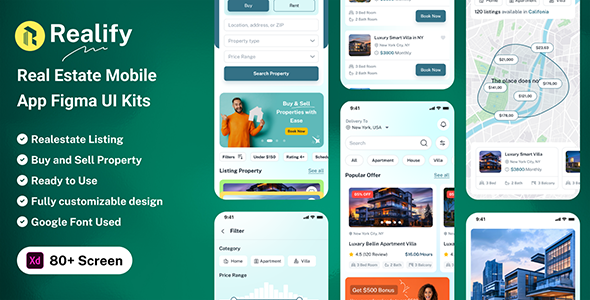
Production description:
Realify is a clean, modern, and user-friendly Adobe XD UI Kit crafted for real estate and property marketplace apps. Tailored for seamless property browsing, buying, selling, and renting, Realify offers a rich collection of professionally designed screens and reusable components to help you build intuitive and efficient real estate experiences.
From exploring property listings to scheduling visits and managing favorite homes, Realify is designed with a strong focus on usability, visual clarity, and performance. With features like advanced property filtering, smart search, map integration, booking requests, and secure payment options, Realify ensures a smooth and delightful journey—connecting buyers, sellers, and agents with ease.
More from this category
 Themeforest
What’s Inside:
- 80+ Screens (iOS/Android Support)
- 100% Editable & Customizable
- Compatibility: Adobe XD
- Well Organized Layers System
- Unique, Stylish & Modern
- Used Google Free Fonts
- Pixel Perfect Design
- Global Styleguide
- Easily Drag & Drop Design
Product Highlights:
File Format
01_Onboarding
02_Onboarding_Style_01
03_Onboarding_Style_01
04_Onboarding_Style_01
05_Onboarding_Style_02
06_Onboarding_Style_02
07_Onboarding_Style_02
08_Login
09_Forget_password
10_Forget_password_OTP_Sent
11_Forget_password_OTP_verify
12_Set_new_password
13_Successfully Password Reset
14_Signup
15_Choose a country
16_Terms of Service
17_Choose your location
18_Alert_Setting
19_Home
20_Home_V2
21_Home_V2
22_Search_Result
23_Search_Empty
24_Search_Result
25_View_Listing
26_Maps_Direction
27_Maps_Direction_Detailss
28_Search Style_01
29_Search_Result_Style02
30_Apartments Rent
31_House Rent
32_Villa
33_Services Near by You
34_Filter
35_Category_Grid
36_Category_List
37_Listing_Details_Style_01
38_Listing_Details_Style_02
39_Listing_Details_Style_03
40_Listing_Details_Style_04
41_Review
42_Agent
43_Agent Profile
44_Chat_list
45_Video_Call
46_Video_Call_Off
47_Chat
48_Voice_message
49_Chat_Attachment
50_My Property
51_Add Property
52_Add Property_Details
53_Listing_Sucessful
54_Property Rent
55_Booking
56_Visiting Booking
57_Payment_method_01
58_Payment_method_02
59_Add New Card
60_Booking_Placed
61_My_Accounts
62_Notifications
63_Profile
64_My Booking
65_Booking Details
66_Booking_Cancel_Modal
67_Booking Cancelled_Sucessful
68_Receipt
69_Wishlist_Grid
70_Wishlist_List
71_Remove_wishlist_modal
72_Manage Address
73_Add Address
74_Invite Friends
75_Settings
76_Notifications Settings
77_Complains
78_Help_Center
79_Privacy_Policy
80_FAQ
81_logout
Font:
- https://fonts.google.com/specimen/Public+Sans
Icon :
- https://fonts.google.com/icons
- https://hugeicons.com/
Credits:
- https://www.freepik.com/
- https://www.pexels.com/
- https://pixabay.com/
- https://unsplash.com/
Software Version :
- Adobe XD CC
How to Install Adobe XD
1. If you don’t have any software, you can Free download or buy a License of Adobe XD here: https://www.adobe.com/products/xd.html
Download and Open Creative Cloud Desktop App. Log in to Adobe Creative Cloud with Adobe account or Facebook or Google Account. Click to Install XD CC Wait until XD finish install.
How to Use Adobe XD Files
Renaming Artboards: Double-click the name to select it. Then type the name and press Enter or Return. Import Assets: Paste assets into your design, import them using the Import command, or drag them into your XD document from a folder.
Note:
All images are just used for preview purpose only and replaced with Placeholder Images. They are not part of the template and not included in the final purchase files.
Thank You!
So thanks again for your support, its greatly appreciated. Also checkout my other template files if you are interested.
In case you come across any problem, please message me on my profile:- https://themeforest.net/user/createuiux
I hope you like the designs. If You Like It! Please, Do not Forgot to Rate it Thank you!
- Item type
- digital product
- Category
- Others
- Version
- Latest Version
- Availability
- In stock
- Delivery
- Digital
- Last updated
- October 23, 2026
For shoppers browsing Others, Realify – Real Estate Mobile App Adobe XD UI Kits is recorded as a digital product. The page below separates supplied product information from general store and license terms.
Usage rights depend on the license selected at checkout. Review the complete terms before using this item for client work, redistribution, SaaS, or more than one end product.