ROBBIE - Portfolio Resume Figma Template Latest Version
Others Themeforest 4.8 (1.2K reviews)
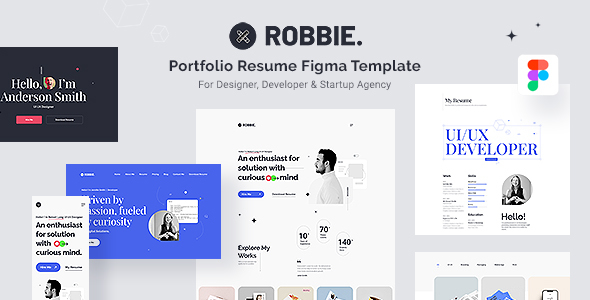
Introducing our ROBBIE Portfolio Resume Figma Template, with 3 unique landing page and many other inner pages like portfolio detail, portfolio listing, blog pages, about us and many more a meticulously crafted and versatile solution designed to elevate your online presence and help you make a lasting impression in the competitive world of job hunting, freelancing, or professional networking. This comprehensive Figma template is more than just a design; it’s your gateway to a successful and impactful digital portfolio and resume.
Built with a responsive Bootstrap grid system, your portfolio will look flawless on all devices, ensuring a seamless and impressive online presence. Elevate your career with these versatile and user-friendly templates.
Other products to consider
 Themeforest
Unlock your potential with ROBBIE’s well-organized layers, providing you with a seamless editing experience, ensuring your portfolio evolves alongside your career.
ROBBIE’s versatility shines through with its FIGMA templates. It’s a perfect fit for a wide range of professionals, including Designers, Developers, Freelancers, Artists, and Photographers, while also serving as an excellent choice for Personal Pages.
ROBBIE, the epitome of minimalism, presents itself as an immaculate, clean, and sharp CV/Resume Landing Portfolio FIGMA Template that promises to leave a lasting impression.
Don’t miss out on the opportunity to take your online portfolio and resume to the next level. With our Portfolio Resume Figma Template, you’ll have the tools to impress potential employers, clients, or collaborators, leaving a lasting impact and opening doors to exciting opportunities. Start showcasing your skills and achievements like never before with this comprehensive and visually stunning Figma template.
Features:
- 3 Unique Landing Pages
- 30 Screens or Artboard
- Desktop & Mobile Version
- Stylish and Modern Design
- Bootstrap Grid System
- Well Documented
- Organized Figma File
- Blog Page Design
- Google Web Fonts
ROBBIE.fig : Contents of 30 screens of Figma Template as mentioned blow:
File Included:
- 01 – Landing Page-01
- 02 – Landing Page-02
- 03 – Landing Page-03
- 04 – Portfolio-Listing-01
- 05 – Portfolio-Listing-02
- 06 – Portfolio-Listing-03
- 07 – Portfolio-Listing-04
- 08 – Portfolio-Listing-05
- 09 – Portfolio-Listing-06
- 10 – Portfolio-Detail-01
- 11 – Portfolio-Detail-02
- 12 – Portfolio-Detail-03
- 13 – Blog-Listing-01
- 14 – Blog-Listing-02
- 15 – Blog-Listing-03
- 16 – Blog-Listing-04
- 17 – Blog-DetailPage-01
- 18 – Blog-DetailPage-02
- 19 – About-01
- 20 – About-02
- 21 – Navigation Menu
- 22 – Navigation Menu-Extended
- 23 – Mobile Version-Landing Page
- 24 – Mobile Version-Portfolio Listing Page
- 25 – Mobile Version-Portfolio Details Page
- 26 – Mobile Version-Blog Listing Page
- 27 – Mobile Version-Blog Details Page
- 28 – Mobile Version-About
- 29 – Mobile Version-Navigation
- 30 – Design System
Fonts Used:
RalewayRoboto
Icons Credit:
Riddle Figma UI
Image Credit:
unblast.com mockups-design.com unsplash.com
How to Edit Figma:
To begin, you’ll want to either install the Figma software or simply access it through your browser since it’s cloud-based. However, if you intend to use the fonts mentioned in the credits, you’ll need to have those fonts installed on your system beforehand.
Once you have the software ready, import the “robbie.fig” file into Figma. Upon doing so, you’ll notice a meticulously organized and grouped folder on the right-hand panel for easy navigation.
Making edits is a breeze – just click on the respective folder, select the layer you wish to modify, and proceed with your changes. It’s as simple as that.
If you need to tweak images, a straightforward process awaits. Simply double-click on the image, and a panel will appear on the right, labeled “Choose Image.” From there, select the desired image from your computer, and you’re all set!
- Documentation included ( Contains the Figma file, Images Link, Font Info & Drag-n-Drop for image replace guidance )
Note: All images are just used for preview purposes only and NOT included in the final purchase files
- Item type
- template
- Category
- Others
- Version
- Latest Version
- Availability
- In stock
- Delivery
- Digital
- Last updated
- October 12, 2026
ROBBIE - Portfolio Resume Figma Template is one of the Others items recorded as a template. The content below uses the supplied listing information and current local catalog data.
Usage rights depend on the license selected at checkout. Review the complete terms before using this item for client work, redistribution, SaaS, or more than one end product.