Smylee - Dentist & Dental Care Services Elementor Template Kit Latest Version
Others Themeforest 4.8 (1.2K reviews)
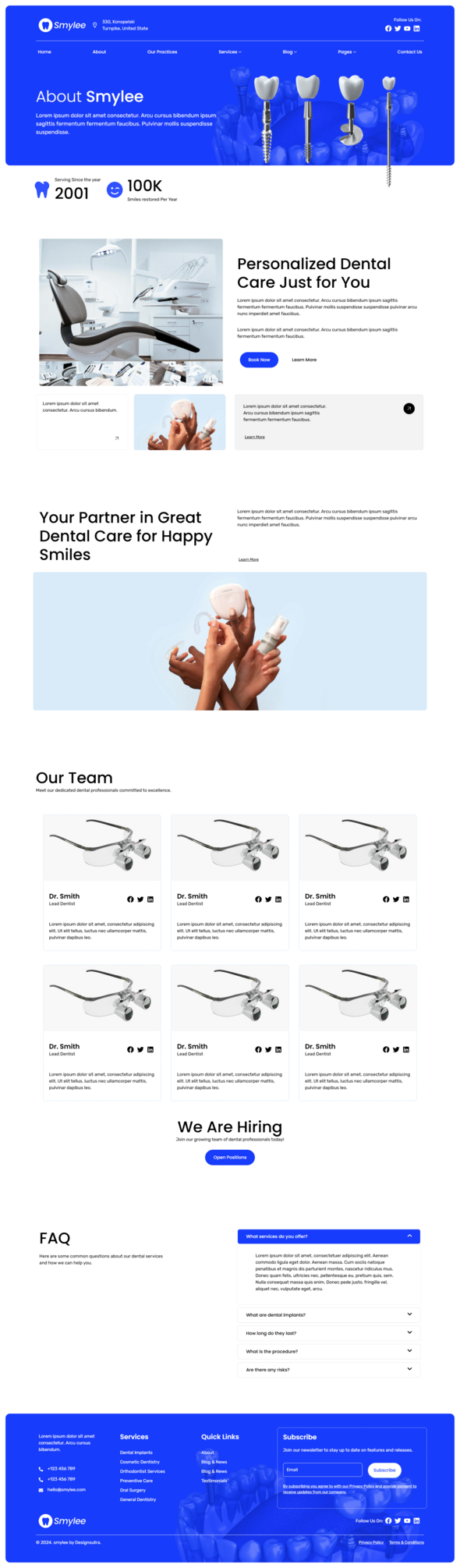
Smylee – Dentist And Dental Care Services Elementor Template Kit – is a sleek and sophisticated Elementor Template Kit designed specifically for health and medical websites. This versatile template kit is ideal for Dentists, Dental clinics, dental practices professionals. Elevate your online presence with ease and professionalism.
This is not a WordPress theme. Template Kits contain page content for Elementor page builder. This kit has been optimized for use with the free Hello Elementor theme but may be used with most themes that support Elementor.
More from this category
 Themeforest


Template Features:
- Built With Elementor Free
- 100% Responsive & mobile-friendly Modern design
- No Coding Knowledge Required
- Easy & Fully Customizable
What’s Included:
- Global Style
- Home
- About
- Our Practices
- Blog
- Single Blog
- Services
- Single Service
- Our Team
- Appointments
- Contact Us
- FAQs
- 404 Page
- Header
- Footer
- Metform Contact Us
- Metform Appointments
- Metform Newsletter
Plugins installed with kit:
- ElementsKit Lite
- Metforms
- Jeg Elementor Kit
- Gum Elementor Addon
- Elementor Header & Footer Builder
How to Use Template Kits:
This is not a WordPress Theme. Template kits contain the design data for Elementor only and are installed using the envato Elements plugin for WordPress or directly through Elementor.
For Elementor Template Kits use the Envato Elements plugin to install.
Detailed Guide:
- https://help.elements.envato.com/hc/en-us/articles/36032349441945-How-to-Install-Elementor-Template-Kits-With-the-Envato-Elements-Plugin-in-WordPress-for-Envato-Elements-Subscribers
For further support, go to Elementor > Get Help in WordPress menu.
How to Import Metforms If you have Elementor Pro, skip install of Metform and form blocks.
- Import the metform block templates
- Import the page template where the form appears and right-click to enable the Navigator
- Locate and select the Metform widget and click Edit Form. Choose New, then Edit Form. The builder will appear
- Click ‘Add Template’ grey folder icon.
- Click ‘My Templates’ tab.
- Choose your imported metform template, then click ‘Insert’ (click No for page settings).
- Once the template is loaded, make any desired customizations and click ‘Update & Close’ The form will appear in the template
- Click Update
How to setup header in Jeg Elementor Kit plugin
If you have Elementor Pro, headers and footers may be customized under Theme Builder.
- Go to Jeg Elementor Kit menu item > Header Template
- Click Add New Header
- Add condition > All Site and click Create
- Click the pencil icon to Edit and elementor will appear
- Click gray folder icon to access My Templates tab
- Insert the header template.
- Customize and Save.
Images: All images are free to use under CreativeCommons0 license.
- Last updated
- October 18, 2026
- Delivery
- Digital
- Availability
- In stock
- Version
- Latest Version
- Category
- Others
- Item type
- template kit
Listed under Others, Smylee - Dentist & Dental Care Services Elementor Template Kit is a template kit. This presentation keeps the product name and recorded facts intact while organizing the details for easier review.
Usage rights depend on the license selected at checkout. Review the complete terms before using this item for client work, redistribution, SaaS, or more than one end product.