Terrain - Landscape & Gardening Elementor Template Kit Latest Version
Others Themeforest 4.8 (4.7K reviews)
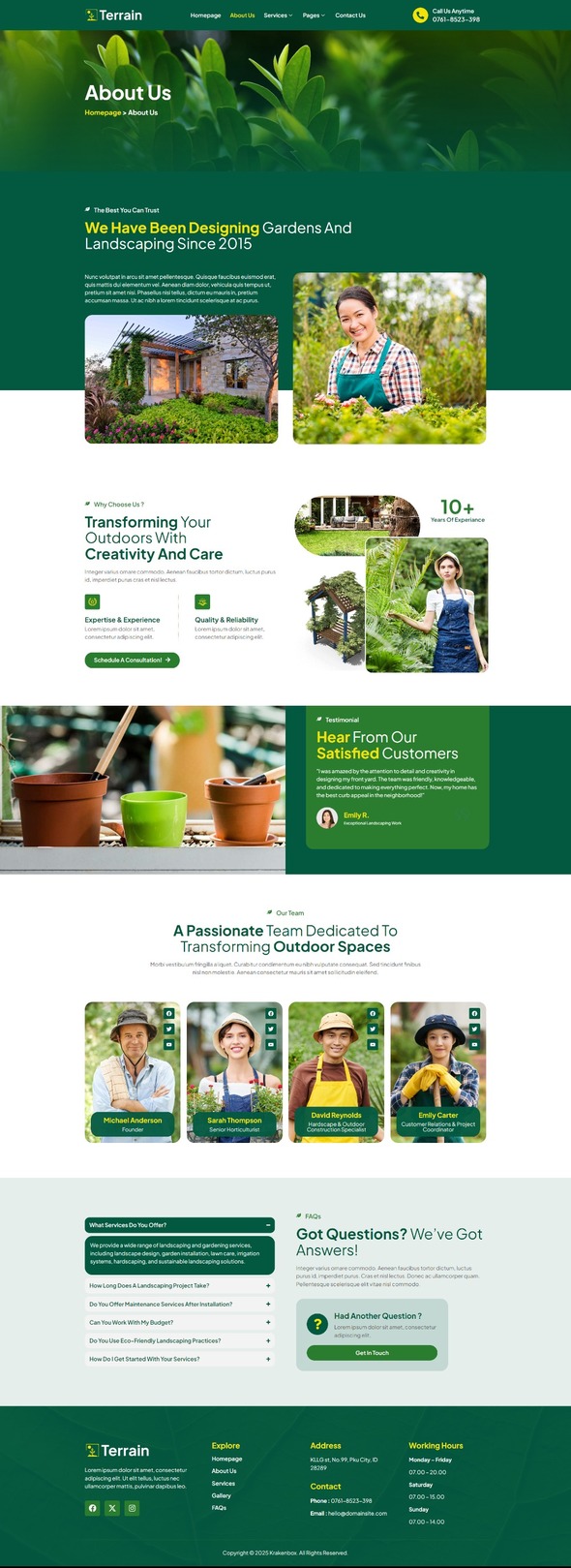
Terrain is an Elementor Template Kit for quickly and easily creating a full website in WordPress for your business featuring a modern and professional design. The kit features a fully compatible design system and professionally hand-picked images for a premium, branded head-start on your next project. Optimized for use with the free Hello Elementor theme, this kit is fine-tuned, fast-loading and fully responsive.
Features :
Similar products

 Themeforest

- Compatible with WordPress – Elementor
- Using Free Plugins (Elementor Pro is not required)
- True no-code customization with drag and drop
- 100% Fully Responsive & mobile-friendly
- Modern and Professional design
- 13+ pre-built templates ready to use
- Customize fonts and colors in one place (Global Theme Kit Style)
Templates in Zip :
- Homepage
- About Us
- Services
- Service Detail
- Pricing Plan
- Portfolio
- Gallery
- Blog
- FAQs
- Error 404
- Contact Us
- Header
- Footer
- Contact Form – Block
Required Plugins :
- Elementor
- ElementsKit Lite
- RTMKit Addons for Elementor
- RTMForm Builder for Elementor
How to Use Template Kits:
This is not a WordPress Theme. Template kits contain the design data for Elementor only and are installed using the Envato Elements plugin for WordPress or directly through Elementor.”
- Install and Activate the “Envato Elements” plugin from Plugins > Add New in WordPress
- Go to Elements > Installed Kits and click the Upload Template Kit button. You may also import automatically by clicking Connect Account to link your Elements subscription, then import under Elements > Template Kits.
- Check for the orange banner at the top and click Install Requirements to load any plugins the kit uses
- Click import on the Global Kit Styles first
- Click Import on one template at a time. These are stored in Elementor under Templates > Saved Templates.
- Go to Pages and create a new page and click Edit with Elementor
- Click the gear icon at lower-left of the builder to view page settings and choose Elementor Full Width and hide page title
- Click the gray folder icon to access My Templates tab and then Import the page you’d like to customize.
If you have Elementor Pro, headers and footers may be customized under Theme Builder.
Detailed Guide: https://help.market.envato.com/hc/en-us/articles/900000842846-How-to-use-the-Envato-Elements-WordPress-Plugin-v2-0
For further support, go to Elementor > Get Help in WordPress menu.
Setup Global Header and Footer in RTMKit
If you have Elementor Pro, headers and footers may be customized under Theme Builder.
- Go to RTMKit > Theme Builder > Header in the WordPress admin, then click Add New.
- Enter a title, select “Header” as the type, then go to the Conditions tab, set it to “Entire Site”, and click Save.
- Click Edit with Elementor to open the builder.
- In the editor, click the gray folder icon, go to the My Templates tab, select your Header Template, and click Insert.
- Make any adjustments, then click Update to save.
- Repeat the same steps for the Footer under RTMKit > Theme Builder > Footer.
How to Setup Forms with RTMForm
If you have Elementor Pro, skip install of form plugin and form blocks.
- Import the form blocks.
- Go to RTMKit Plugin > Theme Builder > Forms in the WordPress admin.
- Click “Add New”, enter a form name, then click “Save and Edit”.
- In the builder, click the gray folder icon, go to the My Templates tab, and click Insert on your form block.
- Click Publish (or Update).
- When customizing pages with forms, use the RForm widget and select the form you created.
Images
This Template Kit uses demo images from Envato Elements. You will need to license these images from Envato Elements to use them on your website, or you can substitute them with your own.
- https://elements.envato.com/collections/8Q35CJ9FLY
- Item type
- template kit
- Category
- Others
- Version
- Latest Version
- Availability
- In stock
- Delivery
- Digital
- Last updated
- October 20, 2026
Terrain - Landscape & Gardening Elementor Template Kit belongs to the Others section and is treated as a template kit. Its preview, description, and listing facts can be checked without adding claims not found in the source.
Usage rights depend on the license selected at checkout. Review the complete terms before using this item for client work, redistribution, SaaS, or more than one end product.