WhizCyber - Cyber Security Elementor Template Kit Latest Version
Elementor Kits Themeforest 4.8 (466 reviews)
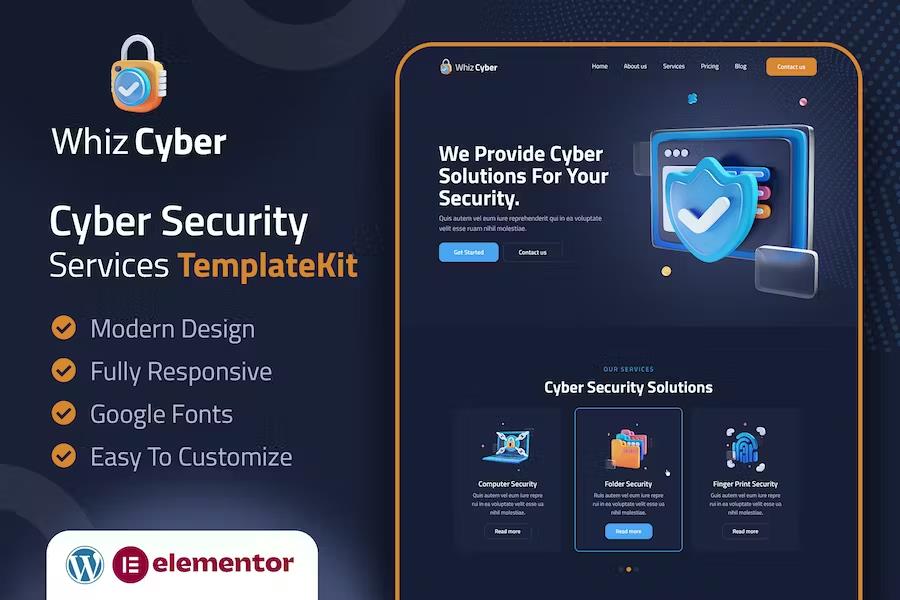
WhizCyber is a specialized Elementor template kit designed specifically for businesses operating within the cybersecurity industry. It provides a structured collection of pre-designed page layouts tailored to showcase services such as network protection, computer security, and web defense. Because this product is a template kit rather than a standalone WordPress theme, it functions as a collection of page structures and content blocks meant to be imported directly into the Elementor page builder. Users can modify the appearance of these pages using a drag-and-drop visual interface, allowing for adjustments to fonts, colors, and layout configurations without writing code. The visual design focuses on a professional, tech-oriented aesthetic that communicates reliability to visitors. By providing these specific design elements, the kit allows businesses to construct a credible online presence that reflects the technical nature of their security services while maintaining a clean look that is easy for potential clients to browse and understand.
To build these pages, the kit requires several specific plugins to function as intended, including Elementor, ElementsKit Lite, and MetForm. These tools work together to handle the layout, header and footer management, and contact form functionality. Because the kit is built to work with the free Hello Elementor theme, it offers a lightweight foundation that keeps page loading times fast, although it remains compatible with most other themes that support the Elementor builder. Users manage the components through the WordPress dashboard, where they can import individual page templates or global styles. This modular approach allows for specific sections to be inserted into existing sites or used to build a brand new website from scratch. The system keeps all imported templates organized within the Elementor saved templates folder, ensuring that you can access and edit any part of the site architecture whenever you need to make adjustments to your business information.
More from this category

Framarket - Digital Marketing Elementor Template Kit
 Themeforest

Apprista - Creative App Landing Elementor Template Kit
Themeforest

Docbook – Online Bookstore WooCommerce Elementor Template Kit
Themeforest
Importing the content requires a series of steps through the WordPress plugin interface to ensure that all assets and settings are correctly linked. You start by installing the required plugins and importing the global kit styles, which establish the consistent design elements across the entire project. Once the global styles are set, you can import individual pages, headers, and footers to construct the full site. The process for integrating functional elements like contact forms involves using the MetForm widget to map specific form templates into your chosen page layouts. For the header and footer areas, the ElementsKit plugin provides a management system that allows you to designate global blocks that appear consistently on every page of your site. This setup process is designed to provide a clear path from a raw installation to a fully functional website that displays your cybersecurity services effectively to your target audience.
Managing the visual content of your site involves swapping out placeholders with your own branding and imagery. While the preview images demonstrate how the layouts look with professional photography, these assets are not included in the final files, meaning you must provide your own images or license appropriate media to populate your site. You have full control over the styling of every component, including the ability to fine-tune individual elements or apply global changes to your site wide color palette and typography. The template kit acts as a framework, giving you the necessary building blocks to organize your service descriptions, contact details, and company information. By sticking to this structure, you save time on design layout and formatting tasks. This allows you to focus your attention on crafting the specific text and information that defines your cybersecurity brand, ensuring your site remains both functional and visually consistent across all desktop and mobile devices.
- Item type
- template kit
- Category
- Elementor Kits
- Version
- Latest Version
- Availability
- In stock
- Delivery
- Digital
- Last updated
- October 21, 2026
This listing covers WhizCyber - Cyber Security Elementor Template Kit, a Elementor Kits from template kit. Use the source description and recorded item details below to check whether it fits the intended project.
Usage rights depend on the license selected at checkout. Review the complete terms before using this item for client work, redistribution, SaaS, or more than one end product.