WP Clever FAQ Builder 1.43
Wordpress Plugins Codecanyon 4.8 (799 reviews)
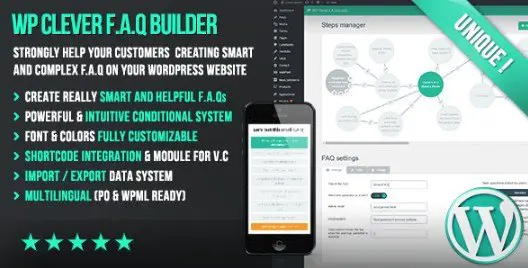
The WP Clever FAQ Builder plugin provides a structured environment for WordPress site owners to organize and display frequently asked questions for their visitors. This tool functions by generating accordion-style or list-based layouts that present information clearly without cluttering a page. Because it relies on a specific backend interface, users can manage large volumes of questions and answers through a centralized dashboard. Each entry is designed to be easily modified, allowing you to update your support content as your services evolve. The plugin handles the presentation logic so that your text remains readable on various screen sizes, ensuring that mobile users have the same access to your documentation as those on desktop computers. By moving away from static text blocks, this plugin helps visitors find the specific information they need quickly, which reduces the manual workload of answering repetitive inquiries through direct email or live chat support channels throughout your business day.
Managing the content within the plugin involves a drag-and-drop interface that simplifies the arrangement of your FAQ items. If you have a specific order in mind for your questions, you simply click and move them into the desired sequence. The backend UI is designed to be intuitive, meaning you spend less time configuring settings and more time refining the actual content your users will see. One practical function included is the ability to duplicate both individual questions and entire steps with a single click. This feature proves useful when you have multiple categories or similar technical topics that require a consistent layout. You can also move your existing data between different WordPress installations by using the built-in import and export system. This portability makes it easier to keep your documentation consistent across multiple websites or to move your settings when you decide to migrate your content to a new server.
Integration with existing page builders is a core part of how this plugin functions within your site. It includes specific support for Visual Composer, allowing you to place your FAQ sections directly into your custom page layouts without needing to manually write complex code. For those who prefer a simpler approach, the plugin generates shortcodes that you can paste into any standard post or page editor. These shortcodes act as placeholders, rendering the dynamic FAQ elements exactly where you place them. This flexibility ensures that your support documentation can live on a dedicated page or exist as a sidebar element on your product pages. Because the system is built to be responsive, these shortcodes automatically adjust their width and spacing to fit the container they are placed in. Your site visitors will experience a consistent look regardless of the device they use to view your help documentation.
Configuration settings remain straightforward, focusing on the essential aspects of styling and behavior rather than overwhelming the user with unnecessary technical choices. You can control how the FAQ items expand and collapse, which helps maintain a clean aesthetic on your site. The plugin handles the technical heavy lifting, ensuring that the JavaScript and CSS required for the accordion animations are loaded correctly. By maintaining a lightweight footprint, the tool avoids slowing down your page load times, which is a key factor for user retention. The focus remains strictly on providing a functional way to present your information, rather than forcing you into a rigid design template. Whether you are building a small list of common questions or a massive database of technical support steps, the plugin keeps your information organized and accessible. You maintain full control over the wording and categorization, letting you tailor the tone to match your brand identity.

 Gravity Perks


- Item type
- plugin
- Category
- Wordpress Plugins
- Version
- 1.43
- Availability
- In stock
- Delivery
- Digital
- Last updated
- September 30, 2026
For shoppers browsing Wordpress Plugins, WP Clever FAQ Builder is recorded as a plugin. The page below separates supplied product information from general store and license terms.
Usage rights depend on the license selected at checkout. Review the complete terms before using this item for client work, redistribution, SaaS, or more than one end product.