WP File Download – WordPress File Manager 6.3.6
Wordpress Plugins JoomUnited 4.8 (3.5K reviews)
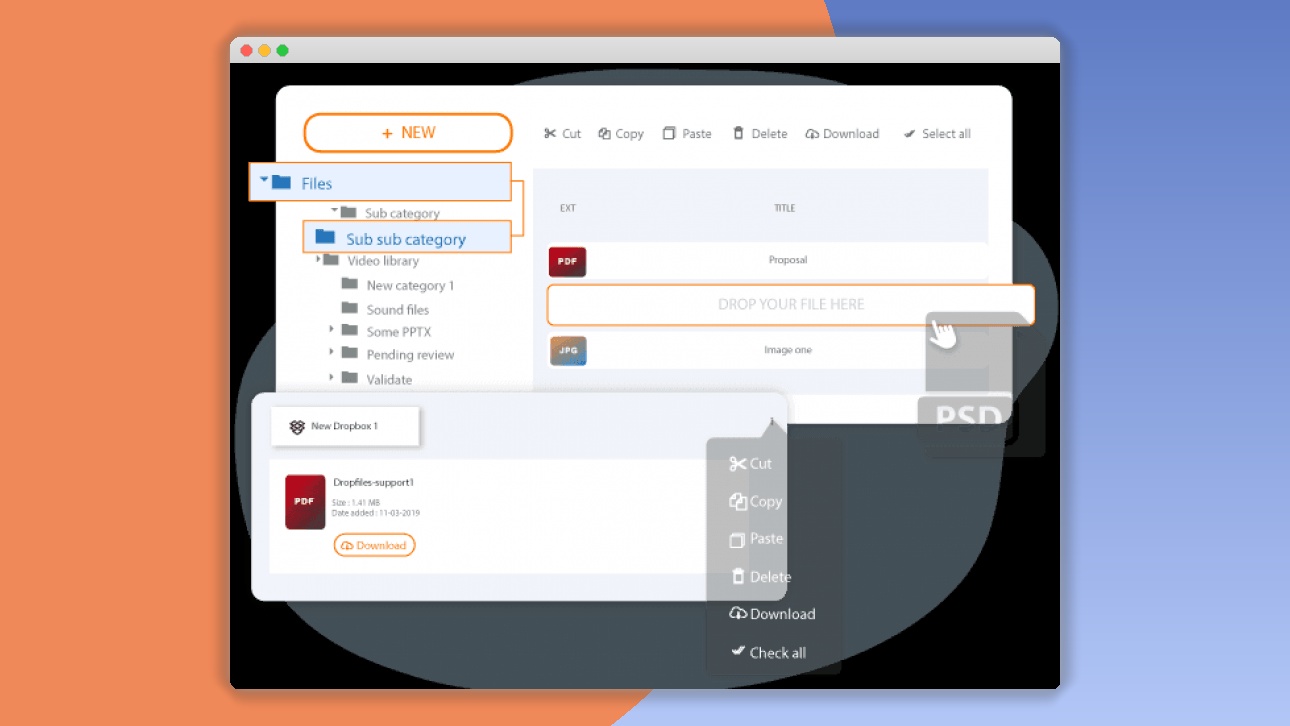
⚡WP File Download – WordPress File Manager Overview
Effortlessly manage and distribute files directly from your WordPress dashboard with WP File Download – WordPress File Manager. This powerful plugin is your all-in-one solution for organizing, categorizing, and sharing documents, media, and any other file type with your audience. Say goodbye to cluttered media libraries and complicated FTP uploads. WP File Download provides an intuitive, user-friendly interface that simplifies the entire file management process, allowing you to create professional download sections with ease.
Whether you're sharing product manuals, company reports, client resources, or creative portfolios, WP File Download offers robust features like categorization, customization, and advanced search to ensure your users can find exactly what they need. Enhance user experience, streamline your workflow, and maintain a professional online presence. With features like AJAX downloads, file versioning, and access control, you have complete command over your digital assets.
WP File Download is designed for efficiency and flexibility, making it an indispensable tool for businesses, educators, creatives, and anyone needing a robust file management system within WordPress. Elevate your website's functionality and provide a seamless experience for your visitors seeking valuable downloadable content.

 AMPforWP
Can't Decide A Single Theme/Plugin?Join The Membership Now
Instead of buying this product alone, unlock access to all items including v with our affordable membership plans. Worth $35.000++
🎯 Benefits of our Premium Membership Plan
- Download v for FREE along with thousands of premium plugins, extensions, themes, and web templates.
- Automatic updates via our auto-updater plugin.
- 100% secured SSL checkout.
- Free access to upcoming products in our store.
🎮 WP File Download – WordPress File Manager Key Features
- 🎮 Intuitive File Management: Organize files into categories and subcategories with a drag-and-drop interface.
- 🔧 Customizable Themes: Choose from multiple pre-built themes or create your own to match your website's design.
- 📊 Download Statistics: Track total downloads per file and per category to understand user engagement.
- 🔒 Access Control: Restrict downloads to specific user roles or registered users for private content.
- ⚡ AJAX Downloads: Ensure smooth, uninterrupted downloads without page reloads.
- 🎯 Advanced Search & Filtering: Allow users to quickly find files by name, category, or keywords.
- 🛡️ File Versioning: Easily update files and maintain previous versions for historical reference.
- 🚀 Theme Integration: Seamlessly integrates with most WordPress themes for a consistent look and feel.
- 💡 Bulk Uploads: Upload multiple files at once via drag-and-drop or a traditional uploader.
- 📱 Responsive Design: Ensures your file download sections look great on all devices, from desktops to mobile phones.
- 🔌 Shortcode Support: Easily embed file download sections anywhere on your website using simple shortcodes.
- 📈 Email Notifications: Get notified when a file is downloaded, keeping you informed.
✅ Why Choose WP File Download – WordPress File Manager?
- ✅ Unmatched Ease of Use: Manage your files with an intuitive interface that requires no technical expertise.
- ✅ Professional Presentation: Showcase your downloadable content with attractive, customizable layouts that enhance user experience.
- ✅ Powerful Analytics: Gain valuable insights into user behavior with detailed download statistics.
- ✅ Secure Content Delivery: Protect your valuable files with flexible access control options, ensuring only authorized users can download.
💡 WP File Download – WordPress File Manager Use Cases & Applications
- 💡 Document Sharing: Easily distribute product manuals, user guides, whitepapers, and company reports.
- 🧠 Resource Libraries: Create organized libraries of educational materials, research papers, or training documents for students or employees.
- 🛒 E-commerce Support: Provide downloadable product guides, warranty information, or order forms for your customers.
- 💬 Client Portals: Offer a secure space for clients to download project files, invoices, or important communications.
- 📰 Media Kits: Distribute press releases, high-resolution images, and branding assets to media professionals.
- 🎓 Academic Institutions: Share lecture notes, syllabi, assignments, and supplementary reading materials with students.
⚙️ How to Install & Setup WP File Download – WordPress File Manager
- 📥 Download the Plugin: Purchase and download the WP File Download plugin from JoomUnited.
- 🔧 Upload & Activate: Navigate to 'Plugins' > 'Add New' > 'Upload Plugin' in your WordPress dashboard. Select the downloaded ZIP file and click 'Install Now', then 'Activate Plugin'.
- ⚡ Create Your First File Category: Go to 'WP File Download' in your WordPress menu. Click 'Add New Category' and give it a descriptive name.
- 🎯 Add Files: Within your newly created category, click 'Add Files' and upload your documents, images, or any other file types using the convenient drag-and-drop interface or the file browser.
Once files are uploaded, you can generate a shortcode to display your file category on any page or post. Customize the appearance and behavior of your file downloads through the plugin's comprehensive settings panel.
🔧 WP File Download – WordPress File Manager Technical Specifications
- 💻 Platform: WordPress
- 🔧 Type: Plugin
- 🌐 Compatibility: Compatible with the latest WordPress versions and major themes.
- ⚡ Performance: Optimized for fast loading and efficient file management.
- 🛡️ Security: Features access control to protect sensitive files.
- 📱 Responsiveness: Fully responsive design for all devices.
- 🔌 Integrations: Supports integration with popular plugins and WordPress features.
- 📊 Data Tracking: Built-in download statistics and analytics.
📝 WP File Download – WordPress File Manager Changelog
Version 5.3.1: Improved file categorization logic for better organization. Enhanced AJAX download handling to prevent intermittent interruptions. Added new theme option for a more compact file list view. Minor bug fixes related to bulk upload processing.
Version 5.3.0: Introduced a new "File Versioning" feature allowing users to upload updated versions of files and track history. Enhanced the search functionality with wildcard support. Updated styling for the "Download Button" component to offer more customization. Improved compatibility with WordPress 6.2.
Version 5.2.5: Resolved an issue where special characters in filenames could cause display errors. Optimized database queries for faster loading of large file repositories. Added a new filter to the admin panel to sort files by upload date. Minor security enhancements.
Version 5.2.4: Fixed a bug causing download counts to reset under specific server configurations. Improved the responsiveness of the file preview modal. Added an option to disable the "Download All" button per category. Refined the user role permission settings for granular control.
Version 5.2.3: Enhanced the file upload process with better error handling and progress indicators. Introduced a new theme option for displaying file sizes and upload dates in a separate column. Improved integration with caching plugins. Minor UI adjustments for better clarity.
Version 5.2.2: Addressed a compatibility issue with PHP 8.1, ensuring stable performance. Improved the accessibility of file download links. Added support for WebP image previews. Refactored the codebase for better maintainability and future updates.
⚡GPL & License Information
- Freedom to modify and distribute
- No recurring fees or restrictions
- Full source code access
- Commercial usage rights
🌟 WP File Download – WordPress File Manager Customer Success Stories
💬 "WP File Download has revolutionized how we manage our client documents. The ability to organize everything into clear categories and provide secure access has saved us so much time and improved client satisfaction significantly. It's incredibly user-friendly!" - Sarah K., Marketing Agency Owner
💬 "As an online educator, sharing resources with my students used to be a hassle. With WP File Download, I can easily upload lecture notes, PDFs, and videos, and students can find them instantly. The download statistics are also a great way to see which materials are most popular." - Professor David L.
💬 "We needed a professional way to offer product manuals and spec sheets on our website. WP File Download delivered exactly that. The customizable themes make our download sections look seamless with our brand, and the search function is a lifesaver for our customers." - Mark T., Product Manager
💬 "The access control feature is a game-changer for us. We can now easily share sensitive company reports with specific teams or departments without worrying about unauthorized access. It's secure, efficient, and easy to manage." - Emily R., HR Manager
💬 "I've tried other file management plugins, but WP File Download is by far the most robust and intuitive. The bulk upload feature alone is worth the investment. It's a must-have for any WordPress site that deals with a lot of downloadable content." - John P., Web Developer
❓ WP File Download – WordPress File Manager Frequently Asked Questions
Q: Can I restrict access to certain files or categories for specific user roles?
A: Yes, WP File Download offers robust access control features. You can easily configure permissions to restrict downloads to logged-in users, specific user roles (e.g., subscribers, editors), or even individual users, ensuring your sensitive content remains secure.Q: How does WP File Download handle large numbers of files and categories?
A: The plugin is optimized for performance, even with extensive file libraries. Its efficient database queries and intuitive categorization system ensure that both you and your users can navigate and find files quickly, regardless of the volume.Q: Is WP File Download compatible with all WordPress themes?
A: WP File Download is designed for broad compatibility. It integrates seamlessly with most well-coded WordPress themes. If you encounter any specific theme conflicts, our dedicated support team is available to assist you.Q: Can I track which files are downloaded the most?
A: Absolutely. The plugin includes a powerful download statistics feature that allows you to monitor total downloads per file and per category. This data helps you understand user engagement and identify your most popular content.Q: Does the plugin support different file types?
A: Yes, WP File Download supports virtually any file type you need to share, including PDFs, documents (DOC, DOCX, XLS, XLSX), images (JPG, PNG, GIF), videos, archives (ZIP, RAR), and more. You can also configure previews for common file types.Q: What kind of support is available if I need help?
A: JoomUnited provides dedicated customer support. You can access our support forum, documentation, and contact our team directly for assistance with installation, configuration, or any issues you might encounter.
🚀 Ready to Transform Your Website with WP File Download – WordPress File Manager?
Take control of your digital assets and elevate your website's functionality with WP File Download – WordPress File Manager. This indispensable plugin offers a streamlined, professional solution for managing and distributing all your downloadable content, from crucial business documents to engaging media files. Experience the ease of an intuitive interface, the power of customizable themes, and the security of advanced access controls, all designed to enhance user experience and simplify your workflow.
Choosing WP File Download means opting for unparalleled efficiency and a polished presentation. Stop struggling with cumbersome file management methods and embrace a tool that empowers you to organize, categorize, and share files with confidence. With features like download statistics, file versioning, and AJAX downloads, you gain critical insights and deliver a seamless experience that keeps your audience engaged and informed. It’s the smartest investment for any WordPress site needing robust file distribution capabilities.
Don't miss out on the opportunity to transform how you manage and share files. WP File Download is your ultimate partner for creating organized, accessible, and secure download sections on your WordPress website. Get started today and discover the difference a powerful, user-friendly file manager can make for your business or project. Unlock the full potential of your content!
- Item type
- plugin
- Category
- Wordpress Plugins
- Version
- 6.3.6
- Availability
- In stock
- Delivery
- Digital
- Last updated
- August 9, 2026
For shoppers browsing Wordpress Plugins, WP File Download – WordPress File Manager is recorded as a plugin. The page below separates supplied product information from general store and license terms.
Usage rights depend on the license selected at checkout. Review the complete terms before using this item for client work, redistribution, SaaS, or more than one end product.