5sec Google Maps Wordpress Plugin 1.43
Wordpress Plugins Codecanyon 4.8 (1.7K reviews)
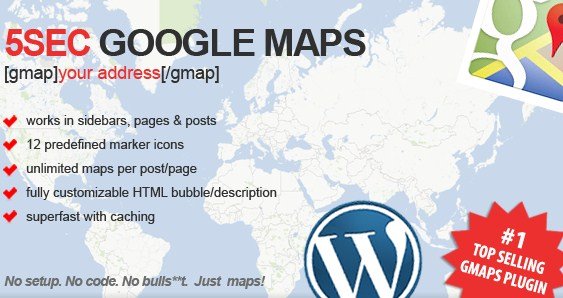
The 5sec Google Maps plugin for WordPress does exactly what its name suggests: it gets a map onto your site in about five seconds. There is no API key to request, no settings screen to click through, and no tutorial to watch. Once the plugin is activated, you generate a map using a simple shortcode and paste it into any post or page. The package is the same build distributed by Codecanyon, so you receive the original author's plugin without any extra wrappers. This tool is aimed at site owners who need a location displayed quickly, not at developers who enjoy tinkering with theme files. You install it, add a shortcode, and the map appears immediately. That straightforward approach carries through the entire plugin, and you never have to edit templates or configuration files just to show an address. The whole experience is designed to get out of your way, and it does.
The visual map builder is where the actual creation happens. You work directly on screen, clicking to drop pins and dragging to reposition them. There is no need to type latitude and longitude coordinates by hand. Zooming and panning the preview is just as direct, so you frame the exact area you want before saving. You can place several pins on the same map, which is handy for showing multiple store locations, delivery areas, or event venues in a single embedded view. The builder is built for speed, so a map with several markers can be completed in seconds rather than through a long form with hidden settings. Once saved, the map stays fully responsive on the front end. It resizes automatically on phones, tablets, and narrow sidebars, so visitors never have to pinch or scroll sideways to see the full layout. Everything renders cleanly, and the map works as a functional part of your page rather than a decorative image.
Similar products
 JoomUnited

A set of ten predefined map skins lets you change the colour scheme and shading to suit your site’s look. If you want a more precise match, unlimited colour overlays give you full control over the final tone. Directions can be calculated to and from any pin address, so a visitor can click a location and receive route guidance without leaving the page. This works for single-pin and multi-pin maps, which is useful for contact pages listing a head office and regional branches. Fifteen predefined pin icons ship with the plugin, so different places can be distinguished at a glance. When those don’t fit your brand, the custom pin upload lets you add your own marker images and place them through the same builder. You control the exact look of every marker. There’s no code involved, and every change takes effect as soon as you save. That level of control keeps your map looking native to the rest of the site.
The plugin also includes live info layers for traffic, transit, and bicycle data. These layers bring up-to-date information into the map, helping visitors check road conditions, plan public transport trips, or find bike-friendly routes. Each layer toggles independently, so you only show what matters for your audience. Configuration never becomes a chore because the same visual builder handles pin placement, styling, and layer options in one place. There is no separate settings page to work through first. A simple one-pin map can be ready in seconds, and expanding it later with more pins, a different skin, or direction controls takes just as little effort. Editing a map means reopening the builder, making the change, and saving. This plugin is a straightforward way to add Google Maps to WordPress without restructuring your workflow. You create what you need, place it with a shortcode, and let visitors explore the map on their own. There’s nothing left to remember after that.
- Item type
- plugin
- Category
- Wordpress Plugins
- Version
- 5.0.10
- Availability
- In stock
- Delivery
- Digital
- Last updated
- August 9, 2026
The 5sec Google Maps Wordpress Plugin listing is available in Wordpress Plugins as a plugin. Check the description, item facts, and purchase details to assess its relevance to a project.
Usage rights depend on the license selected at checkout. Review the complete terms before using this item for client work, redistribution, SaaS, or more than one end product.