WP Media Folder – Media Library with Folders 6.2.2
Wordpress Plugins JoomUnited 4.8 (3.4K reviews)
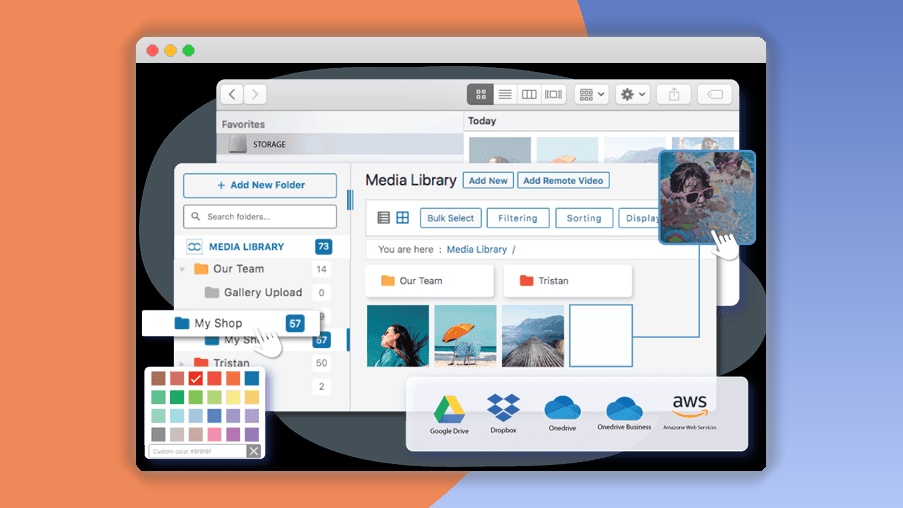
WP Media Folder turns the default WordPress media library into an organized, folder-based system. Instead of scrolling through an endless list of uploaded images, videos, and documents, you create folders and subfolders that mirror how you think about your content. The plugin adds a familiar file-tree panel to the media screen, so you can rename, move, or delete folders with a few clicks. Uploading is just as straightforward: drag files from your computer and drop them directly into the folder where you want them to live. You can also drag files between folders within the library to reorganize them on the fly. Bulk actions let you select multiple files and move or delete them at once, which is a huge time-saver when you have hundreds of items to sort. Existing media items can be moved into their proper folders after installation, so you are not forced to start over with a blank library. Everything operates from within your WordPress dashboard, meaning there is no separate interface to learn or external service to configure.
Beyond basic organization, WP Media Folder adds practical tools that improve how you manage media assets. Custom fields allow you to attach metadata such as alt text, descriptions, or copyright information to any file, making it easier to find things and improving accessibility and SEO. The advanced search and filtering options let you narrow results by folder, file type, custom field values, or keywords, so locating a specific image takes seconds instead of guesswork. The plugin also integrates with popular page builders like Elementor and Beaver Builder. When you are editing a page, you can browse your structured folders and insert media directly, without leaving the builder. For sites that need extra control, there is media library synchronization with your file system, plus automatic image watermarking that protects your visuals the moment they are uploaded. On top of that, the plugin receives updates directly through your WordPress dashboard, so staying current does not require manual downloads or third-party tools.
Different website owners will find different reasons to appreciate this plugin. Bloggers can sort post images by category or date, while e-commerce store owners can group product photos by brand, product type, or collection. Designers and agencies often use it to separate client projects, keeping mockups, logos, and final deliverables in distinct folders. Marketing teams can arrange campaign creatives, and educational platforms can structure course materials and downloadable resources. The plugin works with WordPress 4.0 and above, including multisite networks, and supports the standard range of media file types: images, videos, audio, and documents. Its interface is responsive, so you can manage files from a tablet or phone. The performance has been designed to handle large libraries without slowing down the admin area, which matters when you have several thousand files to organize. Folder loading times remain fast even as the library grows, and the folder tree reflects accurate file counts after bulk moves.
WP Media Folder’s real strength is that it feels like working with your computer’s file manager but inside WordPress. There is no complicated setup process, and the learning curve is essentially non-existent for anyone who has used folders on a desktop. Everything you need, from moving existing media into new folders to adding custom fields for better metadata, is available from the same media library screen you already use. That simplicity translates into a more organized, professional website and fewer wasted minutes hunting for the right image. If your WordPress media library has become a jumble of filenames, this plugin gives you a straightforward way to take control and keep it structured over time. The longer a media library goes without folders, the more overwhelming it becomes, so tackling the problem early pays off. It is a practical investment for anyone who relies on WordPress to manage visual content, and it does not require learning a new workflow or abandoning your existing habits.

 Codecanyon
- Item type
- plugin
- Category
- Wordpress Plugins
- Version
- 1.6
- Availability
- In stock
- Delivery
- Digital
- Last updated
- August 12, 2026
WP Media Folder – Media Library with Folders appears in the Wordpress Plugins catalog and is classified as a plugin. The page focuses on information available in the listing rather than unsupported performance or compatibility claims.
Usage rights depend on the license selected at checkout. Review the complete terms before using this item for client work, redistribution, SaaS, or more than one end product.