GMAPS for WPBakery Page Builder 1.6
Wordpress Plugins Codecanyon 4.8 (4.9K reviews)
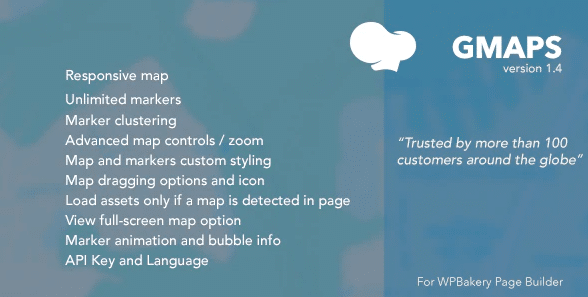
GMAPS for WPBakery Page Builder is an addon distributed through Codecanyon, built for one clear purpose: giving the WPBakery editor a proper Google Maps element. After installation, you can place a fully functional map onto any page or post without copying embed codes from Google or wrestling with shortcodes. The map appears just like any other element inside WPBakery's visual interface, so you work in the same environment you already know. For people who build contact pages, property listings, store locators, or event sections, this removes a frequent source of frustration. You do not need to write any code or handle the embed process yourself. That makes adding location content quick for new users and seasoned designers alike. The plugin sits quietly inside your existing page builder, ready to be dragged into place. Its job is simple, and it stays out of the way while you arrange the rest of the page.
The configuration side of this addon is where the convenience really shows. In the WPBakery editor, the map element opens its own settings panel. There you specify which location to display, enter an address or coordinates, and pick how the map should behave for visitors. You decide how prominent the map should be, which controls appear around it, and how it fits within the surrounding content. The usual options you'd associate with an embedded Google Map are available without extra tools. Testing the options does not require leaving the page builder. You can also adjust the initial view so that the map centers on exactly the area you want to highlight. Every change you make appears instantly in the editor preview, so you can experiment until the framing looks right. This kind of direct feedback means you never have to guess how the map will end up looking on the published page.
The maps this plugin produces are live Google Maps, not static images. Visitors can interact with them the same way they would with a normal Google Map: dragging to explore the neighborhood, zooming in for a closer look, or using the available map controls. That makes the element useful for more than just a basic contact page. A local business can show its exact position relative to nearby streets and landmarks. A real estate site can place several properties in a way that lets potential buyers compare locations at a glance. A store that serves multiple areas can give customers a clear sense of coverage. Because the map is a proper element inside WPBakery, it also inherits the layout structure around it, so it stretches or centers to fit whatever column width you have defined. The result is a location feature that looks like part of the design rather than something glued on at the last minute.
Other products to consider

 Codecanyon

Because the plugin is distributed through Codecanyon, the file you get is the exact package the original author released. There are no edits, repacked installers, or altered files inside. You install it through the standard WordPress plugin upload screen, activate it, and the map element appears among your WPBakery options. That clean distribution makes sense for freelancers and small agencies who build client sites with WPBakery and prefer not to spend time assembling map embeds by hand. It also helps anyone who manages a single business site and just wants a straightforward way to put a map where it belongs. The plugin does one thing, and it does it inside the tool you're already using. For WPBakery users, it fills a gap that used to mean hunting for embed code. No external code has to be pasted into your page text. This keeps the whole process contained from start to finish.
- Item type
- plugin
- Category
- Wordpress Plugins
- Version
- 1.2.0
- Availability
- In stock
- Delivery
- Digital
- Last updated
- August 10, 2026
The available listing for GMAPS for WPBakery Page Builder places it among Wordpress Plugins products. It is presented here as a plugin with its supplied description and purchase information.
Usage rights depend on the license selected at checkout. Review the complete terms before using this item for client work, redistribution, SaaS, or more than one end product.