Mapplic - Custom Interactive Map WordPress Plugin 7.1
Wordpress Plugins Codecanyon 4.8 (1.4K reviews)
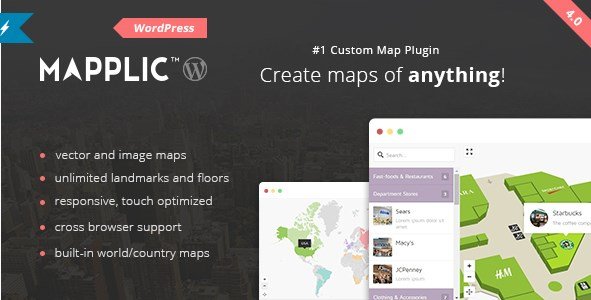
Mapplic is a WordPress plugin built for creating interactive maps without writing a line of code. You start with your own image, an SVG vector, or one of the built-in country and world maps included with the plugin. From there, you plot markers, define areas, and make everything clickable. The result is a map your visitors can explore: tapping a marker opens details, follows a link, or jumps to another floor defined in the admin. Because the plugin runs inside WordPress, all the maps you create are managed through the regular dashboard. There is no separate application to learn and no external service to configure. The plugin handles the display, and your visitors get a smooth, responsive experience whether they are on a desktop monitor or a phone. That said, it is the kind of tool that feels equally comfortable in the hands of a developer and a site owner.
The feature set is straightforward but deep. You can place an unlimited number of landmarks on any map, which means you are never forced to pick and choose which locations matter. For buildings with multiple levels, the plugin supports unlimited floors, so a museum, shopping center, or office complex can have a separate interactive layer for each floor. A dedicated admin interface makes it easy to add, edit, and organize all of those landmarks and floors without touching template files. Each map can also support deeplinking, meaning a specific location on the map has its own URL. That is helpful for sharing a particular store or exhibit directly with someone instead of sending them to the map's homepage. Everything is touch optimized, and the layout responds automatically to fit the screen size it is viewed on. Because the maps themselves are built from the images and vector files you provide, the visitor interaction happens right on those files rather than through another embedded map service.
Other products to consider
 Themify
There is also a practical design angle. Because Mapplic works with any image or SVG you supply, the map can match the visual style of your site instead of looking like a generic widget dropped into the page. The built-in country and world maps cover the cases where your content is geographic in nature. Distribution is handled as a standard WordPress plugin archive, and the zip file in this listing is the same one the original author publishes through Codecanyon. That means you install it the way you would install any WordPress plugin: upload the zip through the WordPress admin, activate it, and begin adding your interactive content. It is a single product with one clear purpose: turning static images into interactive, clickable maps. If your project involves a map at all, this plugin keeps the entire process inside WordPress rather than forcing you to bounce between a third-party service and your site.
In practice, Mapplic suits projects like real estate directories, store locators, university campus guides, event venues, hotel floor plans, travel sites, and anything else where showing a location visually matters. Without a custom-built map system, a site owner normally relies on static images or embedded third-party map services. Mapplic sits between those two: you control the imagery, the landmarks, and the behavior, while the plugin handles the interactivity and responsiveness. Because the number of landmarks and floors is unlimited, growth is not capped. Adding a tenth floor or a hundredth marker means entering new data in the admin interface, not reworking the map. The file you receive is the original zip from the author's Codecanyon distribution, ready to install like any standard WordPress plugin. For a site that needs an interactive map without a long custom build, this package covers the essential functionality completely.
- Last updated
- August 11, 2026
- Delivery
- Digital
- Availability
- In stock
- Version
- 3.0.1
- Category
- Wordpress Plugins
- Item type
- plugin
The Mapplic - Custom Interactive Map WordPress Plugin listing is available in Wordpress Plugins as a plugin. Check the description, item facts, and purchase details to assess its relevance to a project.
Usage rights depend on the license selected at checkout. Review the complete terms before using this item for client work, redistribution, SaaS, or more than one end product.