Mega Posts and Custom Posts Display WP Plugin 1.1
Wordpress Plugins Codecanyon 4.8 (2.1K reviews)
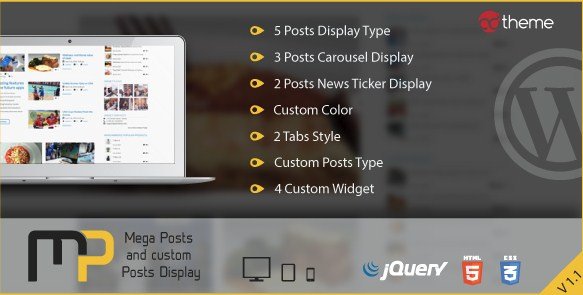
Mega Posts and Custom Posts Display is a WordPress plugin designed to help site owners arrange and present their website content through flexible grid and list structures. Building a custom layout for articles, news items, or blog entries normally requires custom coding or heavy theme modifications. This tool bypasses that friction by providing pre-built visual formats that can be added to any page quickly. Website administrators manage the configuration entirely from the standard dashboard without needing to touch PHP or CSS files. Articles are pulled automatically from your existing database, meaning the displays update in real time whenever new content gets published. Visitors experience a cleaner reading environment because the plugin organizes raw text and featured images into neat visual structures. Bloggers, news portals, and content-heavy websites find this particularly helpful for highlighting specific categories or breaking stories above the fold. The architecture relies on lightweight scripts to ensure that extra visual elements do not slow down page loading times for end users visiting the site on desktop or mobile devices.
Functionality centers around ten distinct display options divided into standard grids, moving carousels, and scrolling news tickers. Five unique layout styles provide varied ways to showcase standard blog posts or custom post types created by other plugins. Three carousel variations allow images and headlines to slide horizontally across the screen automatically or via manual arrow clicks. Two news ticker formats present breaking updates in a continuous horizontal scroll, which works well for high-traffic journals or time-sensitive announcements. Each display mode comes with settings that let administrators control how many items appear on the screen simultaneously. Sorting options allow you to arrange displayed articles by publication date, comment count, or alphabetical order. You can also filter content by specific tags or categories so that particular sections of a website display only relevant topics. Thumbnail images scale properly within each layout to maintain a neat appearance across different screen sizes and display resolutions.
More from this category
 Codecanyon


Customization features give you control over the visual presentation to match your existing brand colors and site theme. A primary color picker lets you apply custom shades to borders, buttons, and text elements, while opacity controls help adjust transparency levels for background fills. Shortcode generation forms the core of the placement system, allowing you to paste display blocks inside standard pages, sidebars, or custom template files. Advanced shortcode parameters also support column arrangements and tabbed interfaces, meaning multiple content feeds can share a single page area without cluttering the screen. Tabs let users switch between different categories or recent posts within the same container block. Columns organize articles into neat vertical rows that adapt automatically as browser windows get resized by the reader. Setup involves activating the plugin, generating the desired shortcode through the options panel, and pasting that code wherever you want the posts to appear.
Compatibility extends to standard WordPress installations and custom post types defined by themes or third-party plugins. Standard WordPress loops are used to retrieve data, ensuring the software works reliably with most caching mechanisms and SEO tools. Documentation provided with the package covers basic installation steps and shortcode usage parameters for site administrators. Support for multiple instances means you can place different post displays on separate pages throughout the same website without configuration conflicts. Maintenance involves standard plugin updates applied through the normal WordPress dashboard interface whenever new versions become available from the original author. Clean code practices ensure that database queries remain efficient even when handling large archives of older content. Ultimately, this utility offers a straightforward method for structuring website content visually, giving readers an organized way to browse through archives, featured articles, and recent updates.
- Item type
- plugin
- Category
- Wordpress Plugins
- Version
- 2.20
- Availability
- In stock
- Delivery
- Digital
- Last updated
- August 10, 2026
The catalog entry for Mega Posts and Custom Posts Display WP Plugin is grouped with Wordpress Plugins and classified as a plugin. Available product information is shown below with related items from the local catalog.
Usage rights depend on the license selected at checkout. Review the complete terms before using this item for client work, redistribution, SaaS, or more than one end product.