Sidebar & Widget Manager for WordPress 4.7
Wordpress Plugins Codecanyon 4.8 (1.7K reviews)
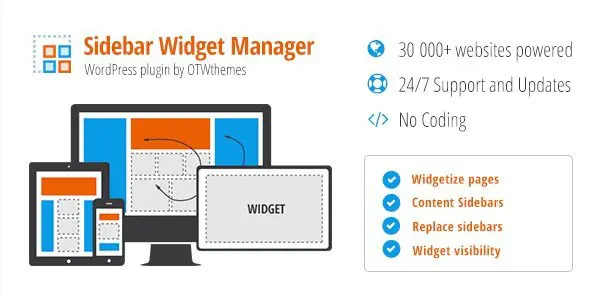
Sidebar & Widget Manager for WordPress is a plugin that puts your theme's widget areas under your control. Most WordPress setups treat sidebars as fixed blocks determined by the theme, leaving you to cram widgets into whatever spaces already exist. This tool changes that arrangement. You can build new sidebars, edit existing ones, and place them on specific pages or posts using a drag-and-drop grid. The same interface handles multiple layout zones, so a single page might have a left sidebar, a right side column, or no sidebar at all. If you run a content-heavy site, you'll appreciate the ability to design each page's widget structure independently. The plugin runs entirely within the WordPress dashboard, which means no editing of template files and no need to understand PHP or CSS just to reorder your widgets. Everything from the width of a widget column to the order of items inside it stays accessible from one clean panel.
Layouts are built around a visual grid that responds to screen size. The OTW Grid Manager lets you drag columns and widgets directly onto a page outline, then set how they shrink or stack on mobile screens. Responsive page layouts come together without writing media queries. Widgets can be aligned vertically or horizontally within their container, giving you simple control over whether you want a stacked list or an inline row of buttons, banners, or text blocks. Unlimited custom sidebars are available, so you could create separate widget areas for each post category, footer section, or landing page. Sticky sidebars and widgets keep specific elements visible as a visitor scrolls, which works well for navigation aids, contact forms, or promotional boxes. The grid snap makes alignment feel predictable, and every change previews live in the admin screen. Site owners often use these layouts to build custom homepages, archive pages, or product category listings without installing a separate page builder.
Widget visibility rules let you show or hide a widget based on page type, post, category, or user login state. That means you can restrict a newsletter signup to blog posts only, keep a special offer visible to logged-in customers, or hide a sidebar menu from the front page. OTW Content Sidebars take this further by allowing you to replace a theme's default sidebar with a custom one for a particular post or archive. User role controls add another layer: certain widgets can appear only for administrators, editors, subscribers, or custom roles you have set up. WPML support lets you assign different sidebars to translated pages, while WooCommerce, bbPress, and BuddyPress integrations give each of those sections its own widget layout. A storefront can use a product-specific sidebar, a forum can have its own set of quick links, and a BuddyPress member page can show different tools to different groups. Each integration works from the same dashboard.
Other products to consider
 Ninja Forms
Built for WordPress sites that outgrow the default sidebar behavior, this plugin gives you one manager instead of a pile of separate fix-it plugins. You receive the same installable file that's listed on the Codecanyon marketplace, so it drops into your WordPress admin like any other plugin. Site owners working with multilingual stores, membership directories, or busy forums get integrated support for WPML, WooCommerce, bbPress, and BuddyPress, which means no patching together several tools. All the settings live in one place, so the learning curve stays low. After an afternoon of pointing, clicking, and dragging, you'll have a layout system that matches how your content actually needs to appear across desktop and mobile screens. The drag-and-drop grid, sticky widgets, and visibility rules combine to handle the kinds of layouts that usually require a page builder or a custom theme.
- Last updated
- August 9, 2026
- Delivery
- Digital
- Availability
- In stock
- Version
- 3.1.3
- Category
- Wordpress Plugins
- Item type
- plugin
Sidebar & Widget Manager for WordPress is one of the Wordpress Plugins items recorded as a plugin. The content below uses the supplied listing information and current local catalog data.
Usage rights depend on the license selected at checkout. Review the complete terms before using this item for client work, redistribution, SaaS, or more than one end product.