SupportCandy Assign Agent Rules 3.1.2
Wordpress Plugins SupportCandy 4.8 (2.6K reviews)
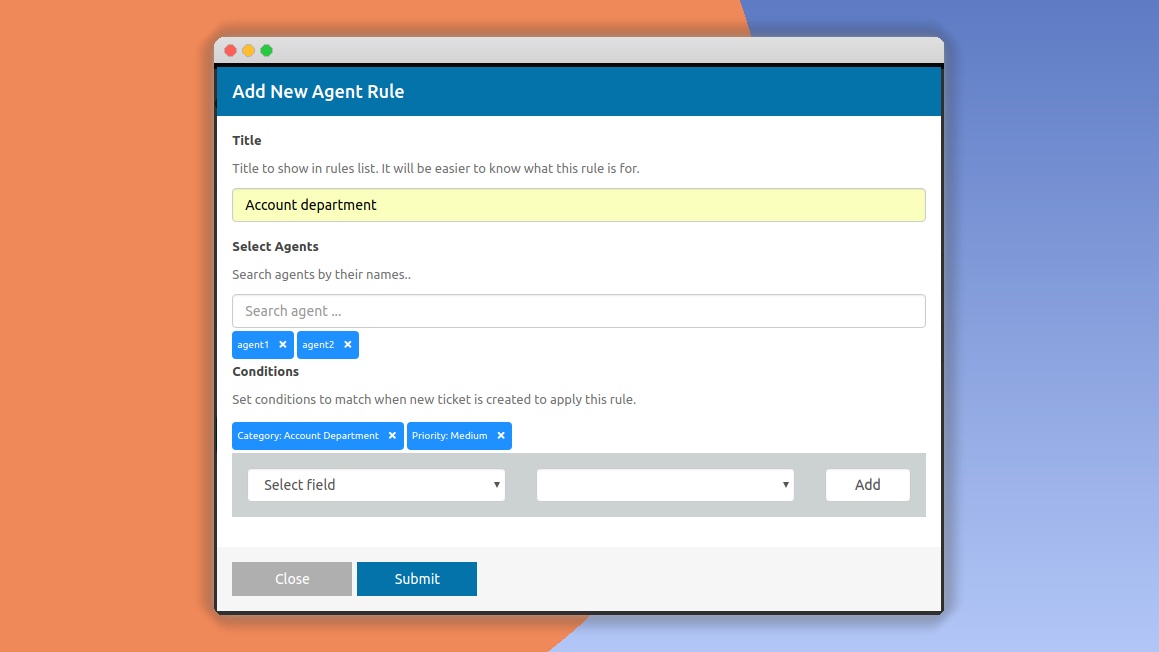
SupportCandy Assign Agent Rules is an add-on for the SupportCandy WordPress help desk plugin. It replaces manual ticket assignment with an automated system that works according to rules you create. Each incoming ticket is evaluated against the conditions you set, and the plugin then routes it to a selected agent, department, or team. Rules can be built around ticket category, priority, department, the customer's user role, keywords in the subject or body, the ticket source, or custom fields. The plugin also supports department-specific rules, a fallback agent for tickets that match no criteria, and load balancing to spread work fairly across your team. Because assignment happens in real time, a newly submitted ticket gets an owner immediately without anyone having to sort it. For teams that handle a high volume of requests, this removes an entire category of repetitive admin work, and the add-on lives inside the same SupportCandy interface you already use.
Similar products

 Codecanyon

Creating a rule starts with choosing a trigger. You might assign all tickets with the Billing category to your payments team, or route anything marked high priority to a senior agent. The condition editor supports multiple criteria per rule and both AND and OR logic, so you can build combinations that fit how your team actually works. You can also direct tickets to a specific group or team, not just an individual agent. Keyword-based routing helps with bug reports or account requests, while customer-specific rules can send VIP users to a dedicated agent. The plugin lets you set a fallback agent or department that receives any ticket failing to match an existing rule. There is also an option to distribute tickets evenly among agents so one person does not get overwhelmed while others sit idle. Changes to rules apply to new tickets immediately, and you can fine-tune them as your support structure evolves.
Using this add-on requires the core SupportCandy plugin to be installed and active. The publisher lists WordPress 5.0 or newer and PHP 7.0 or newer as minimum requirements, and the plugin is maintained for compatibility with recent SupportCandy releases. Setup is straightforward: you install the plugin like any other WordPress extension, activate it, and open the Assign Agent Rules section under SupportCandy's settings. Rule conditions can also check the ticket source, such as email or web form, and any custom fields your help desk uses, so the routing logic can match the specific structure of your organization. The admin interface is responsive, and the plugin is optimized so rule evaluation does not add noticeable overhead to ticket processing. This add-on is distributed under the GPL license, which means you get full source code access, can modify it for your own needs, and are free to use it commercially. No subscription or recurring payment is tied to the plugin itself.
Automated assignment changes how support teams use their time. Agents no longer pause to figure out who should handle a ticket, and managers do not need to monitor the inbox for misrouted requests. Tickets reach the person best positioned to address them, which typically leads to faster resolutions and fewer back-and-forth transfers. Load balancing keeps workloads reasonable, while the fallback option guarantees that even unusual tickets are assigned somewhere. Because rules are easy to edit, the system can grow with your team; adding a new product line, department, or customer tier simply means adjusting conditions. Teams that handle technical support, onboarding, or e-commerce requests can tailor conditions to their own categories and keywords. The plugin does not promise to solve every support challenge, but it does remove a recurring source of friction for organizations that rely on SupportCandy, and it helps turn a busy inbox into a more orderly workflow.
- Last updated
- August 11, 2026
- Delivery
- Digital
- Availability
- In stock
- Version
- 2.6
- Category
- Wordpress Plugins
- Item type
- plugin
The SupportCandy Assign Agent Rules listing is available in Wordpress Plugins as a plugin. Check the description, item facts, and purchase details to assess its relevance to a project.
Usage rights depend on the license selected at checkout. Review the complete terms before using this item for client work, redistribution, SaaS, or more than one end product.