Visual Composer Addon - Chameleon Audio Player 1.6.2
Wordpress Plugins Codecanyon 4.8 (3.4K reviews)
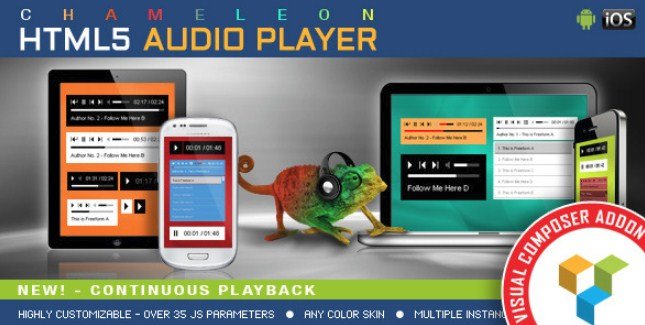
Chameleon Audio Player is a WordPress plugin that extends Visual Composer, the popular page builder. It gives you a dedicated HTML5 audio player element that you can drop into any page or post layout. The player works like any other Visual Composer component, so you add it through the familiar content editor interface and configure it from the same settings panel. No separate setup screens or shortcode memorization are required. The element is designed for people who want to present audio files, such as music tracks, podcast episodes, or voice clips, without relying on a plain browser default player. It renders as a custom-designed player on the front end of your site. Because it is built on HTML5, it handles audio playback natively and does not depend on Flash or other deprecated technologies. That keeps it compatible with how modern browsers handle media. You can manage everything from the Visual Composer interface without touching code.
The main draw of this addon is its color customization. Every visible part of the player can be matched to your site's existing palette. You can change the player background, the volume slider, the timer, the buffer indicator, the seekbar, and the song title text. The playlist area is also fully adjustable, with separate controls for the playlist background, the font used for item names, and the line that separates each entry. This level of control means the player does not stand out as a third-party component. Instead, it blends into your design or becomes a deliberate accent, depending on the choices you make. Along with colors, you can show or hide individual elements of the player. If you do not want the timer displayed, or you prefer a minimal player without a visible playlist, you can turn those parts off. Everything is controlled with simple options, so there is no need to edit CSS or override template files.
The player is built to work on mobile devices, which means it responds to touch input and scales down to smaller screen sizes without losing its core functionality. That makes it a practical choice for responsive layouts. Multiple instances are supported as well, so you are not limited to a single player per page. Each player can be configured independently with its own set of parameters. You could have one player with a dark color scheme and a visible playlist in the sidebar, while another player in the same page uses a light theme and hides the playlist. The addon exposes multiple parameters for each instance, covering the design options mentioned earlier as well as playback settings. Easy configuration is a central part of the design, with the Visual Composer interface presenting all the choices in a structured way. You do not need to work with shortcode attributes or manual HTML to get the player running.
This plugin is distributed through Codecanyon, where it appears under the Visual Composer addon category. The package you receive from woocrack.com is the exact zip file that the original author uploaded, with no modifications or re-packaging. Once downloaded, you can install it through the WordPress plugin upload screen, and the activation process works normally. If you are already using Visual Composer, the addon will appear as a new element in your editor once activated. The distribution method does not require any special activation keys or additional accounts. You simply get the plugin file and install it like any other WordPress plugin. It is important to ensure your WordPress installation meets the requirements for Visual Composer, since the addon depends on that base plugin to function. This addon does not replace Visual Composer; it extends it with an additional audio player component. That means you need to have Visual Composer installed and active for the addon to show up.

 Memberpress

- Item type
- plugin
- Category
- Wordpress Plugins
- Version
- 1.1.10
- Availability
- In stock
- Delivery
- Digital
- Last updated
- August 9, 2026
This listing covers Visual Composer Addon - Chameleon Audio Player, a Wordpress Plugins from plugin. Use the source description and recorded item details below to check whether it fits the intended project.
Usage rights depend on the license selected at checkout. Review the complete terms before using this item for client work, redistribution, SaaS, or more than one end product.