Visual Composer Ultimate Pricing Tables Add-on 1.6
Wordpress Plugins Codecanyon 4.8 (3.3K reviews)
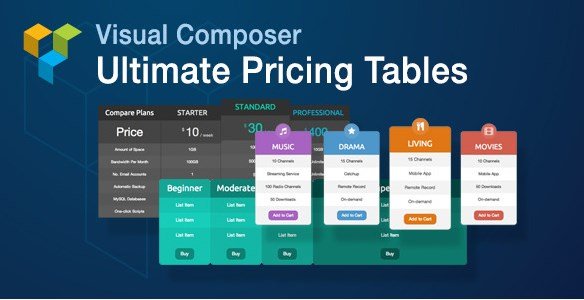
The Visual Composer Ultimate Pricing Tables Add-on is a WordPress plugin that brings a dedicated pricing table element into the Visual Composer page builder. It is distributed through Codecanyon, meaning it is an extension that works with the core Visual Composer plugin rather than standing alone. Once installed, you can add a pricing table to any page or post in the same way you add any other content element. The tool is aimed at people who need to display service packages, subscription tiers, or product pricing in a structured, visually arranged block. Before using this add-on, setting up that kind of layout usually meant hand-coding columns, writing custom CSS, or relying on a theme-specific pricing table with limited options. This add-on replaces that work with a controlled interface where the pricing table's structure, colors, and content are managed directly within Visual Composer's editor. The base Visual Composer plugin must already be installed.
Similar products

 Codecanyon


The add-on offers a set of options that are commonly needed for pricing layouts. You can choose custom column layouts, allowing for a layout with two, three, four, or more columns, or an asymmetric arrangement where one plan is featured. Each column acts as an individual pricing plan with its own set of features, headline, and price. You are not locked into a predefined template. Background colors and text colors are fully customizable, and transparency is supported, so the tables can blend with your page background or stand out as needed. The content inside each plan is completely custom, meaning you write exactly what appears, from feature lists to fine print. Additionally, Font Awesome icons are included, so you can add icons to headings, buttons, or feature rows without loading a separate icon plugin. This makes it possible to create subtle pricing tables that match your brand colors or bold tables that draw attention to a specific plan.
Because the add-on works inside Visual Composer, every pricing table you build is managed through the same drag-and-drop interface you already use for the rest of your page. You place the element, adjust columns, and then edit each plan's properties in the familiar backend or frontend editor. Color controls give you direct input for background and text, including a transparency slider. You can type whatever you want in each plan, from a short list of included features to a longer description. The included Font Awesome icons are rendered with the table, keeping your design cohesive and reducing the need for extra plugins. You can set one column apart with a different background color, a common way to highlight a recommended plan. This workflow keeps pricing tables consistent with the layout language of your site. Since everything is stored with the page content, you can duplicate, revise, and reuse your designed tables across different pages.
Visual Composer Ultimate Pricing Tables Add-on suits anyone who uses Visual Composer and needs to present pricing information clearly. It works for service providers, digital product sellers, membership sites, and agencies that build client pages with Visual Composer. The plugin is distributed through Codecanyon, and the file provided here is the exact package from the original author. You are receiving a standard installable WordPress plugin file, with nothing added and nothing removed. Once installed, it appears as a new content element in your Visual Composer library. The add-on exists to make pricing tables fit your site's needs, rather than forcing a fixed design. You control the column count, colors, transparency, and content all from the Visual Composer interface. It simply adds a professional pricing table element to your toolset, and you can make it as simple or as detailed as the project calls for.
- Last updated
- August 11, 2026
- Delivery
- Digital
- Availability
- In stock
- Version
- 2.6
- Category
- Wordpress Plugins
- Item type
- plugin
The Visual Composer Ultimate Pricing Tables Add-on listing is available in Wordpress Plugins as a plugin. Check the description, item facts, and purchase details to assess its relevance to a project.
Usage rights depend on the license selected at checkout. Review the complete terms before using this item for client work, redistribution, SaaS, or more than one end product.