WordPress User Bookmarks (Standalone Version) 3.4
Wordpress Plugins Codecanyon 4.8 (1.7K reviews)
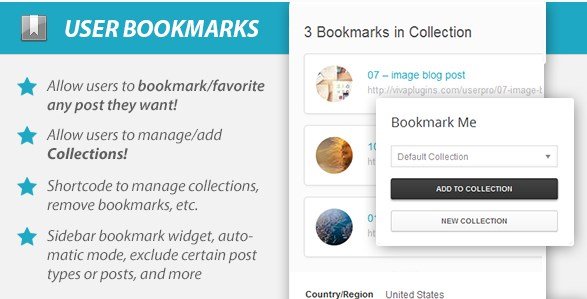
WordPress User Bookmarks is a standalone plugin that gives your site’s registered users a simple way to save and organize content for later reading or reference. It works with regular posts, pages, custom post types, and forum topics, so almost anything on your site can be bookmarked. Each user gets a personal bookmark library, and within that library they can create their own named collections. Instead of one endless list of saves, a user might have collections called “Recipes,” “Tutorials,” or “Client Work.” Adding a bookmark is a single click, and everything stays tied to their WordPress account. The plugin is the standalone build of a premium Codecanyon product, meaning it doesn’t require a larger framework or additional plugins to function. It’s a self-contained solution aimed at sites that want to offer a genuinely useful bookmarking feature without building something from scratch. Bookmarks are stored inside the user’s account, so they will appear every time that person logs in.
The whole bookmarking process runs on Ajax, which means users never wait for a page reload when they save or organize something. Clicking the bookmark button sends the request in the background, and the new bookmark appears instantly in the user’s list. That same smoothness carries over to creating collections, renaming them, and moving bookmarks between them. Each user has a dedicated area where they can view all of their saved items and see which collection each item belongs to. Managing a collection is as straightforward as navigating your own folders on a computer. Users can build up their library over time without any disruption to the page they’re currently reading. Everything remains quick and responsive, which is exactly what you want when someone is hopping between several posts and saving a few gems along the way. It also gives visitors a clear sense of where each bookmark sits, so nothing feels hidden.
Similar products

 Codecanyon

For site owners, the plugin offers several ways to put the bookmarking system in front of visitors. You can add a bookmark widget to a dynamic sidebar, which lets users save content from anywhere on the page. Another way is to turn on automatic mode, and the bookmark widget will appear below the content of each post without any manual placement. If you prefer more control, drop a shortcode into any post, page, or custom template, and the widget shows up exactly where you want it. There are also PHP methods available for theme developers who want to call the widget or a user’s collections directly from a template file. This flexibility also means the plugin works on a simple blog, a busy news site, or a community forum, and each type of layout can integrate the bookmark system into its existing structure. These options can be combined as needed.
Beyond the ready-made display options, the plugin includes its own API, which is a useful addition for developers. The API opens up the bookmarking data to other parts of your site, so you can pull a user’s saved items, collection names, or bookmark counts into custom interfaces if you need them. It also works with any custom post type, not just standard blog posts. As a result, you can enable bookmarking on products, portfolio items, events, directories, or anything else your WordPress site uses. Because the plugin is built to handle a variety of content types, it fits easily into projects that go beyond the default post and page setup. What you get from combining the API and the flexible content support is more than a surface-level widget; it actually keeps the bookmark data structured and accessible for whoever builds on top of it. This makes the plugin a practical choice for sites that expect to grow or change over time.
- Item type
- plugin
- Category
- Wordpress Plugins
- Version
- 5.0.2
- Availability
- In stock
- Delivery
- Digital
- Last updated
- August 10, 2026
WordPress User Bookmarks (Standalone Version) is one of the Wordpress Plugins items recorded as a plugin. The content below uses the supplied listing information and current local catalog data.
Usage rights depend on the license selected at checkout. Review the complete terms before using this item for client work, redistribution, SaaS, or more than one end product.