YITH WooCommerce Quick Export Premium 1.3.10
Wordpress Plugins Yithemes 4.8 (3.5K reviews)
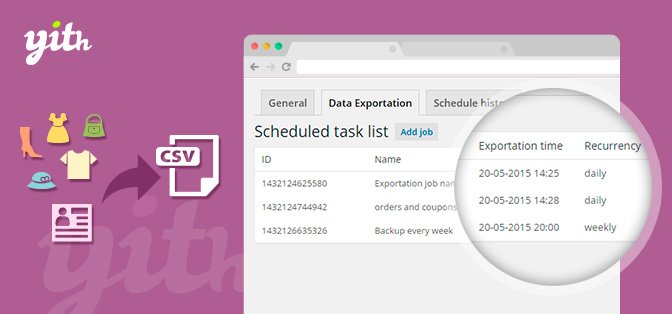
YITH WooCommerce Quick Export Premium is a dedicated extension for WooCommerce, developed by YITHEMES, that gives store owners direct control over how their store data is exported and stored. Rather than relying on manual, browser-based downloads, this tool works through your WordPress admin panel to handle exports in a structured way. Its main purpose is straightforward: take the information you need from your store, package it cleanly, and get it to an external location you trust. The extension integrates with Dropbox, which means you can send backup copies of your product lists, orders, customer data, and other important records to the cloud without having to download them to your computer first. That alone changes how often you might consider backing up, because the process no longer depends on remembering to click a button. The entire operation is managed from within your site, so there is no need to switch between different tools or services.
The export process itself gives you plenty of control over what is included. You do not have to settle for a complete dump of everything in your database. Instead, you can choose which information you want to export, whether that means a specific set of products, a particular range of orders, or customer details for analysis. This selectivity makes the tool practical for routine tasks like syncing data with other systems or preparing a clean subset of records. You can also customize both the filename and directory structure for each export. Rather than being forced into a generic naming scheme, you set a convention that fits your filing system. That level of customization matters when you handle exports regularly and need to know at a glance what a file contains, when it was created, or which part of the store it came from. The result is a workflow that matches how you work.
Dropbox integration is where this extension really comes into its own. You can link your Dropbox account and have exports sent there automatically, which removes the risk of losing data when a local hard drive fails or a hosting account runs into trouble. The scheduling feature takes this a step further by letting you set automatic exports on a daily, weekly, or monthly basis. Once the schedule is configured, the extension runs on its own and pushes the exported files to Dropbox. You do not need to remember to run a backup or manually transfer files. That combination of off-site storage and recurring automation gives you a dependable safety net for your store’s data. It also means your backup routine no longer depends on a single person remembering to do it. Instead, the system works in the background and keeps your records current. For anyone managing an online store, that kind of reliable, hands-off backup is hard to ignore.
Similar products
 Codecanyon
For store owners who want a straightforward way to keep an eye on their data, YITH WooCommerce Quick Export Premium does not overcomplicate things. It fits directly into the WordPress dashboard and works with the WooCommerce data you already have. You define what to export, where the file should go, and how often the task should run, then the plugin handles the rest. There is no need to build custom scripts or rely on another service to move files around. Because it comes from YITHEMES, you are using an extension built specifically for WooCommerce rather than a generic tool that only partially works. The focus is practical: regular exports, clear naming, and scheduled backups to Dropbox. All of these features combine into a single package that does not demand constant attention. Once it is set up, it keeps working. That is the kind of utility that becomes easy to take for granted, in the best way possible.
- Last updated
- August 11, 2026
- Delivery
- Digital
- Availability
- In stock
- Version
- 3.1
- Category
- Wordpress Plugins
- Item type
- plugin
The YITH WooCommerce Quick Export Premium listing is available in Wordpress Plugins as a plugin. Check the description, item facts, and purchase details to assess its relevance to a project.
Usage rights depend on the license selected at checkout. Review the complete terms before using this item for client work, redistribution, SaaS, or more than one end product.