Hyipex - Hyip Investment App UI Design Latest Version
Others Themeforest 4.8 (4.5K reviews)
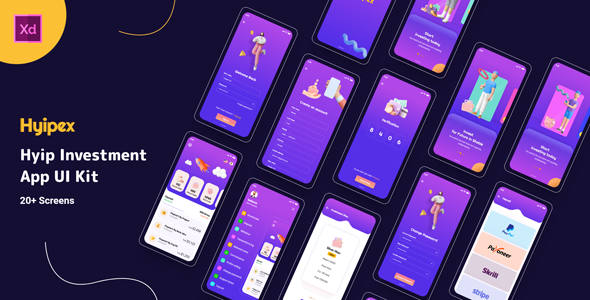
Hyipex
Hyipex App UI Kit is perfect for your Hyip investment app UI design and project, it contains ready-to-use components, Typography, Design System, and customizable Color Palette.
Over 28+ Unique Layouts, we covered almost every aspect of a Hyip investment App would require.
Template Features:
- 30 Mobile App Screens Totally
- Dark and light mode
- Modern and Clean Design
- Purposeful Pages
- Symbol Objects
- Compatible with Figma & Sketch
- Unique and Creative Design
- Easily Customizable files
- Pixel Perfect
- Well Organized & Grouped Layers
Pages Included:
- Splash Screen
- Onboarding 01
- Onboarding 02
- Onboarding 03
- Sign In
- Sign Up
- OTP Verification
- Change Password
- Home
- Menu
- Investment Plan
- Confirm to invest in silver
- Deposit
- Payment by stripe
- Withdraw
- Withdraw by stripe
- Referred User
- Profile Setting
- Profit Calculator
- Transfer Balance
- Notification
- Change language
- Notification
- Transactions Log
- Referral Commission
- Support Ticket
- 2FA SEcurity
Graphics Files Included
- Adobe XD CC
how to install adobe xd
- 01 Go to Adobe XD on Academic Software and click on the green button ‘Download Adobe XD’ to download the installer.
- 02.Open the .exe installer file from your downloads folder to start the installation.
- 03.Once the installation is completed, the startup screen of Adobe XD will appear.
The program is now installed and ready to use
How to Edit Adobe XD File
You can edit any text, colors, or any component by double click and change the same
Related products
 Themeforest

Add or Replace Images: Select the Group Layer of a section of the Template, then double click on the single-layer where you can put an image; now on the right you can see a menu with a lot of options of customization, just click choose an image and done!
Font Family
- Rounded
- Roboto
Icon
- Flaticon
Image
- Unsplash
- Freepick
Note: All images are just used for preview purposes only and NOT included in the final purchase files.
Support Facility:
Please send us your product presale query, after sales developer support request, customization project, and any other queries to: https://viserlab.com/support
- Last updated
- October 5, 2026
- Delivery
- Digital
- Availability
- In stock
- Version
- Latest Version
- Category
- Others
- Item type
- digital product
Hyipex - Hyip Investment App UI Design is listed in Others as a digital product. The supplied description, preview, version, price, and recorded product details are collected here for review.
Usage rights depend on the license selected at checkout. Review the complete terms before using this item for client work, redistribution, SaaS, or more than one end product.