OBER - Resume CV Landing Page XD Template Latest Version
Others Themeforest 4.8 (2.8K reviews)
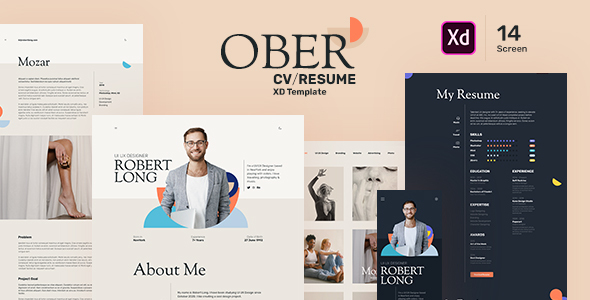
OBER – Resume CV Landing Page XD Template
OBER is a minimal, clean & Sharp looking CV/Resume Landing Portfolio XD Template. It’s focused on visualizations and design shapes so the reader surely can focus on content as well as design. OBER is comes with Dark & Light template and its suitable for Designer, Developer, Freelancer Artist, Photographer & Can be use for Personal Pages.
Layers are well organized with proper naming conventions so you can easily access and change things according your needs. Mobile version of homepage also included.
Template Features:
- 14 Screens or Artboards
- Fully Layered XD Files
- Unique Design
- Dark & Light Template
- Clean & Professional Design
- Easy & Customizable XD files
- Google Free Font
- 1170 Grid
Ober.xd : Contents of 14 screens of Light and Dark Template as mentioned blow
File Included
- 01_Light_Homepage
- 02_Light_Portfolio_List_Page
- 03_Light_Portfolio_Detail_Page
- 04_Light_Blog_List_Page
- 05_Light_Blog_Detail_Page
- 06_Light_Menu
- 07_Light_Mobile_Homepage
- 08_Dark_Homepage
- 09_Dark_Portfolio_List_Page
- 10_Dark_Portfolio_Detail_Page
- 11_Dark_Blog_List_Page
- 12_Dark_Blog_Detail_Page
- 13_Dark_Menu
- 14_Dark_Mobile_Homepage
Fonts Used:
Rubik
Sorts Mill Goudy
Icons Credit:
flaticon.com
Image Credit:
www.pexels.com unsplash.com freepik.com
How to Edit Adobe XD File
You can edit any text, colors by just double click and change the same.
Add or Replace an Image: Select the Group Layer of a section of the Template, then you have to double click on the single-layer where you want to place an image; now drag a image and place over the selection, you will see selection area with blue highlight background color and just drop it. Its done.
- Documentation included ( Contains the XD file, Images Link, Font Info & Drag-n-Drop for image replace guidance )
Note: All images are just used for preview purposes only and NOT included in the final purchase files
 Themeforest

- Item type
- template
- Category
- Others
- Version
- Latest Version
- Availability
- In stock
- Delivery
- Digital
- Last updated
- October 5, 2026
For shoppers browsing Others, OBER - Resume CV Landing Page XD Template is recorded as a template. The page below separates supplied product information from general store and license terms.
Usage rights depend on the license selected at checkout. Review the complete terms before using this item for client work, redistribution, SaaS, or more than one end product.