Students - Online e-Course Elementor Template Kit Latest Version
Others Themeforest 4.8 (363 reviews)
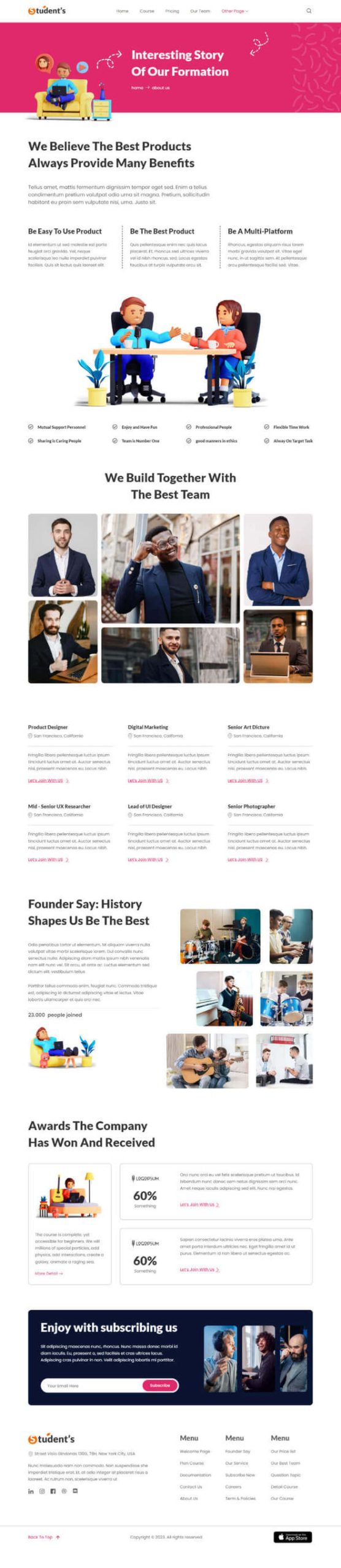
Student’s is an Elementor Template Kit designed for e-learning websites, e-courses or education services. This Template Kits support responsive mobile view. The kit features a fully compatible design system and professionally hand-picked images for a premium, branded head-start on your next project. Optimized for use with the free Hello Elementor theme, this kit is fine-tuned, fast-loading and fully responsive.
Templates:
- Homepage
- About Us
- Contact
- Pricing
- Service
- Testimonials
- Our Team
- FAQ
- Course
- Detail Course
Required Plugins installed with kit:
- ElementsKit Lite
- Elementor
- Envato Elements
- MetForm
- Elementor Header & Footer Builder
How to Use Template Kits:
This is not a WordPress Theme. Template kits contain the design data for Elementor only and are installed using the envato Elements plugin for WordPress or directly through Elementor.
Elementor Template Kits use the Envato Elements plugin to install.
Detailed Guide:
https://help.market.envato.com/hc/en-us/articles/36033428836889-How-to-Upload-Install-Elementor-Template-Kits-from-Themeforest-to-WordPress
For further support, go to Elementor > Get Help in WordPress menu.
How to Import Metforms
- Import the metform block templates
- Import the page template where the form appears and right-click to enable the Navigator
- Locate and select the Metform widget and click Edit Form. Choose New, then Edit Form. The builder will appear
- Click ‘Add Template’ grey folder icon.
- Click ‘My Templates’ tab.
- Choose your imported metform template, then click ‘Insert’ (click No for page settings).
- Once the template is loaded, make any desired customizations and click ‘Update & Close’ The form will appear in the template
- Click Update
Setup Global Header and Footer in UAE
If you have Elementor Pro, setup headers and footers in Theme Builder. Pages you create with Elementor must have the Page Layout set to Elementor Full width for the global header and footer to appear.
- Go to UAE > Header Footer and click Add New button
- Give it a title and select Header, Display on Entire Website and click Publish
- Click Edit with Elementor
- Click the gray folder icon to access My Templates tab and select the header template to import and Update.
5 Repeat for Footer
Images:
This Template Kit uses demo images from Envato Elements. You will need to license these images from Envato Elements to use them on your website, or you can substitute them with your own.
This Template Kit uses demo images from Envato Elements. You will need to license these images from Envato Elements to use them on your website, or you can substitute them with your own.
- https://elements.envato.com/collections/Y2UFZV4Q7E
 Themeforest
- Last updated
- October 8, 2026
- Delivery
- Digital
- Availability
- In stock
- Version
- Latest Version
- Category
- Others
- Item type
- template kit
Students - Online e-Course Elementor Template Kit is cataloged as a Others under template kit. Review the preview and recorded details alongside the original description before purchase.
Usage rights depend on the license selected at checkout. Review the complete terms before using this item for client work, redistribution, SaaS, or more than one end product.