Business Animated Banner GWD Latest Version
HTML Templates Codecanyon 4.8 (4.0K reviews)
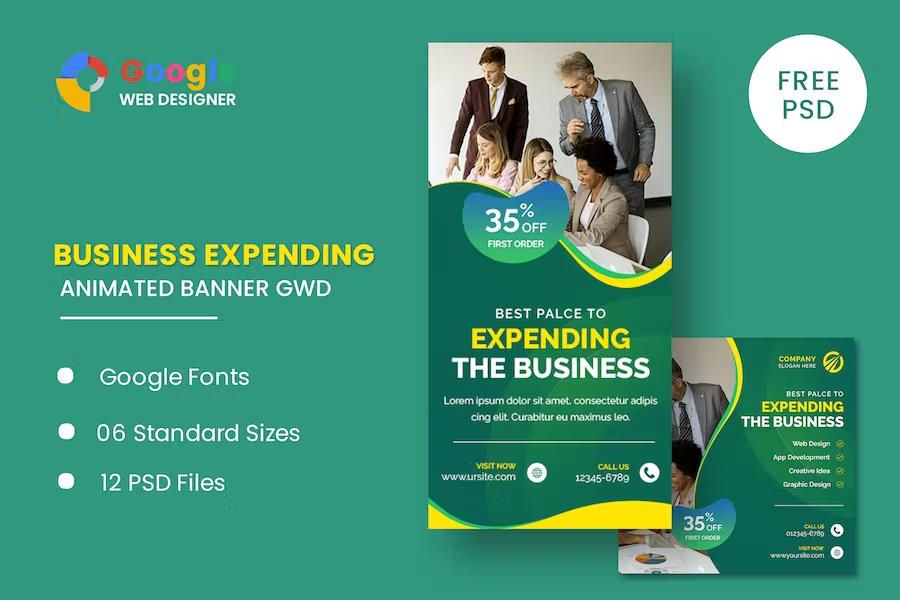
⚡Business Animated Banner GWD Overview
Elevate your online presence with the Business Animated Banner GWD, a dynamic and eye-catching HTML template designed to capture attention and drive engagement. This premium template is meticulously crafted for businesses seeking to create professional, modern, and highly effective advertising banners that stand out across the digital landscape. Whether you're launching a new product, promoting a special offer, or reinforcing your brand identity, this animated banner provides a sophisticated solution.
Leveraging the power of Google Web Designer (GWD), this template offers a seamless experience for customization and deployment. Its responsive design ensures optimal viewing across all devices, from desktops to mobile phones, guaranteeing your message reaches your audience without compromise. With a focus on clean aesthetics and impactful animations, the Business Animated Banner GWD is your key to creating compelling visual narratives that convert visitors into loyal customers, making it an indispensable tool for any digital marketing campaign.
Can't Decide A Single Theme/Plugin?Join The Membership Now
Instead of buying this product alone, unlock access to all items including v with our affordable membership plans. Worth $35.000++
🎯 Benefits of our Premium Membership Plan
- Download v for FREE along with thousands of premium plugins, extensions, themes, and web templates.
- Automatic updates via our auto-updater plugin.
- 100% secured SSL checkout.
- Free access to upcoming products in our store.
🎮 Business Animated Banner GWD Key Features
- 🎮 Eye-Catching Animations: Captivate your audience with smooth, professional, and engaging motion graphics.
- 🔧 Google Web Designer Ready: Easily customize and edit using the intuitive Google Web Designer interface.
- 📊 Versatile Business Designs: Perfect for a wide range of business promotions, from product launches to corporate branding.
- 🔒 Fully Responsive Design: Adapts flawlessly to all screen sizes and devices for maximum reach.
- ⚡ High-Performance Optimization: Ensures fast loading times for a superior user experience.
- 🎯 Clear Call-to-Action Elements: Strategically placed CTAs to guide users towards desired actions.
- 🛡️ Cross-Browser Compatibility: Works seamlessly across all major web browsers.
- 🚀 Easy to Customize: Modify colors, text, images, and animations with minimal effort.
- 💡 Modern & Professional Aesthetics: A clean, contemporary look that enhances brand credibility.
- 📱 Mobile-First Approach: Designed with mobile users in mind for optimal engagement on the go.
- 🔌 Ready for Ad Networks: Optimized for seamless integration with Google Ads, DoubleClick, and other platforms.
- 📈 Conversion-Focused Layout: Built to maximize click-through rates and lead generation.
✅ Why Choose Business Animated Banner GWD?
- ✅ Boost Engagement: Dynamic animations grab attention far more effectively than static images.
- ✅ Enhance Brand Image: Professional and modern design conveys credibility and sophistication.
- ✅ Drive More Conversions: Optimized for performance and clear calls-to-action to maximize results.
- ✅ Save Time & Resources: Pre-designed and easily customizable, reducing development time and cost.
💡 Business Animated Banner GWD Use Cases & Applications
- 💡 Product Launches: Showcase new products with exciting visual flair.
- 🧠 Brand Awareness Campaigns: Reinforce your brand identity with memorable animated messaging.
- 🛒 E-commerce Promotions: Highlight sales, discounts, and special offers to drive purchases.
- 💬 Service Advertising: Clearly communicate the benefits of your business services.
- 📰 Event Announcements: Generate excitement for webinars, conferences, or special events.
- 🎓 Lead Generation: Encourage sign-ups, downloads, or demo requests with compelling visuals.
⚙️ How to Install & Setup Business Animated Banner GWD
- 📥 Download the GWD File: Obtain the Google Web Designer file for the animated banner.
- 🔧 Open in Google Web Designer: Launch the file within the Google Web Designer application.
- ⚡ Customize Content: Easily replace placeholder text, images, and adjust colors to match your brand.
- 🎯 Export for Web: Use the "Publish" function in GWD to export the banner in the required HTML5 format for ad networks or websites.
Ensure you have the latest version of Google Web Designer installed for the best compatibility and access to all features.
🔧 Business Animated Banner GWD Technical Specifications
- 💻 File Format: Google Web Designer (.gwd) and exported HTML5
- 🔧 Customization Tool: Google Web Designer
- 🌐 Output Compatibility: HTML5, CSS3, JavaScript
- ⚡ Animation Technology: GWD Animation Engine
- 🛡️ Cross-Browser Support: Chrome, Firefox, Safari, Edge, Opera
- 📱 Responsiveness: Fully responsive across all device breakpoints
- 🔌 Ad Network Ready: Compatible with Google Ads, DoubleClick, and other HTML5 ad platforms
- 📊 File Size: Optimized for fast loading (typically under 150KB for exported banners)
📝 Business Animated Banner GWD Changelog
Version 2.1.3: Enhanced animation sequences for smoother transitions and added a new CTA button style. Improved GWD project structure for easier customization and updated export scripts for better compatibility with modern ad platforms.
Version 2.1.2: Resolved an issue with text rendering on specific mobile devices and optimized image assets for faster loading. Added a new color scheme preset for corporate clients.
Version 2.1.1: Introduced refined animation easing for more professional motion. Updated the responsive layout to better accommodate ultra-wide desktop screens and improved the placeholder image system.
Version 2.1.0: Major update with a complete overhaul of animation timings for increased impact. Added new pre-set animation templates and improved the overall GWD project organization for quicker edits.
Version 2.0.5: Fixed a minor bug related to button hover states in Firefox. Optimized JavaScript for faster execution and ensured all interactive elements adhere to accessibility standards.
Version 2.0.4: Refined the animation timeline within GWD for more precise control. Updated the responsive breakpoints to ensure consistent display across a wider range of devices and screen resolutions.
⚡GPL & License Information
- Freedom to modify and distribute
- No recurring fees or restrictions
- Full source code access
- Commercial usage rights
🌟 Business Animated Banner GWD Customer Success Stories
💬 "We saw a significant increase in click-through rates after implementing the Business Animated Banner GWD. The animations are professional, and it was incredibly easy to customize with our branding." - Sarah K., Marketing Manager
💬 "As a small business, we needed a cost-effective way to create high-impact ads. This template delivered exactly that. It looks premium and has helped us attract more leads." - John P., Small Business Owner
💬 "The responsiveness of the banner is fantastic. It looks great on both desktop and mobile, which is crucial for our diverse customer base." - Emily R., E-commerce Specialist
💬 "Customizing the banner in Google Web Designer was a breeze. I was able to update it quickly for a flash sale without needing to hire a developer." - Michael T., Digital Marketer
💬 "The professional animations have really helped our brand stand out in a crowded online space. It's a great tool for brand awareness." - Jessica L., Brand Coordinator
💬 "We used this animated banner for our latest product launch, and the engagement was phenomenal. It's a must-have for anyone serious about online advertising." - David Chen, CEO
❓ Business Animated Banner GWD Frequently Asked Questions
Q: What software do I need to customize this banner?
A: You will need Google Web Designer, which is a free software available from Google. It's essential for opening, editing, and exporting the GWD file.Q: Can I use this banner on different ad platforms?
A: Yes, the exported HTML5 banner is compatible with most major ad networks, including Google Ads, DoubleClick, Facebook Ads (for HTML5 ads), and others that support custom HTML5 creatives.Q: How do I add my own logo and images?
A: Open the banner in Google Web Designer. You can easily replace placeholder images by dragging and dropping your own images onto the stage or using the "Replace Image" function. Your logo can be added similarly.Q: Is this template optimized for speed?
A: Absolutely. The banner is designed with performance in mind, utilizing optimized assets and efficient animation techniques to ensure fast loading times, which is crucial for user experience and ad performance.Q: Can I change the colors and fonts to match my brand?
A: Yes, the template is fully customizable. In Google Web Designer, you can easily change colors, fonts, text content, and even adjust animation timings to perfectly align with your brand's visual identity.Q: What kind of support is available if I encounter issues?
A: While the product is provided as-is with Google Web Designer, the community around GWD is extensive. For specific issues related to the template's structure or customization within GWD, resources and forums are readily available.
🚀 Ready to Transform Your Website with Business Animated Banner GWD?
Elevate your digital advertising with the Business Animated Banner GWD, the ultimate solution for creating stunning, high-converting animated banners. This template is your key to capturing audience attention, enhancing brand visibility, and driving tangible results for your business. With its professional design and dynamic animations, you'll stand out from the competition and make a lasting impression.
Choosing the Business Animated Banner GWD means opting for ease of use and maximum impact. Its compatibility with Google Web Designer ensures a seamless customization process, allowing you to tailor every element to your specific needs without requiring advanced coding skills. Invest in a tool that delivers superior engagement and measurable success, making your marketing efforts more effective and efficient.
Don't miss out on the opportunity to boost your online presence and achieve your marketing goals. The Business Animated Banner GWD is more than just a template; it's a powerful asset designed to deliver exceptional performance and outstanding value. Get started today and experience the difference that a professionally animated banner can make for your business!
Every item on Gplzone comes with a license that defines how you can use the product. Understanding the license terms before purchasing is important to ensure you have the right permissions for your intended use. Gplzone offers two main license types: Regular License and Extended License.
The license grants you a non-exclusive, non-transferable right to use the item in accordance with the terms described below. You are not purchasing the item itself, but rather a license to use the item within the specified conditions. All intellectual property rights remain with the original author.
Please read this page carefully before making a purchase. If you are unsure which license you need, refer to the comparison table below or contact our support team for guidance.
The Regular License is designed for personal projects and single-client use. It is the most common license type and is suitable for most individual and freelance use cases. The Regular License allows you to use the item in one end product.
What You Can Do
- Use the item in one end product for personal or commercial use.
- Use the item in an end product that is sold to a single client. You may charge your client for creating the end product.
- Modify the item to suit your needs. You may customize, adapt, or alter the item as part of your end product.
- Use the item in a free end product. This includes personal websites, portfolios, and non-commercial projects.
- Combine the item with other works to create a larger end product, provided the end product is not distributed or sold as a template or theme.
What You Cannot Do
- Use the item in multiple end products. A separate license is required for each end product.
- Redistribute, resell, license, or sub-license the item in its original form or as a competing product.
- Use the item in a product that is sold to multiple end users (SaaS, template, theme marketplace, etc.).
- Extract the source code or components of the item for use in other products outside the end product.
- Use the item on behalf of multiple clients. Each client requires a separate license.
The Extended License is designed for commercial use and projects where the end product is distributed to multiple end users. It grants you additional rights beyond the Regular License, making it suitable for agencies, SaaS products, and commercial applications.
What You Can Do
- Everything permitted under the Regular License.
- Use the item in an end product that is sold, distributed, or made available to multiple end users. This includes SaaS applications, web applications, mobile apps, and software-as-a-service products.
- Use the item in multiple end products for the same client without purchasing additional licenses.
- Use the item in a theme or template that is sold on a marketplace or distributed to multiple customers, provided the item is not redistributed in its original form.
- Charge end users for access to or use of the end product that incorporates the item.
What You Cannot Do
- Redistribute, resell, license, or sub-license the item in its original form. The extended license does not grant you the right to resell the item itself as a standalone product.
- Extract the source code or components of the item for use in other products outside the end product, except as permitted by the item’s specific license.
- Use the item on behalf of multiple different clients in separate end products without separate licenses. The Extended License covers multiple end products for the same client only.
The table below provides a quick comparison between the Regular License and the Extended License to help you determine which one is right for your project:
Rule of thumb: If you are building a project for yourself or a single client, the Regular License is usually sufficient. If the end product will be distributed to multiple users or used commercially across multiple end products, you need the Extended License.
If you initially purchased the wrong license type, you may be able to exchange it under certain conditions. Gplzone allows license exchanges under the following rules:
- Upgrading is allowed — You can upgrade from a Regular License to an Extended License within 30 days of the original purchase. Simply purchase the Extended License and contact us through our help center. We will refund the cost of the Regular License.
- Downgrading is not allowed — You cannot exchange an Extended License for a Regular License. Once an Extended License has been purchased, the additional usage rights have been granted and cannot be reversed.
- Time limit applies — License exchanges must be requested within 30 days of the original purchase date. After this period, no exchanges will be processed.
- One exchange per purchase — You may only exchange a license once per purchase. Make sure you purchase the correct license the second time around.
To process a license exchange, please provide both order numbers (the original purchase and the new purchase) and contact us via our contact page or help center.
The following terms apply to all license types on Gplzone. By purchasing a product on Gplzone, you agree to these general license terms:
Scope of License
The license is a single, non-exclusive, non-transferable right to use the item as specified. You do not acquire ownership of the item or any intellectual property rights. The license is valid in perpetuity unless otherwise stated for the specific item.
Modifications
You may modify the item as necessary to use it in your end product. However, modified versions of the item are still bound by the original license terms. You may not claim ownership of the original item or its components, even after modification.
Third-Party Assets
Some items may include third-party assets such as fonts, images, icons, or libraries. These assets are subject to their respective licenses. If the item includes third-party assets with specific licensing requirements, those requirements are detailed in the item’s documentation.
Updates & Support
Future updates to the item are covered by the same license. You do not need to repurchase the item to receive updates. However, support is provided by the author and may be subject to separate terms or time limitations as specified on the product page.
Termination
The license is effective until terminated. Gplzone reserves the right to revoke the license if you violate any of the terms. Upon termination, you must stop using the item and remove it from all end products. No refunds will be provided for licenses terminated due to violation of terms.
Liability
The item is provided “as is” without warranties of any kind. Gplzone and the author are not liable for any damages arising from the use or inability to use the item. The total liability shall not exceed the price paid for the license.
Can I use a Regular License for a client project?
Yes. The Regular License allows you to create an end product for a single client. You may charge your client for your services. However, if you plan to use the same item for multiple clients, you need a separate Regular License for each client, or an Extended License if all projects are for the same client.
Do I need an Extended License for a SaaS application?
Yes. If your end product is a SaaS application or any product that is distributed to or accessed by multiple end users, you need an Extended License. This applies regardless of whether the SaaS is free or paid.
Can I use the item in a WordPress theme I sell?
Only with an Extended License. The Extended License allows you to incorporate the item into a theme or template that is sold or distributed to multiple users, provided the item is not distributed in its original standalone form.
What happens if I use the item beyond the license terms?
Using an item beyond the scope of its license is a violation of the license agreement and may result in license termination. Gplzone may also take legal action to protect the rights of our authors. If you are unsure about whether your use case is covered, please contact us before proceeding.
Does the license expire?
No. The license is perpetual, meaning it does not expire. You can continue using the item in your end product indefinitely. However, the license applies to a specific version of the item. Major version updates may be released under revised terms.