Knowledge - Knowledgebase & Documentation HTML Template Latest Version
HTML Templates Themeforest 4.8 (1.9K reviews)
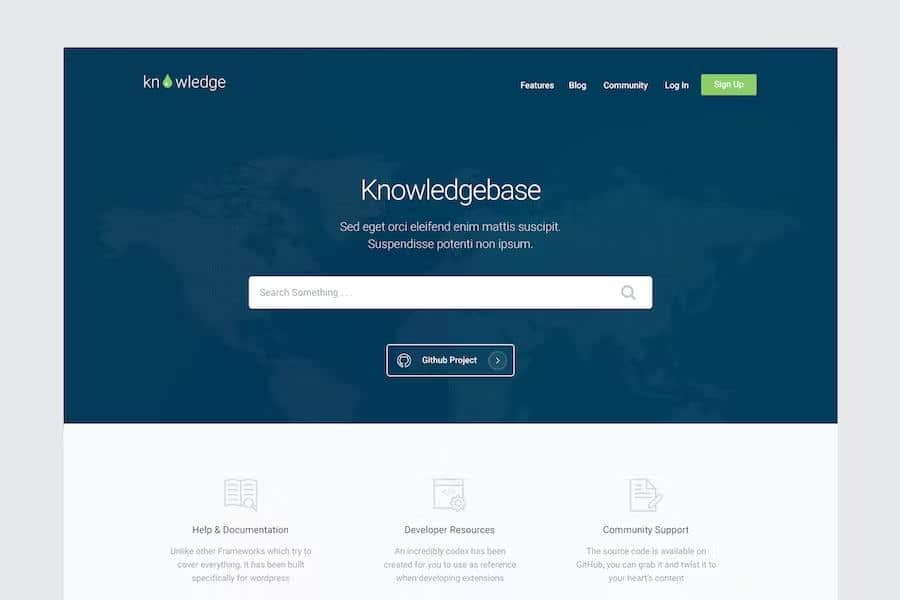
This HTML template provides a structured foundation for building professional documentation hubs or knowledge bases for software projects and digital assets. It offers a clean, organized layout specifically designed to help users find information quickly through logical categorization and clear typography. By separating content into distinct sections, the design ensures that technical manuals, API references, and help guides remain readable on various screen sizes. Developers managing open source projects on platforms like GitHub can use this framework to present their instructions, installation steps, and troubleshooting guides in a polished format. The template relies on standard web technologies, making it accessible for anyone comfortable with basic coding to modify and host. You get a set of pre-built pages that handle the heavy lifting of layout design, allowing you to focus entirely on writing the actual content for your end users while maintaining a consistent visual identity across every page of your site.
Other products to consider

 Themeforest

Search functionality serves as the backbone of this template, providing a dedicated interface for visitors to locate specific topics within a large collection of articles. The search bar is positioned prominently to encourage immediate interaction, while the underlying logic handles queries to display relevant results as users type their questions. Beyond simple text matching, the template includes specific components for displaying categorized lists, which helps break down complex documentation into manageable chunks. You can organize your help topics by product version, feature set, or user role, ensuring that the information architecture remains intuitive for newcomers and experienced users alike. This organizational depth prevents your documentation from becoming a cluttered mess, instead offering a clear path for readers to follow. By using these predefined structural elements, you maintain a predictable experience that builds trust with your audience, as they can rely on finding information in the same spot every time.
Visual cues and notification styles are integrated into the design to highlight critical warnings, helpful tips, or important updates within your technical text. These elements allow you to call attention to specific instructions without forcing the reader to scan through dense paragraphs of plain text. You might use these styled blocks to distinguish between mandatory configuration steps and optional customization advice, which improves the overall clarity of your technical guides. The design aesthetic remains minimalist to ensure that the content itself takes center stage, avoiding unnecessary distractions that often plague generic website templates. Because the layout is responsive, these notification boxes and tip sections adapt automatically to mobile devices, tablets, and desktop monitors. This flexibility is vital when your users might be accessing your documentation from a smartphone while trying to troubleshoot a problem on their primary computer. Consistent styling across all viewports keeps your technical documentation looking professional at all times.
Customization remains straightforward because the template relies on clean, well-commented HTML and CSS files that do not require complex build processes to deploy. You can adjust colors, fonts, and spacing to match your existing brand identity or project theme by editing the central stylesheet provided in the package. Since the code follows standard web practices, it integrates easily into existing hosting environments or static site generators. The structure includes everything needed to build a complete portal, including sidebars for navigation, footers for secondary links, and dedicated areas for article content. By providing a stable framework, this template removes the need to design a documentation site from scratch, saving you hours of development time. Whether you are documenting a complex software library or simply providing a set of instructions for a digital product, the resulting site provides a functional and reliable environment for your users to learn your tools effectively.
- Last updated
- September 26, 2026
- Delivery
- Digital
- Availability
- In stock
- Version
- Latest Version
- Category
- HTML Templates
- Item type
- template
The Knowledge - Knowledgebase & Documentation HTML Template listing is available in HTML Templates as a template. Check the description, item facts, and purchase details to assess its relevance to a project.
Usage rights depend on the license selected at checkout. Review the complete terms before using this item for client work, redistribution, SaaS, or more than one end product.