MIGO mobile UI Kit for Adobe XD Latest Version
Others Themeforest 4.8 (2.0K reviews)
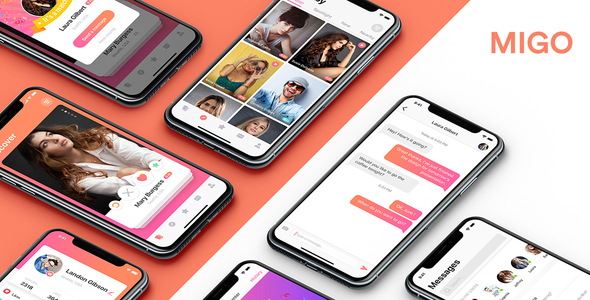
MIGO Dating App is includes 22 high-quality iOS screens in Adobe XD format that you can use for inspiration for your app design. Each elements is carefully named and grouped for you can easily edit.
This UI kit is ready to display for iPhoneX!
Key Features :
More from this category
 Themeforest

List of All Pages :
Source & Credits Images:
• Unsplash, pixabay, shutterstock…
Please Note: All images are just used for Preview Purpose Only. They are not part of the theme and NOT included in the final purchase files. Complete source files in Documentation.
How to use for Adobe XD
You can edit any text, colors or any component by double click and change the same
Add or Replace Images: Select the Group Layer of a section of the Template, then double click on the single layer were you can put a image; now on the right you can see a menu with a lot of options of customization, just click “choose image” and.. done!
- Item type
- digital product
- Category
- Others
- Version
- Latest Version
- Availability
- In stock
- Delivery
- Digital
- Last updated
- October 1, 2026
The available listing for MIGO mobile UI Kit for Adobe XD places it among Others products. It is presented here as a digital product with its supplied description and purchase information.
Usage rights depend on the license selected at checkout. Review the complete terms before using this item for client work, redistribution, SaaS, or more than one end product.