None - Stylish Fashion Elementor Template Kit Latest Version
Others Themeforest 4.8 (3.1K reviews)
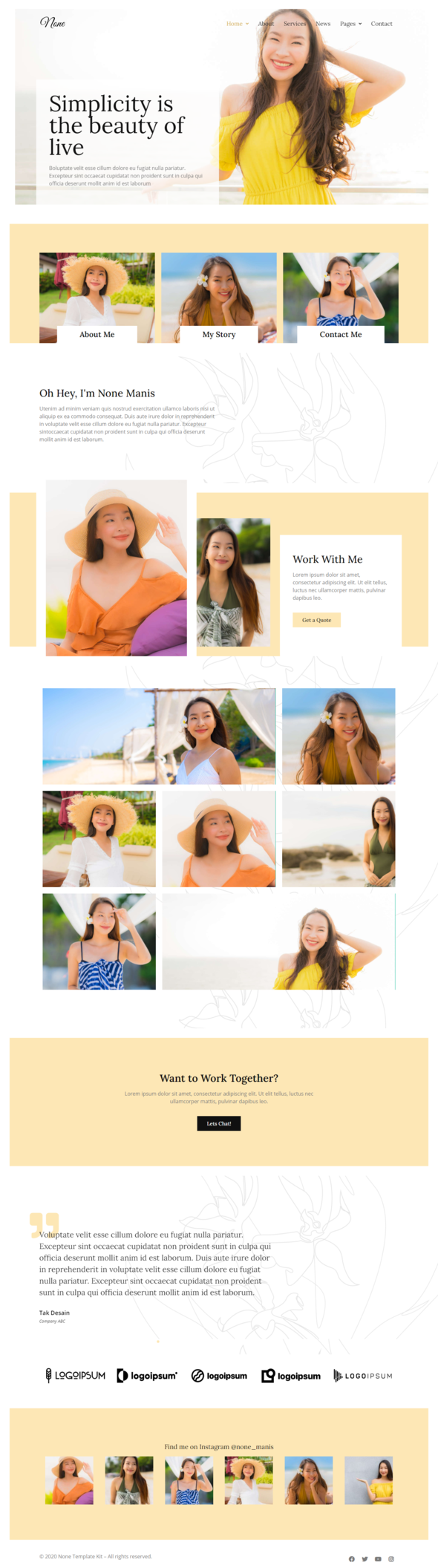
None is a beautiful and stylish Fashion Template Kit for Elementor crafted for the elementor page builder. It is perfect for a screative Model, Artist, photographer or pretty much any professional.
Templates :
- Homepage 1
- Homepage 2
- About
- Services
- Projects
- Single Projects
- News
- Contact Us
Required Plugins :
- Elementor (Free)
- PowerPack Lite for Elementor
- Elementor – Header, Footer & Blocks
- MetForm
How to Install:
- Install and Activate the “Template Kit Import” plugin from Plugins > Add New in WordPress
- Do not unzip
- Go to Elements > Installed Kits and click the Upload Template Kit button.
- Before importing a template, ensure the Install Requirements button is clicked to activate required plugins
- For best results, do not import more than one template at a time.
Detailed Guide
More from this category
 Themeforest

How to import Metforms and content blocks
- Import the metform block templates
- Import the page template where the form appears and right-click to enable the Navigator
- Locate and select the Metform widget and click Edit Form. Choose New, then Edit Form. The builder will appear
- Click ‘Add Template’ grey folder icon.
- Click ‘My Templates’ tab.
- Choose your imported metform template, then click ‘Insert’ (click No for page settings).
- Once the template is loaded, make any desired customizations and click ‘Update & Close’ The form will appear in the template
- Click Update
Setup Global Header and Footer in Header Footer & Blocks plugin
- Import the header and footer template
- Go to Appearance > Header Footer and click Add New button
- Give it a title and select Header, Display on Entire Site and click Publish
- Click Edit with Elementor
- Click the gray folder icon to access My Templates tab and select the header template to import and Update.
- Repeat for Footer
Images:
This Template Kit uses demo images from Envato Elements. You will need to license these images from Envato Elements to use them on your website, or you can substitute them with your own.
- https://elements.envato.com/collections/HK5WGZEFCV?utm_source=my_collection&utm_medium=link&utm_campaign=share_collection
I Hope you enjoy Thanks!
Tak Desain
- Item type
- template kit
- Category
- Others
- Version
- Latest Version
- Availability
- In stock
- Delivery
- Digital
- Last updated
- October 2, 2026
The catalog entry for None - Stylish Fashion Elementor Template Kit is grouped with Others and classified as a template kit. Available product information is shown below with related items from the local catalog.
Usage rights depend on the license selected at checkout. Review the complete terms before using this item for client work, redistribution, SaaS, or more than one end product.