Phoenix - Responsive Email + Themebuilder Access Latest Version
HTML Templates Themeforest 4.8 (2.1K reviews)
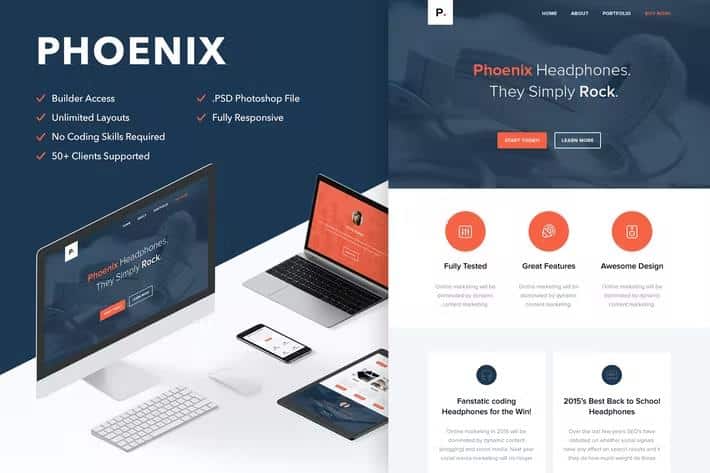
Phoenix is a responsive email template designed to give you a solid starting point for building newsletters that look right across the modern inbox. Your purchase includes the working HTML file, a Photoshop source file for visual editing, and ready-to-import versions for MailChimp and Campaign Monitor, plus documentation to help you find your way around. Documentation walks through the file structure and points out the main editable areas, so even a first-time template user can get oriented quickly. Its layout uses a full-width design with clean, commented code, so if you prefer working directly in HTML, you can trace exactly what each section does without digging through messy markup. Modular content blocks are at the core of the design, which means you can rearrange sections, drop in new ones, or strip out what you do not need while keeping the structure intact. Whether you send occasional updates or regular campaigns, this gives you a dependable base rather than a rigid one-off design.
The included builder access is where Phoenix really comes alive for non-coders. You get a free, hosted editing environment where you can drag and drop modules, duplicate or delete entire blocks, and create unlimited layout structures without touching a line of code. Colour changes, text edits, and linking background images to your own URLs are all handled visually, and an undo/redo option keeps mistakes from ruining your work. There is a responsive preview mode so you can see how your design behaves on different screen sizes before you commit, and when you are satisfied, you can export the file for desktop use. If you import the template into Campaign Monitor, you can continue editing texts, buttons, and images there, as Repeater and Layout tags are already included. Keep in mind the builder does not support every feature in the template, so some advanced elements may appear differently in that environment.
More from this category
 Themeforest
Phoenix is built for broad compatibility, which is the whole point of an email template. On the sending side, it works with MailChimp, Campaign Monitor, FreshMail, ActiveCampaign, StampReady, iContact, Constant Contact, and Aweber. The rendered result has been designed to display properly in Apple Mail, Android, AOL, Outlook.com, Yahoo Mail, Thunderbird, Microsoft Outlook 2003/2007/2010, Outlook Express, Windows Mail, Lotus Notes 8/8.5, OperaMail, iPad, iPhone (4/5/6/6+), and Live Mail. A few practical limits are worth understanding before you start. The Gmail App is not supported, and while custom web fonts work in clients like iOS Mail, Apple Mail, the default Android client, and Thunderbird, other clients will automatically fall back to standard web fonts. Older versions of Outlook may also ignore background images, so a larger background image might be needed to achieve the intended look in those environments. The compatibility list reflects the reality that email clients vary widely in what they support, and the template accounts for that with graceful fallbacks.
When you buy Phoenix, the template files themselves are what you get; the demo images shown in the previews are not included in the download, so you would replace them with your own photography or artwork. This is standard practice for email templates, and the documentation covers what you need to know to get started. The builder is free to use but is hosted, meaning you cannot download it and install it on your own server. It simply serves as the editing tool for your template files. If you need help with small customizations after purchase, the support team can assist, though larger redesigns fall outside that scope. Custom fonts are supported in a limited set of email clients, and unsupported clients will display a standard fallback font, so your message remains readable everywhere. Between the HTML file, the Photoshop source, and the MailChimp and Campaign Monitor imports, you have several routes to a finished newsletter.
- Item type
- theme
- Category
- HTML Templates
- Version
- Latest Version
- Availability
- In stock
- Delivery
- Digital
- Last updated
- August 18, 2026
The available listing for Phoenix - Responsive Email + Themebuilder Access places it among HTML Templates products. It is presented here as a theme with its supplied description and purchase information.
Usage rights depend on the license selected at checkout. Review the complete terms before using this item for client work, redistribution, SaaS, or more than one end product.