Rozoom - Distance Education & eLearning Template for Adobe XD Latest Version
Others Themeforest 4.8 (1.5K reviews)
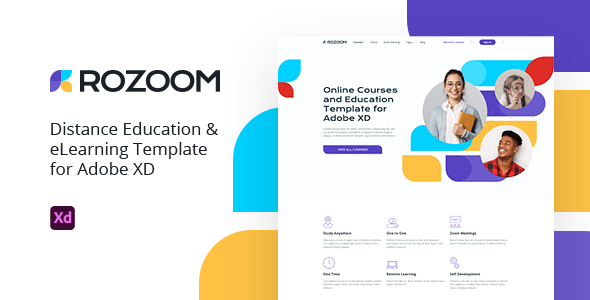
Introducing a new template for the education industry.
Now more than ever, one of the in-demand niches is e-learning. We have created an attractive and useful template for selling your lessons and courses online.
This template is multifunctional and is suitable for both marketplaces for selling courses and for tutors to conduct their classes online.
Template Benefits:
- Attractive and unique design;
- Convenient for kids, students, and adults;
- A thoughtful page lists of teacher and course;
- Personal account with dashboard;
- Clear curriculum;
- Open course or lesson with a teacher chat;
- Doing homework as tests;
- Buying tickets for online and offline events;
- Calendar Zoom meetings.
Template Features:
- 36+ Carefully designed pages and blocks;
- Full width 1920px;
- Grid 1290px;
- All layers named and grouped;
- Free fonts and icons used;
- Easy customizable Adobe XD files.
Credits:
- Icons from Flaticon;
- Model photos only from Envato Elements. All used photos collected in this collection;
- Font used Krona One and Open Sans;
- Pattern in dashboard page from Lstore Graphics.
Important Information:
- If you customize one of the components in the “Documentation artboard”, all components will change on template pages;
- When changing fonts and colors in styles in the “Assets panel” will be changed on all pages of the template;
- The header, footer, icons added as components and located in the “Assets panel”;
- Some UI elements have two states. They are located on the “Documentation artboard” in the asset section named “Active components”.
 Themeforest
- Last updated
- October 2, 2026
- Delivery
- Digital
- Availability
- In stock
- Version
- Latest Version
- Category
- Others
- Item type
- template
This page summarizes the available listing data for Rozoom - Distance Education & eLearning Template for Adobe XD in Others. The item type is recorded as template, with further details shown below.
Usage rights depend on the license selected at checkout. Review the complete terms before using this item for client work, redistribution, SaaS, or more than one end product.